
Looking to rebrand your website?
Lots of businesses plan a major site makeover to better align with new business goals, yet the process can still feel daunting when changes start adding up.
Website rebranding involves refreshing a site's identity through core design elements such as structure, visuals, content, and user experience. It focuses on showing growth, supporting changing priorities, and presenting a brand image that feels clear and relevant.
Read on to find out what website rebranding is all about, including signs that you might need to rebrand, a rebranding strategy, how to keep track of your goals, how to plan a project, how to manage SEO risks, and launch a checklist.
What Is Website Rebranding?
Website rebranding is a strategic, comprehensive update to a site's visual identity, structure, messaging, and user experience to better align with a brand's new core identity, audience expectations, and business direction.
It involves thorough redesigning of essential website elements to better present a business online while keeping a new brand identity intact. This process strengthens brand recognition, improves user engagement, and shapes visitors'visitors' perceptions of the brand. Website rebranding goes beyond just simple modifications like changing a logo, typography, or color scheme.
Because of its broad scope, website rebranding is sometimes confused with other types of website updates. The sections below explain the differences between visual refreshes, partial rebrands, and full website rebrands.
Visual refresh
A visual refresh is a low-risk, moderate update to a website’s visual appearance.
With this method, the company's core brand identity, messaging, site structure, and user experience stay the same. The main focus is still on changing colors, fonts, images, and layout.
Partial rebrand
A partial rebrand goes beyond surface-level design updates and introduces broader changes.
It includes changes to the tone, messaging, and selected pages, like the homepage, service pages, or landing pages, without having to completely redesign the website.
Full website rebrand
Taking transformation to a full scale, a full website rebrand involves extensive changes across important website and brand elements.
This process can affect identity, site structure, content direction, and user experience, resulting in a website that looks and functions very differently from its previous version.
Signs You Need a Website Rebrand
Not sure if your website needs a rebrand? Here are some signs it might be time for a refresh:
1. Outdated visuals or messaging
One of the most obvious signs that your website requires a rebrand is if it appears outdated and uses design elements, messaging, tone, or voice that are no longer in line with current industry standards.
2. Declining conversion or engagement metrics
If your conversion metrics, like conversion rate, bounce rate, and pages per session, keep going down, it's a good sign that your website needs a new look.
3. Website misaligned with current product or ICP
While it is common for businesses to change products, services, or even target audiences, the website design and content must continually improve.
When these elements fall out of sync, customers can become confused about your value and what you actually offer.
4. Competitors appear more credible or modern
Nearly 46% of users evaluate a website's credibility solely on the basis of its visual design, according to the Stanford Web Credibility Project, indicating that appearance plays a significant role in perceived professionalism and trust.
A rebrand may be necessary if your competitor's website seems more up-to-date or reliable.
5. Inconsistent brand across channels
When your website doesn't seem connected with your design system, ads, social media, or even physical presence, it can confuse customers and not match your current Ideal Customer Profile (ICP).
Key Note: A website rebrand should always be based on data, not subjective or opinion-based decisions. Most effective rebrands are supported by clear evidence and defined goals, not by personal preferences such as "we’re bored of the site."
Rebranding Strategy Comes Before Design
Most website rebrands fail before the design phase even starts because teams rush into visual decisions like colors, logos, and layouts without first making sure they know what the main business goals are and how to support them. Website rebranding is not just a solution, it’s a strategic tool that communicates business goals and supports a broader growth strategy.
Set clear KPIs and guardrails to make sure that the rebrand improves performance without hurting important channels like SEO, paid traffic, or existing conversion paths.
Pro Tip: If you are struggling to bring your new brand vision to life, hiring a rebranding company can guide you every step of the way, making the process faster and ensuring your new identity truly resonates. Don’t do it alone! Expert support can save time and deliver a polished result.
Document key constraints
Below are some key constraints that should be written down before starting a website rebrand:
- Timeline - includes launch deadlines, campaign coordination, funding schedules, and phased releases.
- Budget and Resources - covers total investment, allocated funding, and internal team capacity for content creation, development, design, and QA.
- CMS / Technical limitations - includes platform constraints related to the current system and third-party integrations.
Goals and Success Metrics
A strategic website rebrand should be cross-checked against clearly defined goals organized into specific and measurable categories, using tools like Google Analytics, Hotjar, CRMs, and other usability and survey tools.
Consider the following categories:
1. UX clarity
UX does more than anticipate how effectively a person interacts with a website, it also influences how people feel while using it.
Clarity makes it easier for visitors to navigate your rebranded website, understand your offerings within seconds, and take the intended action without hesitation.
2. Conversion
Conversion is the primary goal of every website rebrand.
The overall objective is to increase the percentage of visitors who complete high-value actions that benefit the business, such as purchasing a product, subscribing to services, or signing up for a newsletter.
3. Positioning
Market positioning is all about making sure that your target customers see your brand, product, or service in a way that sets it apart from your competitors. When you rebrand a website, you can create a strong and unique impression on your customers.
4. Demand generation
When done right, a website rebrand can create new demand by bringing in customers who are ready to buy or sign up at different price levels within your target market.
5. Trust and credibility
The primary goal of a rebrand is to strengthen confidence signals that influence buying decisions and encourage customers to purchase and subscribe to your products or services.
Rebrand Scope: Partial vs Full
In order to gain a more comprehensive understanding of the scope of partial and full rebrands, consider the various characteristics of each strategy.
Partial rebrand scope
A partial rebrand often keeps some of the old branding elements while changing some areas without having to start over from scratch. Its main goal is to keep parts of the website that already work while making things clearer, more relevant, and better overall.
Positioning
The core market position and value proposition remain unchanged, though the way they are expressed may be refined rather than fully repositioned.
Tone of voice
Communication style changes to better connect with the retargeted audience, making headlines and newly created content a bit different.
Visual identity
Updates to design elements including the logo, color palette, typography, and multimedia assets to enhance perceived modernity.
Page structure
Navigation, information architecture, and URL structure typically remain intact.
Domain and SEO
The primary domain stays the same to retain brand equity, backlinks, and search visibility.
Scope trade-offs
A partial rebrand protects the SEO value that has already been established, keeps the standard UX the same to help eliminate confusion and lower down the risk of losing conversions.
Full rebrand scope
A full or total rebrand is typically more comprehensive, costly, and time-intensive to execute.
It is not a quick update or a one-time task but a complete transformation of how the business website presents, positions, and delivers its offering online.
Positioning
Market stance, value proposition, and target audience definitions are often re-established to reflect a strategic change and position the business in a new direction.
Tone of voice
Typically results in a name change, new messaging, and a consistent shift in tone that defines a new brand personality and communication style.
Visual identity
A total makeover spans the logo, color palette, typography, imagery style, iconography, and layouts.
Page structure
The old site structure is scrap and rebuilt from scratch. The navigation, URL structure, user flows, page templates, and content hierarchy are redesigned completely.
Domain and SEO
The company name may change, which often requires a new domain and updated URL structure, which can temporarily affect search visibility.
Scope trade-offs
The biggest downside with a full rebrand is that it can drastically hurt your SEO visibility due to changes in the URL structure. This change usually causes traffic and conversions to drop for a short time while search engines crawl and reindex the new site.
Website Audit: Data Before Opinions
Here are the primary aspects of a website audit to review before starting a rebrand:
1. Analytics audit
There are three important questions that should be answered by the analytics audit: What do we have? What is going well? What should be kept?
These insights stop teams from throwing away high-performing assets when they redesign.
Always look over the following basic information and patterns of behavior:
- Top landing pages
- Funnels and drop-offs
- Device, geography, and traffic sources
2. Review heatmaps and session recordings
Heatmaps and session recordings reveal which areas of a page attract attention and which are ignored.
When reviewing recordings and heatmaps, focus on the patterns below:
- Click concentration and ignored elements
- Scroll depth and content visibility
- Confusion signals
- Navigation patterns and hesitations
3. Map key user journeys
Mapping user journeys helps uncover pain points from the visitor’s perspective and reveals how people actually move through your website.
4. Run an SEO audit
Protecting organic search performance requires a clear understanding of what currently drives traffic and what could be lost during a rebrand.
When running an SEO audit, focus on the following high-impact areas:
- Traffic-driving pages and queries
- Backlinked URLs
- Indexation and rankings
5. Conduct a content audit
A content audit evaluates existing pages against performance criteria to determine what should be kept, revised, merged, or removed.
When doing a content audit, focus on the following areas:
- High-performing content
- Duplicate or overlapping content
- Missing or weak CTAs
- Voice and promise gaps
6. Check brand consistency across pages
A study cited by Forbes, consistent brand presentation across platforms can increase revenue by up to 23%.
To build trust and credibility, it's important to keep a consistent visual style, message, and terminology across all pages.
7. Document all high-value URLs
Create a protection list of URLs that contribute significant business value, including details such as:
- Website traffic
- Leads or revenue
- Brand authority
- External links
- Marketing performance
8. Flag SEO risks from URL or structural changes
Create a list of URLs that must be preserved or redirected with precision.
Any change to existing URLs can delay how quickly search engines such as Google or Bing rediscover and reindex those pages.
9. Output a prioritized list of pain points and opportunities
After the assessment is over, all the pain points and opportunities observed should be put into a systematic list to help with the rebranding plan.
Audience and Positioning Reset
Here are some important steps to take when repositioning during a rebrand:
1. Define primary and secondary audience segments
Understanding audience segments helps you connect with customers in ways that build stronger relationships.
Primary audience segments
Represent the main users, like decision-makers, direct stakeholders, or target customers who are most likely to buy, renew, and recommend the product or service.
Secondary audience segments
These users are influencers, researchers, or nearby buyers who may help make decisions but don't have the power to buy right away.
2. Map jobs-to-be-done (JTBD), pains, motivations, and decision context
Finding out what users' Jobs-to-Be-Done, pain points, motivations, and decision context are makes it clear what they really want to do.
This information helps you decide what to say, what features to include, and what to focus on during a rebrand based on what real users need instead of what you think they need.
3. Clarify trust drivers
According to Salsify, 87% of shoppers are willing to pay more for brands they trust regardless of the price.
Keeping this in mind, understanding what builds trust for your specific audience helps determine which credibility signals should be most visible during the rebrand.
4. Produce a single positioning statement
Your positioning statement brings together everything learned about your audience and differentiation into a single, shareable declaration that can be used across the entire website, from messaging and tone to visual design.
Website Brand System: Visual and Verbal
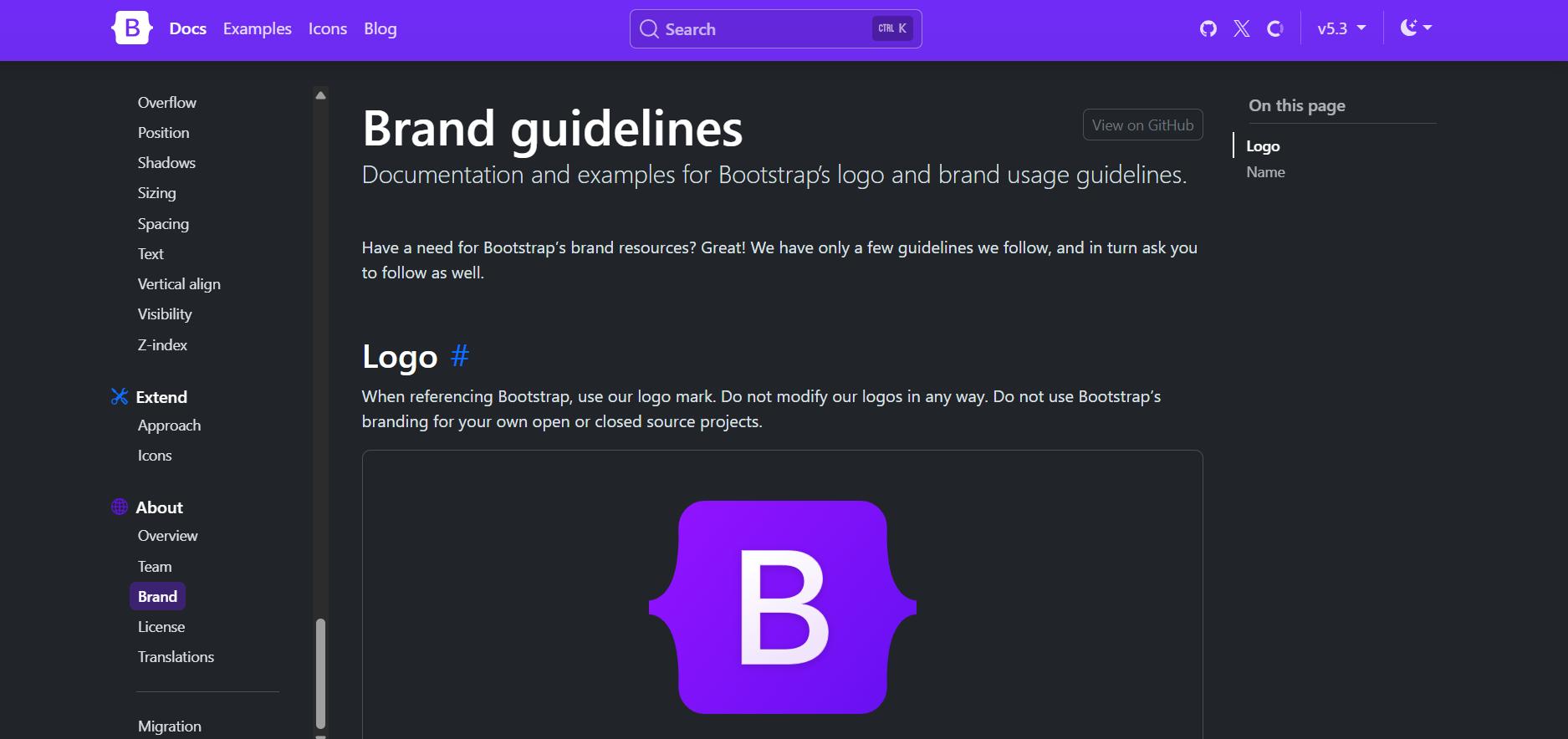
The Bootstrap documentation is a good example of a comprehensive design guideline. (Image Source)
Brand systems help identify strengths, expose gaps in the current strategy, and ensure consistency across the entire user experience.
Visual foundations
These elements define how your brand looks and create immediate recognition through design. This includes:
- Colors
- Typography
- Grid
- Imagery Style
- UI Patterns
Verbal foundations
Includes parts that determine what your brand says and how it sounds, which affects how language conveys meaning and connection.
This typically includes:
- Tone
- Terminology
- Core Promises
Tone of voice and copy rules
Tone of voice defines the brand’s personality through consistent language choices.
Common attributes may include being confident, clear, human, precise, solution-focused, and respectful of the reader’s time.
Create say and don’t-say rules
One common tone-of-voice tool is the Say-and-don’t-say rules that turn abstract voice traits into practical guidance. They give writers clear boundaries while still allowing room for creativity.
Copy rules, on the other hand, provide technical standards for execution, including grammar, syntax, and formatting.
When developing copy rules, focus on the following:
- Standardize product terminology
- List of taboo words and phrases
- Providing microcopy examples
Design foundations and component library
Design foundations and component libraries translate brand guidelines into functional, reusable design and code assets.
This includes the following elements:
- Design system requirements
- Reusable components
- Standard page sections
Website Information Architecture That Converts
When planning information architecture, there are several best practices that should be considered to ensure the site remains intuitive, goal-oriented, and easy to navigate.
1. Define navigation and page hierarchy
Navigation is one of the most frequently used parts of a website because it allows users to move between pages quickly.
Primary navigation should only have five to seven items, which matches the user's working memory. Secondary navigation can have more pages.
Page hierarchy is also very important because it decides how the content on each page is organized and presented.
2. Map structure by audience segment
Every site visitor visits a website with different goals in mind. While a single navigation alone cannot serve every need equally, it can support multiple pathways through organized structuring.
Content Strategy for Website Rebranding
Producing website content without a clear rebranding plan sets the project up for failure. When it comes to rebranding a website, here are some important rules for content strategy:
1. Define content priorities
Rebranding is not about rewriting every page at once. It is about deciding which content requires immediate attention and determining how to manage the rest strategically.
When setting content priorities, consider the following steps:
- Pages and posts directly tied to conversions or strong SEO equity
- Content types where stronger proof can increase buyer confidence
- Pages where messaging no longer aligns with the updated positioning
2. Rewrite high-impact pages first
After you've set your priorities, rewrite the pages that make up the overall brand experience.
Start with the following:
- Homepage
- Core products or service pages
- Top SEO landing pages
3. Update case studies with outcomes and metrics
A strong case study typically includes:
- The client’s core problem
- The solution implemented
- Quantifiable results
- A direct testimonial that supports the outcome
4. Structure proof consistently
Consistent presentation makes it easier for users to find trust signals and promotes credibility by showing them the same information over and over again.
To make things more consistent:
- Put logos of well-known clients or partners near important parts of the site.
- Include certifications, comparisons, and quantifiable statistics
- Highlight, security benefits, press mentions and awards as third-party validation
URL Strategy, Redirects, and Canonicals
To make sure that every URL is handled correctly during the rebranding, you need to:
1. Export all current URLs
Create a complete list of every URL on the current site.
Use a crawler tool like Screaming Frog SEO Spider Tool or your CRM to make a full list of all your items.
2. Classify each URL
Every URL in the inventory must receive one of four classifications:
- Keep - The URL remains unchanged.
- Move - The content moves to a new URL and requires a redirect.
- Merge - The content combines with other pages into a single new destination.
- Remove - The content is deleted entirely and handled with the appropriate redirect or status code.
3. Build a 301 eedirect map
Create a 301 redirect for each URL that is classified as Move or Merge. The redirect should say exactly where the new destination is.
This makes sure that search engines and users are automatically sent to the right page, which keeps SEO equity and stops traffic loss.
4. Validate critical technical elements
In addition to building a 301 redirect map, several technical elements must be validated to protect link equity and maintain search visibility during a rebrand.
These include:
- Canonicals
- XML Sitemap
- Robots.txt
5. Metadata, internal links, and content integrity
When you rebrand, URLs are often the main thing you look at, but other parts of the page can also have a significant effect on SEO.
Metadata, internal linking, and the overall structure of your content are all very important for keeping your rankings and making sure users have a good experience.
To keep SEO equity safe while you rebrand, think about the following:
- Preserve high-performing titles and descriptions
- Update headings without breaking semantics
- Maintain internal linking structure
- Validate breadcrumbs and navigation links
6. Validate tracking and measurement before launch
Analytics and performance tracking are critical to protecting search visibility and accurately measuring rebrand success.
Before launch, confirm your analytics are properly installed, conversion events are tested and paid ad pixels are validated.
Website Rebranding Project Plan
Like any major initiative, a website rebrand requires a structured and comprehensive plan to succeed.
The following sequence outlines how to implement a website rebrand from initial planning through launch and post-launch optimization.
Phase 1: Goal setting
Before starting complex implementation, define the foundation of the rebranding project by clarifying the primary business goal behind it.
Phase 2: Audit and analysis
Next, gather data to understand the current performance of your website before making changes.
This phase should cover analytics, user behavior, SEO performance, content quality, and overall brand consistency.
Phase 3: Research
Aligning the website with audience needs is the next stage after obtaining the data.
Describe the primary and secondary audience segments, together with their tasks, concerns, driving forces, and decision-making context.
Phase 4: Prototypes
During this phase, develop clickable prototypes for key user journeys and test them with real users to identify friction points before development begins.
Phase 5: Content strategy
Content must evolve alongside design during a rebrand.
At this point, you should focus on rewriting important pages like the homepage, core product or service pages, and top SEO landing pages, which should include case studies and metrics.
Phase 6: Design
This is where brand strategy transforms into visuals. Implement updated brand guidelines, including the color palette, typography system, grid structure, imagery style, and UI patterns.
Phase 7: Development
This phase is all about setting up the development environment, which includes configuring the CMS, making templates, building the component library, installing analytics, and doing technical SEO.
Phase 8: Quality assurance
By this phase, complete functional testing across all pages, devices, and browsers is performed along with SEO validation and end-to-end analytics and tracking tests.
Phase 9: Launch and migration
This covers both pre-launch and post-launch activities, including backing up the old site, DNS verification, SSL certificate validation, analytics validation, and ranking monitoring.
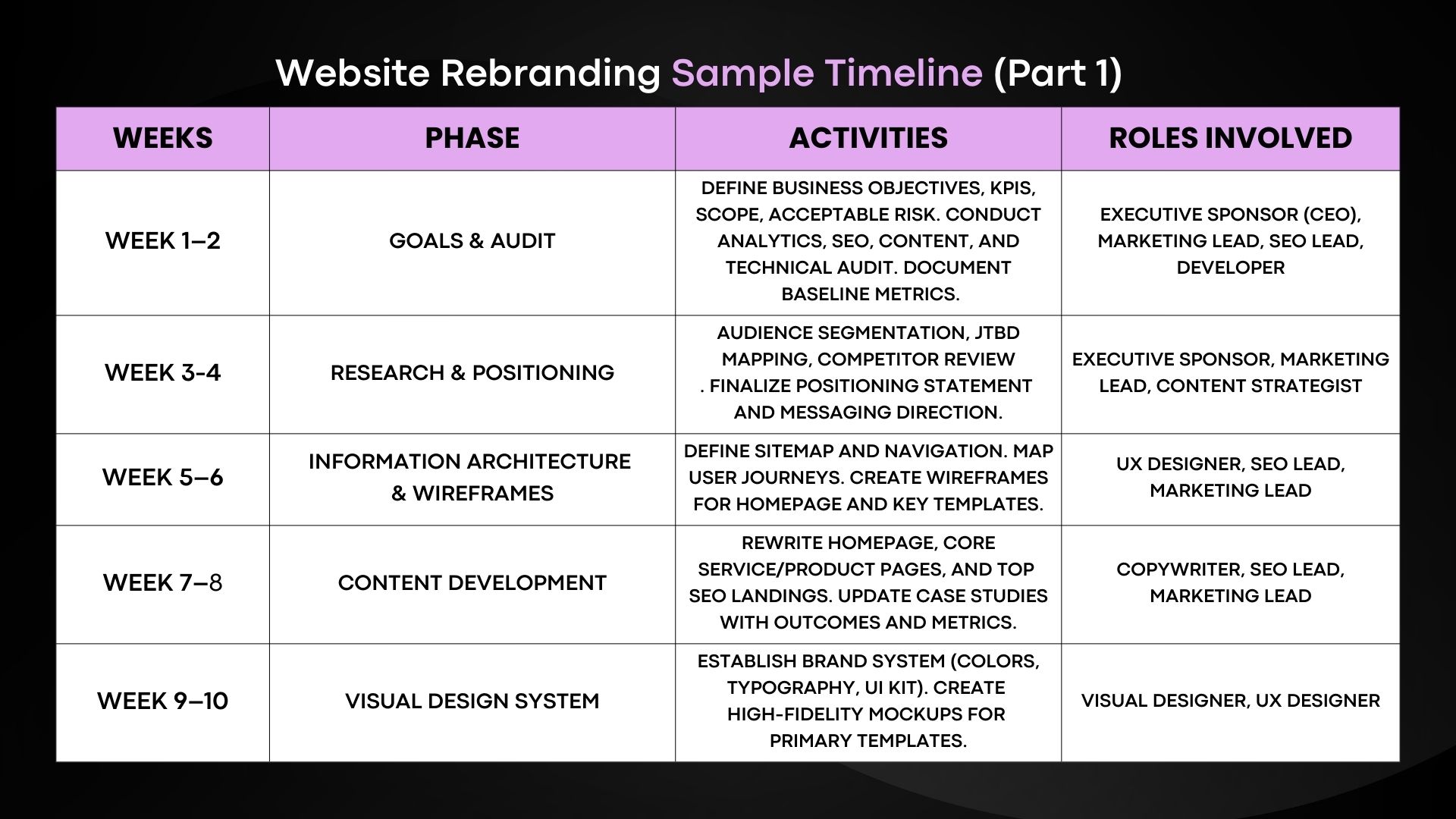
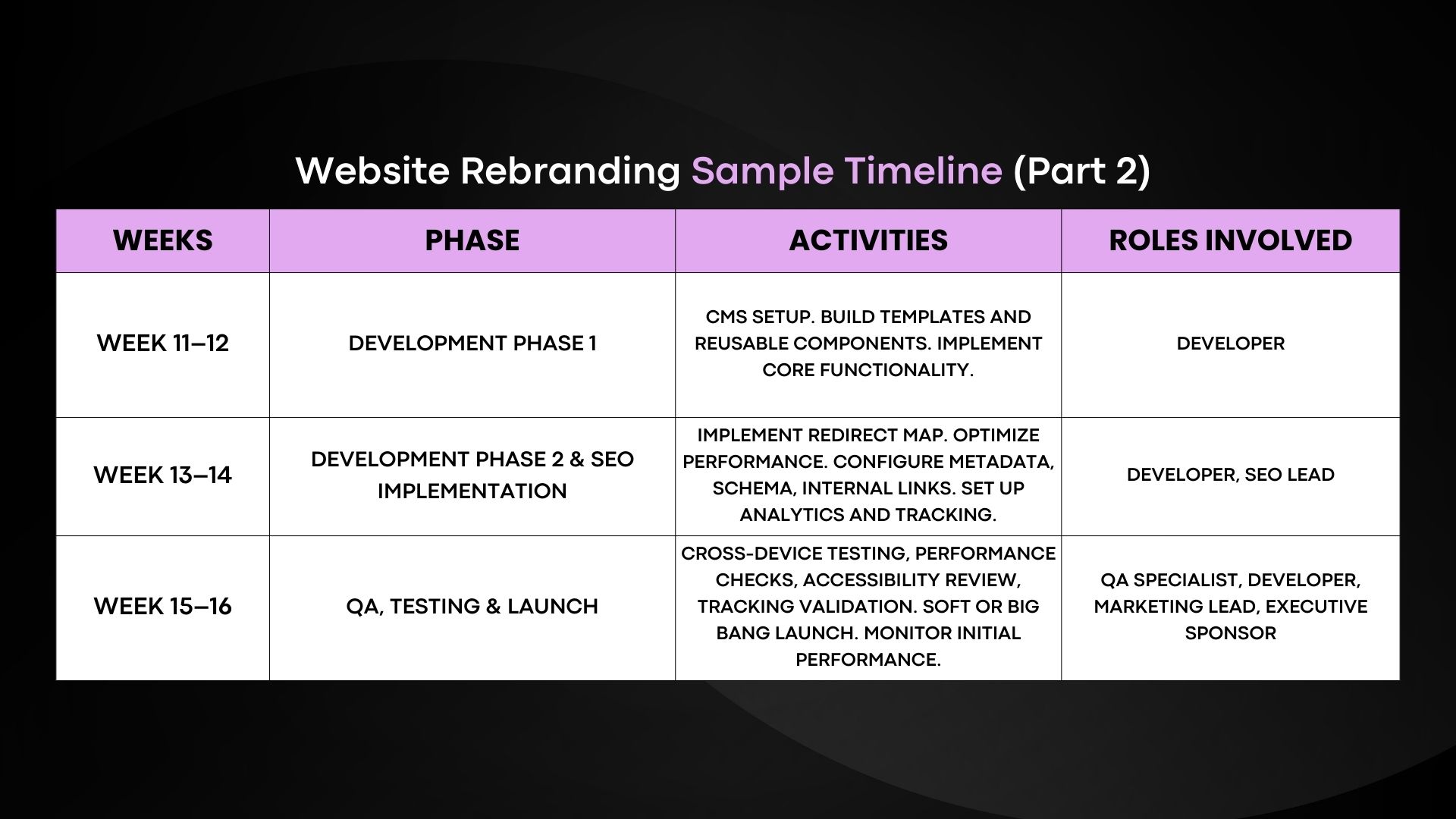
Caption: The tables above present a sample website rebranding timeline that can serve as a reference for future projects. (Image Source)
Pro Tip: Create a rebranding brief at the beginning of the project. This serves as a reference document agreed upon by key decision-makers. This document can serve as the source of truth when disagreements or scope questions arise.
Pre-Launch Website Checklist
Before your rebranded website goes live, this pre-launch checklist acts as a last quality control measure.
1. Verify content accuracy and completeness
Check all of the content to make sure there are no placeholders left.
Make sure that the headlines, text, links, images, and calls to action (CTAs) are all set up correctly.
2. Test responsiveness on All breakpoints
Test the usability of navigation menus, text readability, image scalability, and form functionality across multiple devices and browsers.
3. Validate forms and submissions
Verify that all forms work as intended and that thank-you pages are set up correctly. Verify that spam protection is turned on and test error states and confirmation messages.
4. Check redirects and 404s
Review the 301 redirect map implementation, confirm internal links are not broken, and ensure the 404 page includes a recovery CTA.
5. Measure speed and performance
Monitor all core web vitals and ensure performance meets acceptable levels.
Test using tools such as Google PageSpeed Insights, the Chrome Web Vitals extension, or the Search Console Core Web Vitals report.
6. Confirm basic accessibility (A11Y)
Accessibility is not optional in many regions, it is a legal requirement.
Web Content Accessibility Guidelines (WCAG) provide comprehensive standards covering alt text, ARIA usage, keyboard navigation, color contrast, and other accessibility practices.
7. Test cross-browser compatibility
Confirm that your site functions correctly on major browsers such as Google Chrome, Safari, Mozilla Firefox, and Microsoft Edge.
8. Review legal compliance and cookie setup
Ensure that industry-standard guidelines are updated on the terms and conditions, privacy policy, and accessibility pages.
Check that the cookie permission banner functions correctly, the SSL certificate is active, and all relevant GDPR/CCPA requirements are fulfilled.
9. Confirm analytics accuracy
Make sure that all of your pages have analytics and pixel codes set up. Also, check that conversion events are going off correctly and look into how UTM parameters are handled.
Launch and Communication Plan
How you launch affects how your new target audience and market accept your rebranded version and sets the tone for the brand's relationship with customers going forward.
Below are two types of launch communication models you can implement:
A. Soft launch
A soft launch releases the rebranded website to a limited audience before making it publicly available.
This could be a certain group of users, areas, or current customers. There usually isn't a full public announcement until certain goals or performance standards are met.
B. Big bang launch
As the name suggests, a Big Bang launch is a full-scale release of the new website to all visitors at once, supported by coordinated marketing campaigns and public announcements.
In order to ensure that your customers learn about your rebrand positively and understand what it means for them, it is important to execute the following steps systematically.
- Use branded social media accounts to announce changes.
- Use email templates to reach customers directly.
- Update sales decks to equip customer-facing teams.
- Inform customers about brand assets and logos.
Post-Launch Optimization and Stabilization
The period after launch is usually the most crucial part of the rebranding process.
Below is a weekly breakdown you can follow during this phase.
Week 1–2: Critical monitoring phase.
Monitor technical issues closely, identify tracking gaps, and check for any SEO problems that may be impacting rankings.
Week 3–4: Stabilization phase.
As the site becomes more stable, keep an eye on it, paying more attention to baseline vs. live metrics.
Week 5–6: Optimization phase.
The best time to improve weak funnels and underperforming sections, test layout and content variations, and refine CTAs is now.
Monitor Daily: Traffic, Conversions, Errors
For the first 14 days, monitor the following using tools such as Google Analytics 4 and Google Search Console or similar platforms:
- Overall page session
- Form submissions and purchases
- Conversion rate by landing page
- 404 pages, redirect loops, tracking discrepancies, and other technical SEO issues
Review Weekly: SEO Performance and Behavior Metrics
After completing daily reviews, shift to deeper weekly analysis.
Each week, analyze the following:
- Indexed page count and crawl issues
- Rankings for priority keywords
- Organic traffic by landing page
- Impressions vs. clicks
- Core Web Vitals performance
Conclusion: Website Rebranding Framework
Your company's website rebranding efforts should continually work towards achieving your business goals and not just a simple technical project.
As we discussed the framework, it is a fact that website rebranding must be equipped with strategy plus content plus UX plus SEO plus disciplined launch.
In the end a successful rebranding can only be efficient by following a structured rebranding timeline, launch method, and communication procedures to position your brand in the market with discipline and intent.
Mar 19, 2026

Creates insightful, strategy-driven content that translates complex design and branding concepts into accessible knowledge, supporting Ramotion’s mission to elevate digital experiences.