
About the tool
Token Auditor is a Figma plugin that checks whether design system components actually use their tokens. It finds colors, spacing and corner radii set as raw values instead of variables, and links that point to the wrong component, sit at the wrong level, or skip a step in the token chain.
It is an auditing tool: it doesn’t change the design system for you. You get a report across all components first, and the plugin binds only the properties you select, after you press Bind. Every bind can be undone in one step.
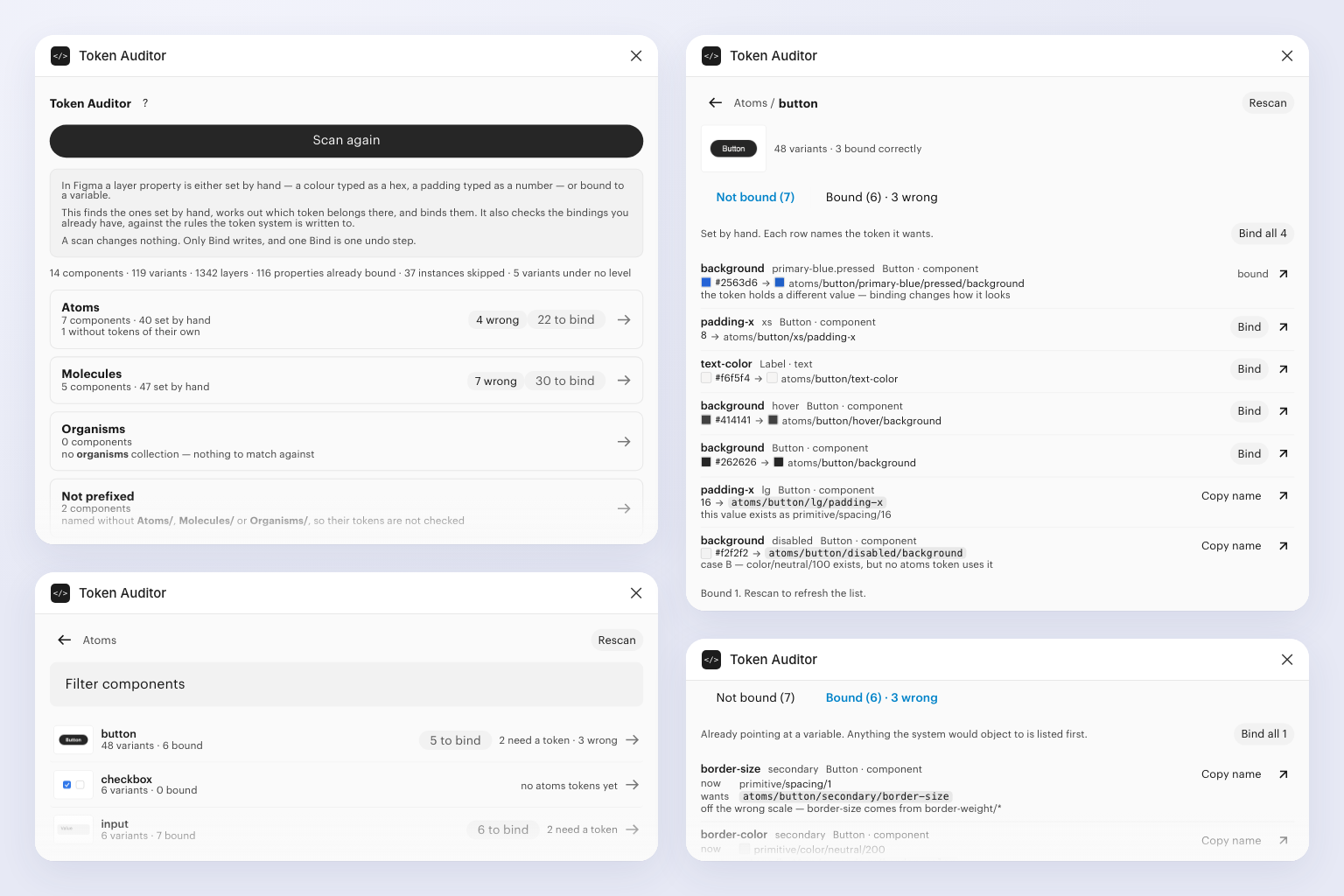
Features
- Unlinked value detection. Flags colors, spacing and radii set as raw values instead of variables.
- Link check. Verifies that existing links point to the correct component, level and token.
- Exact suggestions. Names the variable each flagged property should be linked to.
- Missing variable names. When the right variable doesn’t exist, shows its expected name so you can create it.
- No silent changes. Binds only selected properties, only on Bind, with one-step undo.
How it works
- Open the plugin. Launch Token Auditor from Plugins in Figma.
- Run the audit. The plugin scans the components and builds a report.
- Review the report. See every raw value and wrong link, with the variable it should use.
- Select and bind. Tick the properties you want to fix and press Bind.
- Create what’s missing. For flagged properties with no matching variable, create the variable under the suggested name and run the audit again.