
About the tool
Token Extractor started from a slow, manual step in design system work: every component’s colors, paddings and corner radii had to be typed into a reference file by hand before they could become Figma variables. It took hours, and near-identical shades of the same color were easy to mix up.
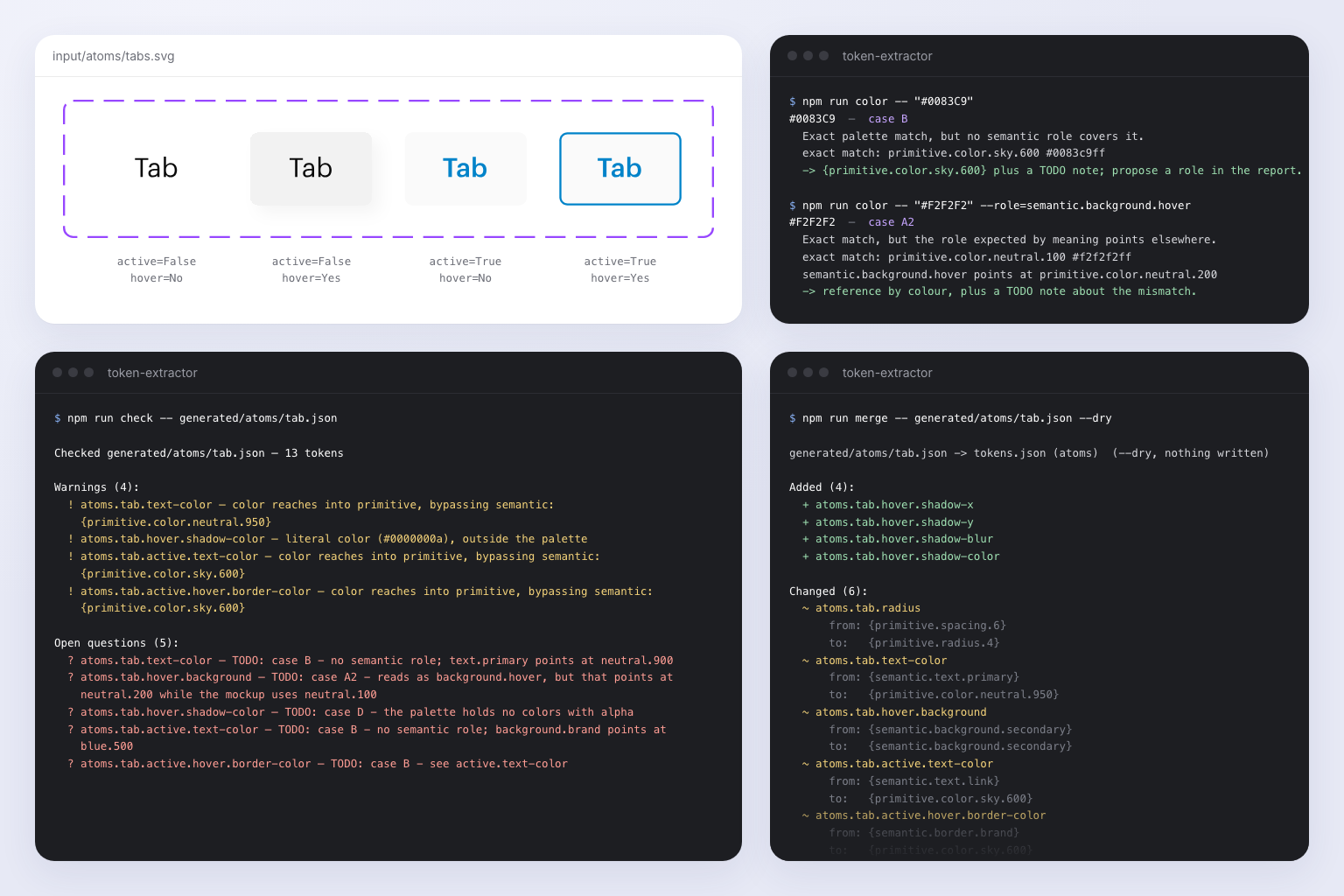
Now you export a component from Figma as SVG, drop it into a folder and run one command. The tool reads the values, checks them against the design system rules and validates every step, so the shared token file never breaks. A companion Figma plugin then loads the result back into Figma in one click.
Features
- SVG in, tokens out. Reads colors, paddings and corner radii straight from components exported from Figma.
- Rule checks. Compares every extracted value against the design system rules before it is written.
- Step-by-step validation. Each stage is checked, so a bad value stops the run instead of reaching the shared file.
- No near-duplicate shades. Values are read from the source, not retyped, so similar colors stay distinct.
- Command line only. No interface to learn: one command per run.
How it works
- Export the component. In Figma, export the component as SVG.
- Drop it in the folder. Place the file in the tool’s input folder.
- Run the command. Start the extraction from the terminal.
- Review the result. The tool reports what it extracted and anything that failed validation.
- Load it into Figma. Import the result back into Figma in one click.