
B2B web application development creates software that helps organizations work together: place orders, approve requests, manage accounts, and exchange data.
Effective projects begin with the workflow, the people responsible for each decision, and the outcome the business can measure. A polished interface cannot fix an unclear approval rule or an unreliable system of record.
This guide is for product owners, enterprise architects, operations leaders, and teams buying development services. It covers the decisions that shape a B2B web app: whether to build, what to release first, how to structure data and integrations, and how to operate the product after launch.
What Is B2B Web Application Development?
A B2B web application is a digital product used by one or more organizations and multiple business roles. It supports work that persists across sessions, such as quoting, ordering, onboarding, approvals, reporting, or service requests. Unlike an informational website, it stores state, applies business rules, and changes what each person can see or do.
Consumer apps usually optimize for an individual journey. B2B application development must account for organizations, departments, negotiated terms, delegated authority, and long deal lifecycles. Off-the-shelf SaaS can meet common needs, but custom B2B software development becomes relevant when those rules and connections are distinctive.
Common types of B2B web applications
The label matters less than the job the product must complete. Common forms include:
| Type | Primary business goal | Critical feature |
|---|---|---|
| Client portal | Reduce account-service effort | Request and order status |
| Partner portal | Coordinate channel sales | Partner-specific permissions |
| Operations dashboard | Spot work needing attention | Actionable exception queue |
| Ordering system | Convert repeat purchases | Contract pricing and reorder |
| Analytics tool | Support commercial decisions | Governed data definitions |
| Industry platform | Connect specialist participants | Shared workflow and records |
| Internal workflow app | Shorten handoffs | Approvals with history |
B2B portal development often combines several of these forms. Define the user task first, then decide whether a portal, focused tool, or wider platform is the right product boundary.
When Custom B2B Web Development Makes Sense
Custom web application development earns its cost when workflow differences are material: several approval paths, customer-specific terms, legacy data, unusual integrations, or controls that standard software cannot express safely. It can also be strategic when the application itself changes how customers buy or how partners deliver a service.
Start with existing software when the process is common and configuration covers the real exceptions. Use a prototype when demand, task sequence, or adoption is uncertain.
A prototype can test a workflow with realistic users before business web application development commits to a permanent data model. Record gaps after a trial, including integration limits and license costs.
Compare the cost of adapting the workflow to a product with the cost of maintaining custom code. Include vendor portability, support effort, and the consequences of a failed integration. B2B application development is justified by a durable advantage.
Start With Business Outcomes and User Roles
Turn a goal such as “reduce email” into a specific action and measure: customers submit complete requests in the B2B web app, and the team measures completion rate, time to approval, and requests returned for missing information. Define the baseline before design so improvement can be tested after launch.
Separate the buyer who funds the product from the person who uses it daily. An administrator manages organizations and access; an approver accepts or rejects transactions within a limit; support investigates exceptions without silently changing customer records.
Each role needs a stated goal, visible data, and allowed actions. Enterprise web application development fails when a single generic “user” hides these differences.
Map Workflows, Exceptions, and Permissions
Map the normal request from creation to closure, then annotate missing data, duplicate submissions, rejected approvals, timeouts, manual overrides, and recovery. Show where an employee must intervene and who owns the next step. This reveals the real scope of B2B web app development before screens are drawn.
Use a roles-and-permissions matrix. For each action, record whether a buyer, end user, administrator, approver, or support agent can view, create, approve, amend, or export it. Add tenant boundaries and approval limits to the matrix. Review it with operations and security, then turn it into authorization tests.
Capture edge cases as examples attached to the map: an approver leaves the company, a request changes after approval, or a payment settles after a cancellation. For each, specify the record owner, permitted correction, customer-visible status, and audit entry. These decisions often determine whether staff can retire the old email process.
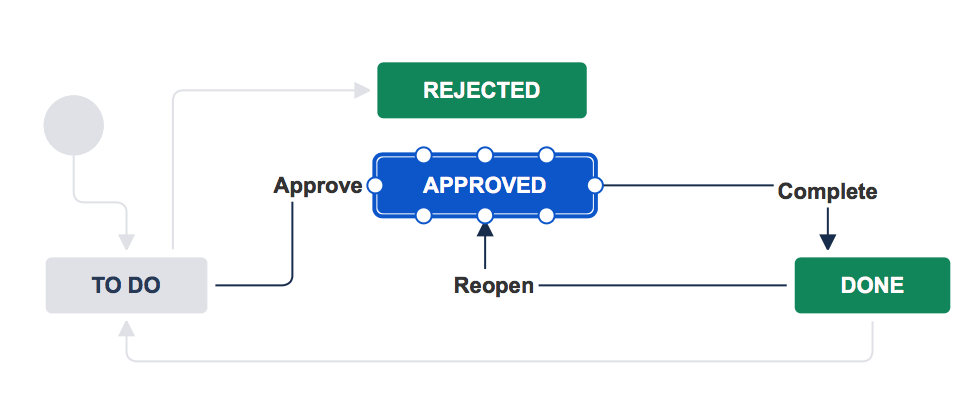
Atlassian workflow example shows approval, rejection, and status transitions (Source)
Define a Scalable B2B MVP
An MVP should prove one complete business transaction, including its common failure path. Prioritize by expected value, implementation risk, and what the first release must validate. A thin interface over an unfinished approval process does not prove that customers can complete the job.
Separate three layers: first-release essentials, operational requirements, and later enhancements. Essentials might be sign-in, request submission, status, and approval. Operational requirements include audit history, support access, backups, and monitoring.
Advanced analytics or broad customization can wait. B2B software development still needs a clean tenant model and integration boundary early, because correcting those after customers arrive is expensive.
Set an explicit learning question for the MVP, such as whether clients can submit complete requests without account-manager intervention. Define the event data needed to answer it and the threshold for expanding rollout. If a feature cannot change the first release's learning or safe operation, it probably belongs in a later release.
Choose the Right B2B Application Architecture
A monolith is often easiest to build and operate when one team owns a stable workflow. A modular monolith keeps clear domain boundaries while sharing deployment and infrastructure. Distributed services can help independently changing teams or workloads, but add network failure modes, data consistency work, and operational cost. Choose web application architecture from actual load, change frequency, team size, and uptime needs.
Warning signs of premature complexity include separate services without separate owners, event queues for simple local actions, and duplicated records with no ownership rule.
A scalable web application needs clear boundaries and measured capacity, not a large number of deployments. Review the design when usage, team structure, or reliability evidence changes.
Data model, multi-tenancy, and integrations
Define the organization or tenant before choosing storage. Decide which records belong to a tenant, which are shared, and how every query enforces isolation. Microsoft describes tenant isolation as a spectrum from shared infrastructure to dedicated resources; the choice affects cost, performance, and security.
Document SSO entry points, API contracts, event ownership, and the authoritative system for each field. Microsoft's tenancy guidance provides useful trade-offs.
The following example data flow keeps customer identity and commercial records in their owning systems. The portal stores its own workflow state and references external records through stable identifiers.
Client → B2B portal → CRM: account and contact lookup
                    → Resource system: availability and reservation
                    → Payment provider: payment intent and status
CRM / resource system / payment provider → events or APIs → portal status
If an external update is late, show a pending state and reconcile it. Do not represent a request as paid or reserved merely because a browser request succeeded. Choose between shared and dedicated tenant data using the customer's isolation needs, expected load, and the team's operating capacity. Whichever model is selected, include tenant identity in authorization and test exports, background jobs, and support tools. A database boundary alone does not settle who may act on a record.
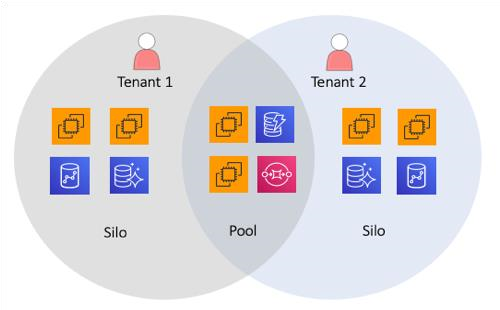
AWS diagram shows how shared and dedicated resources can coexist while keeping tenants isolated (Source)
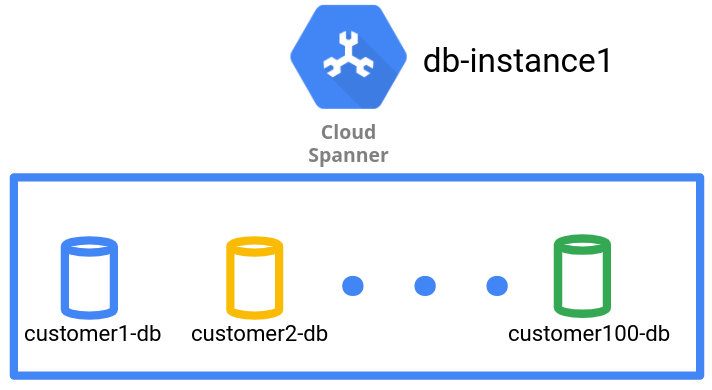
Google Cloud diagram illustrates one database per tenant within a shared database instance (Source)
Design UX for Complex B2B Workflows
B2B UX design should make frequent work fast and costly mistakes hard to miss. Dense tables can be useful when experienced users compare many records, provided search, filters, saved views, and bulk actions match real tasks. Clear status labels should distinguish draft, submitted, pending approval, failed, and completed states.
Show an audit trail where users need to understand who changed a request and why. Onboarding should explain permissions and required data without burying experienced users in prompts. Test B2B UX design with both occasional buyers and daily operators. Their task frequency, vocabulary, and tolerance for extra steps differ, so one path rarely serves both equally well.
Use progressive disclosure when a form has specialist fields. Keep required inputs visible, explain why a field is needed, and preserve entered data after a validation error. For bulk changes, preview the affected records and explain partial failures.
These details matter because a single mistaken bulk action can create more work than the time saved by the feature.
Build Security and Compliance Into Requirements
The threat model should name sensitive records, actors, trust boundaries, and likely misuse. Specify SSO or other authentication, server-side authorization for every action, tenant isolation, logging, encryption in transit and at rest, secrets management, patching, and dependency scanning.
Support access needs limits and traceability. Web application security cannot be added as a final QA checklist.
Use the current OWASP Top 10:2025 to review risks such as broken access control and security misconfiguration, then translate relevant risks into product tests.
Industry and contract requirements may impose additional retention, residency, or audit rules; confirm them with the responsible specialists.
For B2B web application development, the central question is whether each role can perform only its permitted action on its own organization's data.
Write web application security requirements as observable behavior. For example, a suspended user loses access across active sessions; an unauthorized tenant request returns no data; and an administrator action leaves a reviewable log entry. Assign ownership for access reviews and incident alerts. These tests connect policy to the actual workflow.
Plan Integrations and Data Migration Early
External systems shape scope as much as the interface does. Inventory the CRM, resource-management, finance, identity, and messaging systems; identify their owners, rate limits, environments, and change windows.
A vendor API may be available but unable to expose the specific field or event a workflow requires. Test that assumption during technical discovery.
For migration, map each source field to a destination and name the owner who resolves duplicates or missing values. Rehearse imports using representative records and verify totals, relationships, permissions, and history.
Define when writes freeze, how cutover is monitored, and when the team rolls back. Enterprise web application development estimates should include this data work, not just interface and API coding.
Keep a reconciliation report for the rehearsal and the final cutover. It should identify unmatched accounts, rejected records, and records that changed while the import ran. Decide whether legacy history stays searchable in the new product or remains in an archive. That choice changes storage, permissions, and support procedures.
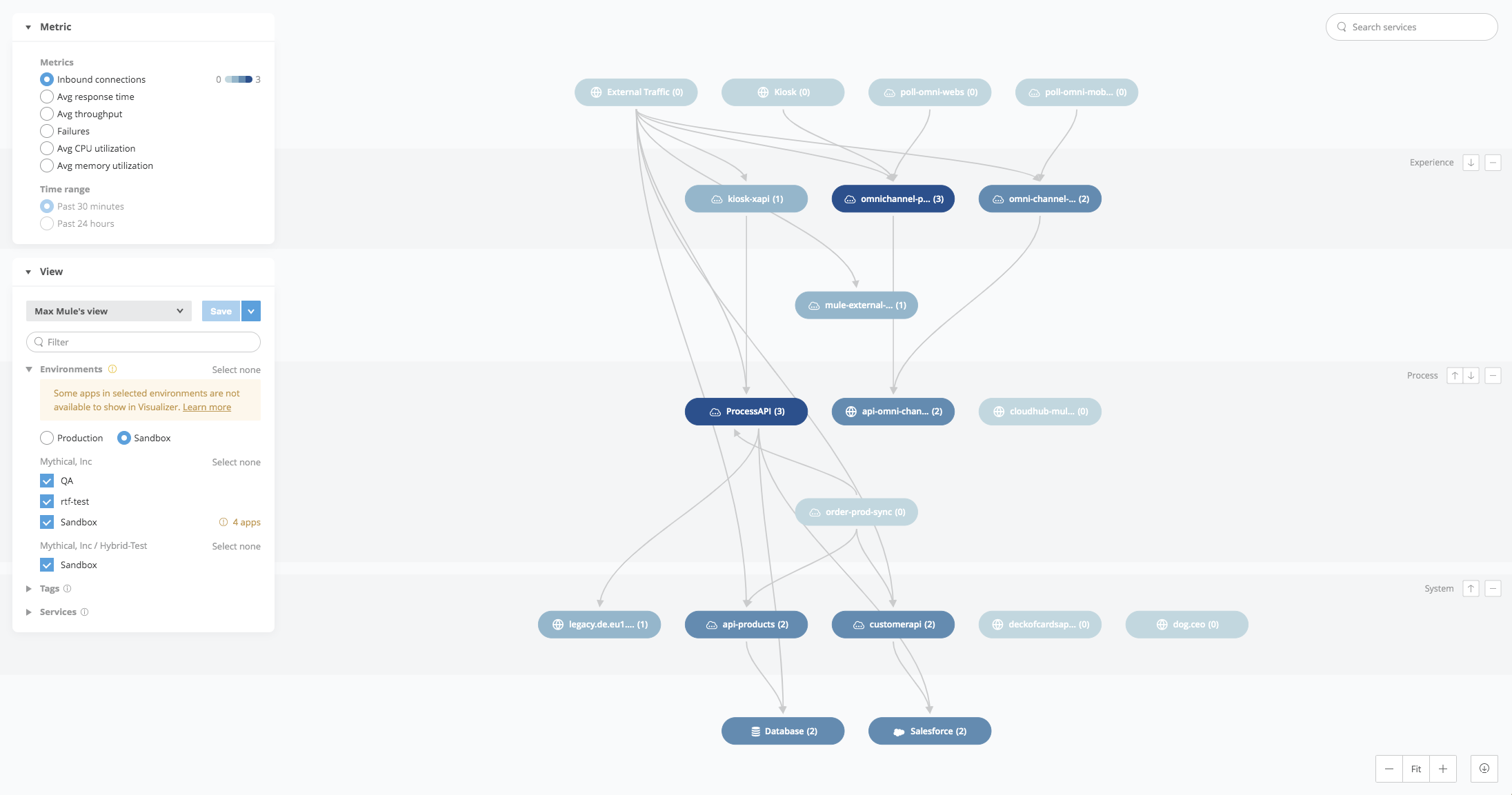
MuleSoft application network visualizes connections between applications and APIs (Source)
B2B Development, Testing, and Release Process
The web application development process moves from product discovery and technical validation to design, implementation, QA, user acceptance testing, and a phased rollout.
Discovery should produce workflow maps, permission rules, integration proofs, and acceptance criteria. Development should deliver small end-to-end slices so business users can inspect real behavior early.
Automate tests for permissions, tenant isolation, core workflows, and integration contracts. Add accessibility checks against WCAG 2.2, performance checks using realistic data volumes, and manual UAT for exceptions.
Release first to internal staff or a small customer group, monitor errors and queue delays, then expand. The web application development process continues through incident response and improvement after launch.
Assign a release owner who can pause expansion when data reconciliation, latency, or support volume moves outside agreed limits. Record deployment changes and give support a way to identify the version and integration state behind a failed request.
Observability should connect a customer-visible transaction to its API calls and background work without exposing sensitive data.
What to Measure Before and After Launch
Set the targets below as illustrative examples only. Replace them with agreed values after measuring the current process; review results by role and customer segment so averages do not hide failed journeys.
| Measure | Baseline | Data source | Illustrative target | Evaluation period |
|---|---|---|---|---|
| Requests completed without staff help | Current email and ticket count | CRM and portal events | Higher share than baseline | First 8 weeks |
| Request completion rate | Current sampled journey | Funnel events | Improve from baseline | Weekly after launch |
| Returned or erroneous requests | Current return log | Workflow and support logs | Fewer than baseline | First 8 weeks |
| Time from submission to decision | Current timestamps | CRM and portal events | Shorter median | Monthly |
| Availability | Current service record | Monitoring | Agreed service objective | Monthly |
| Key page and action speed | Current timed task | Browser monitoring | Faster agreed threshold | Weekly |
| Support requests per active account | Current ticket volume | Help desk and account data | Lower rate | Monthly |
B2B Web Application Timeline, Cost, and Team
Estimate from workflow scope, role count, integration behavior, migration quality, compliance review, and the maturity of existing systems. Unknown API behavior and poor source data create more schedule risk than a straightforward screen. Price should follow a scoped delivery plan, so a fixed project figure without discovery would mislead.
An illustrative team includes a product owner, UX designer, technical lead, application engineers, QA specialist, and part-time security and operations support. An illustrative sequence is discovery and prototype, then core workflow and integrations, then migration rehearsal and UAT, followed by limited rollout.
These phases may overlap; their duration depends on evidence from the systems and people involved. Budget for training and post-launch fixes as part of business web application development.
How to Choose a B2B Web Development Partner
Ask candidates to walk through a comparable project: the original workflow, an architectural trade-off, an integration surprise, the QA approach, and a measured result.
Strong partners can explain why a simpler architecture was enough or why a more complex boundary was necessary. Ask how they research users, verify permissions, transfer knowledge, and support incidents after launch.
Compare top web application development companies using evidence from relevant delivery work, not screenshots alone. A partner for custom web application development should leave you with documented decisions, testable acceptance criteria, and an operable product. Clarify code ownership, access, documentation, and handover in the engagement.
B2B Client Portal Development Example
Consider an illustrative services company that handles client requests by email. Staff copy details into a CRM, check a resource-management system, ask a manager for approval, and send a payment link. Threads get lost and customers cannot see status. The proposed B2B web app gives clients one place to submit and track a request.
The roles are client requester, client approver, internal coordinator, and support agent. The MVP includes SSO, a structured request form, approval limits, status history, and notifications. CRM account data, resource availability, and payment state arrive through defined integrations.
Risks include stale availability, duplicate submissions, and cross-client data exposure. Rollout starts with staff testing, then a small client cohort, then broader access after support and reconciliation checks pass. All scenario assumptions and stages are illustrative.
| Illustrative acceptance criterion | Verification |
|---|---|
| A requester sees only their organization's requests | Cross-tenant role test |
| An approver can approve only within their assigned limit | Boundary tests for each role |
| A duplicate submit creates one tracked request | Retry and idempotency test |
| Failed resource checks show a recoverable status | Integration failure test |
| Payment status reflects provider confirmation | Callback and reconciliation test |
This example shows why B2B application development starts with the transaction and its exceptions. The interface is useful only when people can trust the status and know who acts next.
For this illustrative release, the team would ask pilot clients to complete real representative requests while staff observe where they hesitate. It would compare outcomes with the email baseline, review support contacts, and fix confusing states before inviting more accounts. B2B web app development succeeds here when the manual process can be retired without losing exception handling.
Operating and Scaling a B2B Web Application
Launch changes the team's job from building features to running a service. Monitor failed logins, request errors, queue backlogs, integration delays, and business outcomes. Give incidents an owner and a recovery path. Schedule dependency updates, backups, restore drills, access reviews, and checks on third-party changes.
Collect feedback from support tickets and observed tasks, then rank fixes by customer impact and recurrence. Keep a record of technical debt with an owner and a trigger for action.
B2B web app development continues through this operating loop; scaling should follow evidence such as slower tasks, growing queues, or new tenant requirements. Security reviews should accompany changes to roles, data sharing, and integrations.
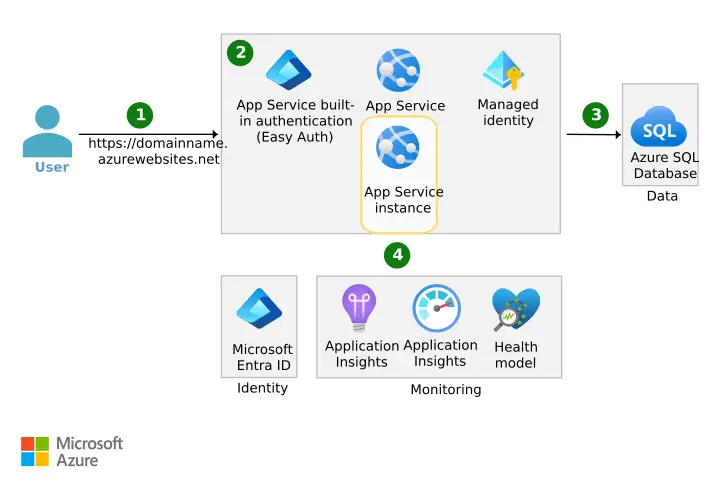
Microsoft diagram shows a web application's identity, database, and monitoring connections. (Source)
Conclusion
B2B web application development works best when technology follows business constraints. First understand who needs to act, what information they trust, which exceptions occur, and what risk the organization can accept. Then choose the web application architecture, integrations, and release scope that support those needs.
The practical next step is a short planning packet: a measurable desired outcome, a workflow map with exceptions, a roles-and-permissions matrix, and acceptance criteria for the first release. That gives product, engineering, and operations a shared basis for decisions and a concrete way to judge whether the application succeeds.

Creates insightful, strategy-driven content that translates complex design and branding concepts into accessible knowledge, supporting Ramotion’s mission to elevate digital experiences.