
AI now supports planning, coding, prototyping, testing, debugging, reviews, and documentation. Developers can ask for an explanation of unfamiliar code, request a working interface, or delegate a bounded task to an agent. Agentic workflows let software execute development steps autonomously within agreed limits, under human supervision.
So, how is AI changing web application development? It changes how teams divide and verify work. A developer can define an outcome, supply repository context, and inspect a proposed implementation instead of directing every edit. That makes task definition and review part of the implementation process itself.
Using AI in web projects also raises a separate architectural question when the product includes model-powered functionality. Building software with AI and adding AI to software require different controls. This article covers both, with practical examples of where each fits.
From AI Code Suggestions to Coding Agents
Autocomplete predicts the next fragment while a developer writes. Chat assistants expand that interaction by explaining functions, proposing fixes, and drafting code from instructions. Repository-aware tools add relevant files and project conventions so responses can address an existing application.
Coding agents extend this into execution. An assistant typically supports an interactive exchange, while an agent can choose intermediate steps toward a delegated goal. The distinction concerns how much work the system carries through between human decisions, rather than a product's marketing label.
For example, GitHub's documentation describes agents that research repositories, edit files, run tests and linters, and prepare pull requests. These capabilities reduce step-by-step guidance, but they do not establish that a proposed change is correct. Developers still need evidence that it meets the requirement.
AI in Planning and Prototyping
AI can turn a feature description into draft user stories, acceptance criteria, and implementation tasks. Ask it to identify existing routes, components, and dependencies before proposing new ones. Treat its codebase summary as a map to check against the files it cites.
A useful planning request separates facts from open questions. For a booking feature, the draft should expose uncertainty about cancellations, time zones, and overlapping reservations. Product owners resolve those questions before developers encode assumptions into the application.
Wireframes and proofs of concept make uncertain ideas easier to discuss. A clickable prototype can reveal a confusing interaction before the team commits to the underlying data model. A technical experiment can test whether an integration provides the information the feature needs.
Keep prototype shortcuts visible. Mock authentication, local storage, and invented sample responses may help validate an idea, but they do not establish production architecture. Record which assumptions the prototype tested and which engineering decisions still need work.
AI in Frontend and Backend Development
Frontend developers can generate draft components from prompts, written specifications, or supplied design context. Useful requests name the existing component library, interaction states, and accessibility expectations. Review keyboard behavior, responsive layouts, loading states, and error messages in the browser.
Backend work includes API handlers, validation, data access, integrations, and service-layer logic. An AI assistant can draft data transformations, explain a query, or propose SQL against a supplied schema. Developers should verify authorization and transaction behavior before relying on generated implementations.
Boilerplate is a reasonable starting point because its expected shape is usually easy to inspect. Refactoring requires more context, especially when a public interface has callers outside the edited module. Documentation should describe the resulting behavior, including limitations the generated code leaves unresolved.
Ask for changes that reuse established patterns. A small export endpoint should not introduce a second validation framework or replace the application's data-access approach. Every extra dependency creates maintenance work that belongs in the review, regardless of who wrote the code.
AI in Software Testing and Code Review
AI can draft unit and integration tests, suggest edge cases, and analyze failure logs. Provide expected behavior independently of the implementation so the model has something meaningful to test. A test that repeats the same mistaken assumption as the code can pass while the feature remains wrong.
For an export feature, check empty results, restricted records, pagination, and invalid filters. Integration tests should confirm that the API enforces access rules rather than trusting a hidden button. Browser checks should verify that the downloaded file corresponds to the user's selected filters.
During review, use AI to investigate suspicious logic, unintended behavior changes, and maintenance problems. Request file references and a concrete failure scenario for each finding. A vague warning should prompt investigation, while a plausible explanation still needs confirmation.
Test quantity measures output volume. Coverage quality depends on whether checks would catch behavior that matters to users. Reviewers should challenge missing cases and confirm that new tests fail when the relevant behavior breaks.
How AI Agents Automate Development Tasks
A typical delegated task begins with an issue that states the desired outcome and acceptance criteria. The agent examines the repository, edits code, runs permitted checks, and opens a pull request. A developer reviews the result and decides whether it can merge.
Keep the execution boundary explicit:
- Give the agent relevant repository instructions and an isolated working environment.
- Limit file access, credentials, network connections, and permitted actions to the task.
- Require a summary of changes, check results, and unresolved questions.
- Reserve merge and release decisions for authorized reviewers.
Within those limits, an agent can repeat implementation and testing without asking for every edit. It should stop when requirements conflict, required access is unavailable, or verification cannot establish the requested behavior. Define those stopping conditions before delegation.
This differs from completion because the delegated unit is an outcome rather than a code fragment. It also creates a review obligation. Someone must understand the accumulated changes, including edits the agent made while responding to failed checks.
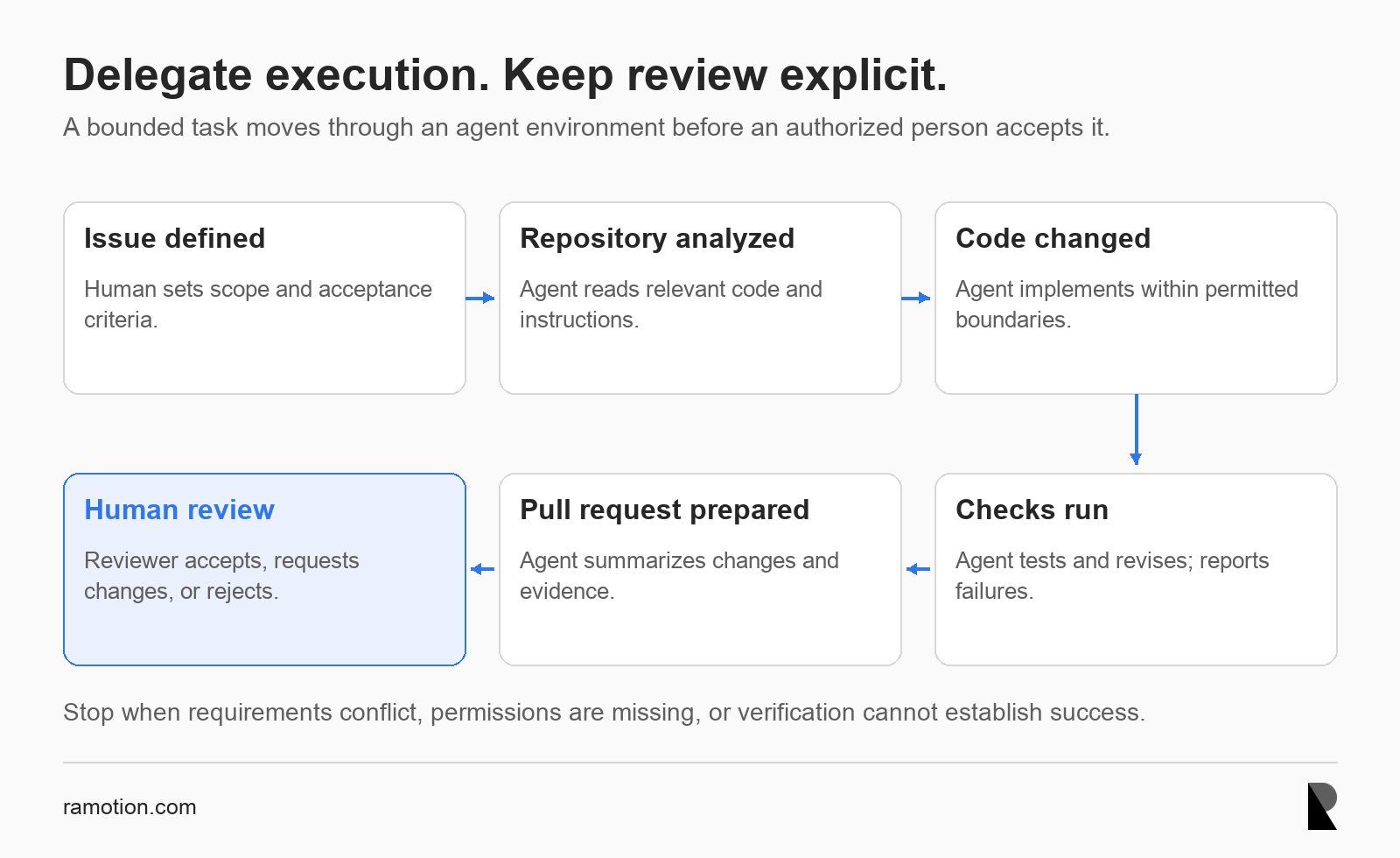
A bounded coding-agent workflow ends with human review
Architecture of AI-Enabled Web Applications
Developer tools operate during software creation. Product AI operates when users interact with the deployed application. Adding a support assistant or semantic search introduces model calls and new failure modes alongside the existing web stack.
Anthropic's architectural guidance distinguishes predefined workflows from agents that choose their own steps and tool use. It recommends starting with the simplest solution that works. A search-and-answer feature may need retrieval and a model call without an autonomous agent.
Traditional web app architecture
A conventional request moves from the user through the frontend to the backend. The backend applies business rules, checks permissions, and reads the database or calls external APIs. It then returns a response that the frontend presents. Those responsibilities remain when AI enters the product. Authentication, billing, and authoritative records still belong to application services. A model's generated response should never become the sole evidence that a user can access a record.
AI-enabled web app architecture
An AI request can move through the application backend to a model gateway and then an AI model. The gateway centralizes model access, request limits, and provider configuration. It is a logical responsibility that can initially live inside an existing service.
Retrieval adds authorized data sources and semantic search to supply relevant context. Tools expose approved application actions through validated APIs. Guardrails and moderation check inputs, outputs, or actions, while evaluation checks behavior against representative cases before release.
Observability records latency, costs, failures, and permitted diagnostic context. Keep sensitive information out of unnecessary logs and define fallback behavior for unavailable models. Supporting components should match the feature's needs, rather than appearing in every implementation by default.
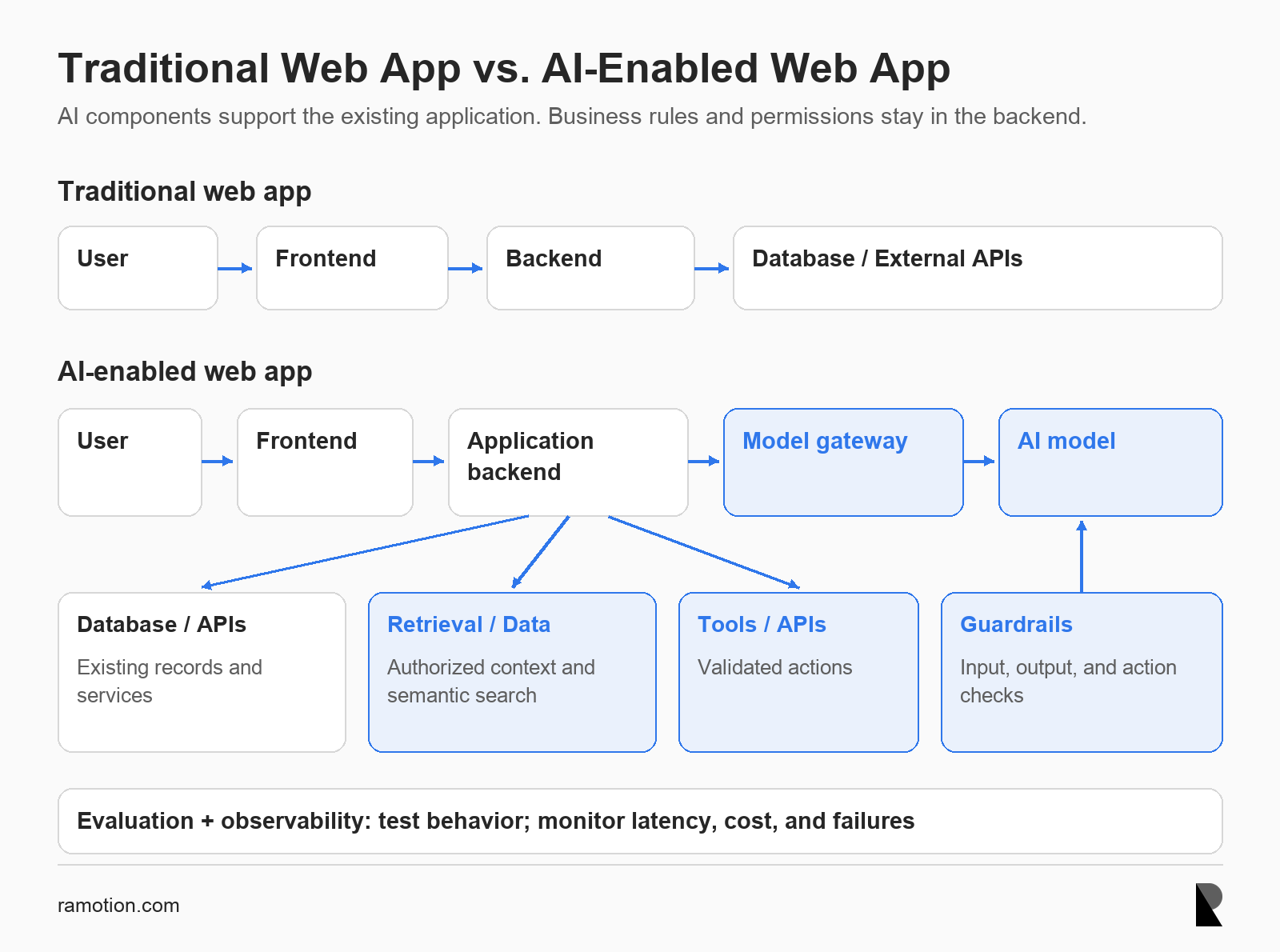
Traditional Web App vs. AI-Enabled Web App
How AI Is Changing the Web Developer’s Role
Developers increasingly specify outcomes, explain architectural constraints, and provide the context a tool needs to work. Acceptance criteria become practical instructions for both implementation and verification. Clear specifications reduce the amount of guessing passed into an automated workflow.
Review skills become more consequential as generated changes grow. A solution may pass local tests while violating a shared interface or introducing a slow database query. Developers need to assess effects on the whole system, including operations and future maintenance.
Prompting is useful when it captures engineering knowledge precisely. Include relevant files, examples, constraints, and a definition of completion. A long prompt with contradictory instructions is less useful than a concise task backed by accurate project documentation.
Teams should also preserve learning opportunities. Ask developers to explain generated code and investigate failures rather than accepting patches without understanding them. Code ownership still requires enough knowledge to diagnose and repair the application later.
Does AI Make Web Development Faster?
AI can reduce effort on repetitive code, documentation drafts, test setup, and initial research. Total delivery time also includes clarifying requirements, reviewing changes, resolving failures, and deploying safely. Faster code production helps only when downstream work does not consume the saved time.
The evidence does not support a universal speedup. METR's productivity update reports that its early-2025 study found experienced open-source developers took 19% longer with AI. That result concerns the tools, developers, and repository tasks studied, rather than every development setting.
The same update says later data provided an unreliable estimate of current effects because of selection and measurement problems. Treat dated productivity findings with their scope intact. Neither a polished demonstration nor a historical slowdown predicts your team's result.
Measure elapsed delivery time alongside active developer effort. Include prompt preparation, review, corrections, and rework after release. Compare similar tasks so a shift toward easier assignments does not look like an improvement in engineering productivity.
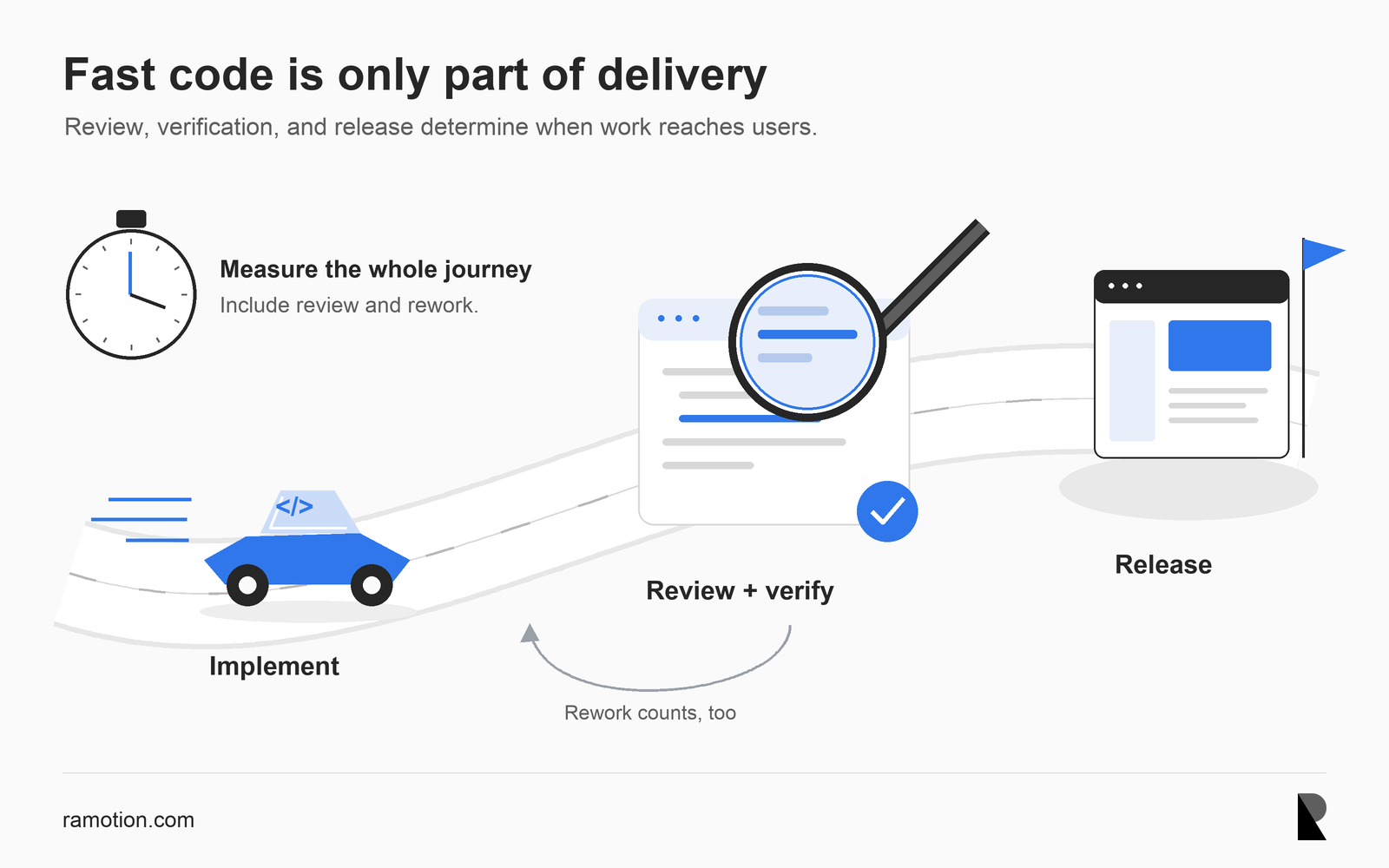
A code-themed car passes inspection on its way to release, illustrating why delivery time includes review and rework
A code-themed car passes inspection on its way to release, illustrating why delivery time includes review and rework
Consider a SaaS dashboard that needs data filtering and CSV export. Users should filter records by status and date, then export every matching record they are authorized to access. The export must use the same filter rules as the dashboard.
In a traditional workflow, a developer traces the existing data flow, plans the API contract, and writes the interface and export logic. They add tests, update documentation, and submit the work for review. Business decisions still precede implementation.
With AI assistance, the developer can delegate repository analysis and request a draft plan before coding. After reviewing that plan, they ask for a bounded implementation that reuses existing components and query logic. The agent can then run relevant checks and summarize the resulting changes.
| Work | Traditional workflow | AI-assisted workflow |
|---|---|---|
| Codebase analysis | Developer traces relevant code | AI proposes a map; developer verifies it |
| Initial implementation | Developer writes the feature | AI drafts changes within agreed scope |
| Testing | Developer creates and runs checks | AI proposes tests; developer checks assumptions |
| Documentation | Developer drafts behavior notes | AI drafts notes against the final implementation |
The developer uses the saved drafting effort to inspect difficult cases. Does export include all matching pages? Which time zone defines a date boundary? Should a large export run as a background job? Those decisions require product context and architectural judgment.
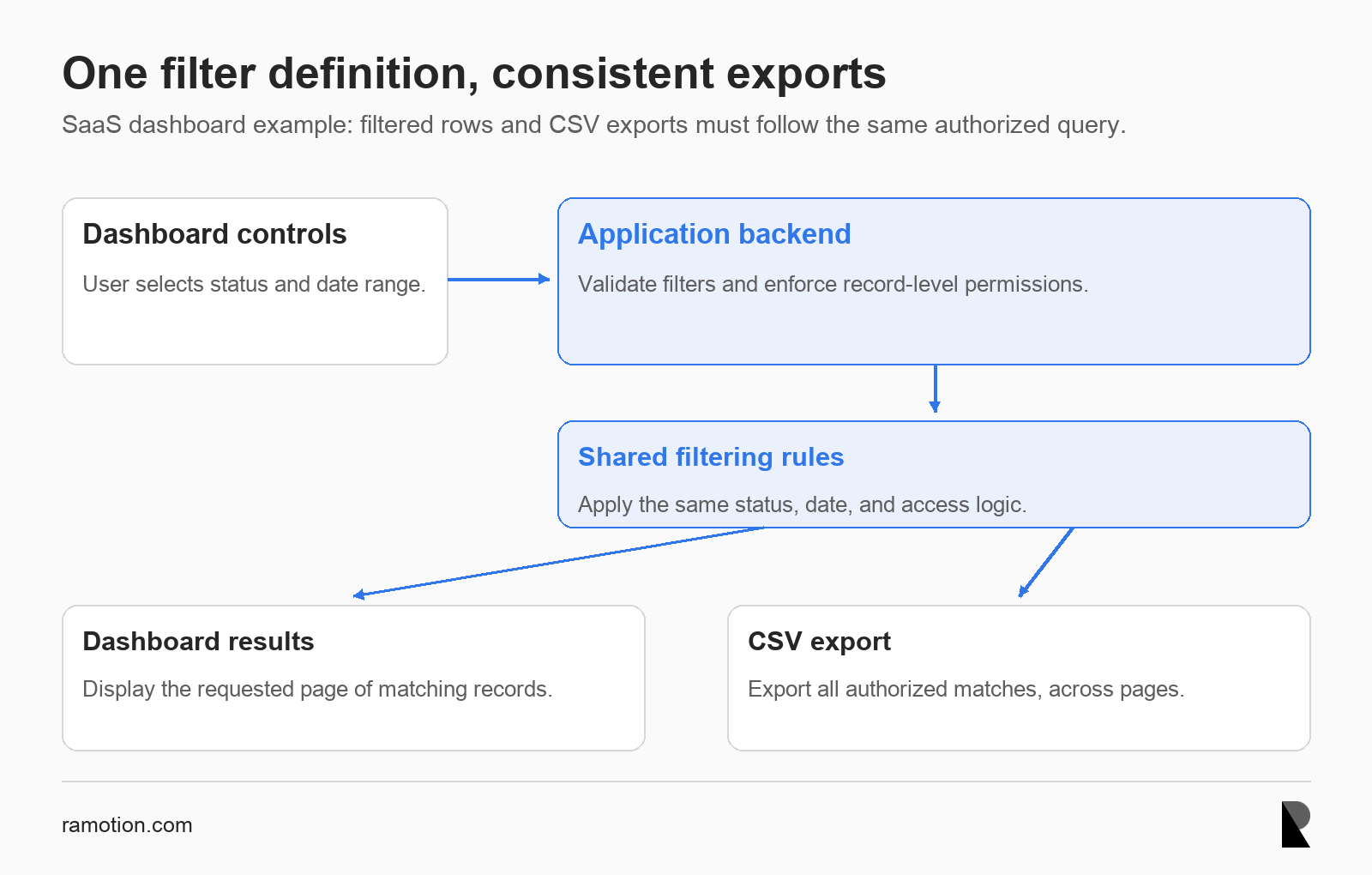
Dashboard filtering and export should share server-side rules
Risks of AI-Assisted Development
Generated code can contain logical errors, outdated APIs, invented methods, and incompatible dependencies. It may misunderstand business rules even when the syntax is valid. Review package versions and interfaces against the actual project before accepting a suggestion.
Security mistakes can hide behind a convincing implementation. A generated endpoint might check that a user is signed in while missing record-level authorization. Require normal security review and checks for sensitive changes, including data exports and account management.
Privacy and governance depend on what the tool receives and can do. Establish which services may process proprietary code and sensitive data, and confirm their configured retention and access settings. Use synthetic examples when real customer information is unnecessary.
Agent permissions add another risk because tools can act on model decisions. Treat repository text, retrieved pages, and tool responses as potentially untrusted input. Limit privileges and require approval for consequential actions through controls outside the model's instructions.
Large patches can also reduce maintainability when nobody understands their purpose. Split work into reviewable changes and reject unrelated rewrites. A team inherits the maintenance obligation for every merged line, including code generated cheaply.
When AI Helps Most and When It Does Not
AI is easiest to apply when the task is clear, the relevant context is available, and success is easy to verify. Examples include repetitive edits, documentation updates, isolated features, and refactoring supported by reliable tests. Choose work where a reviewer can assess the result without reconstructing the entire system.
Ambiguous requirements and poorly understood legacy behavior create weaker conditions. If nobody knows why a rule exists, an agent may remove it as apparent duplication. First document the behavior and establish checks that distinguish a safe improvement from a regression.
Security-critical decisions and hard-to-test code need specialist judgment. AI can assist investigation, but a plausible answer cannot replace evidence. When verification takes more effort than a direct implementation, reducing automation can be the practical choice.
For uncertain legacy changes, begin with a read-only investigation. Ask the assistant to locate callers, describe observable behavior, and identify missing evidence. A developer can then turn that investigation into a smaller implementation task with explicit constraints.
How Teams Can Adopt AI Safely
Start with a bounded use case and record the current workflow before changing it. Documentation updates, targeted test generation, and small implementation tasks provide manageable trials. Expand access only after the team can review the work consistently.
Set repository access controls, mandatory checks, human approval points, and merge requirements in advance. Document who owns generated changes and how to handle uncertain results. Make the same rules visible in project instructions and enforce consequential restrictions through platform settings.
Track cycle time, review effort, defects, and rework against comparable work. Keep model and tool configuration records so teams can interpret changes in results. A productivity gain should survive the cost of checking and maintaining the implementation.
When hiring web application development companies, ask how they scope agent tasks and verify generated changes. Request examples of review evidence and code ownership practices. Tool access alone says little about delivery quality.
Ask who will maintain the code after handoff and how the team records architectural decisions. These answers help establish whether AI assistance fits an accountable engineering process.
Conclusion: The New Unit of Software Development
AI changes how programming work is organized. Teams can combine developer-written code, AI-generated changes, and agent-executed tasks within the same delivery process. A bounded, verifiable task becomes a useful unit of delegation.
That shift increases the value of clear requirements and disciplined review. Human judgment determines architecture, resolves uncertain behavior, and decides whether the evidence supports release. Accountability remains with the people who build and operate the application.

Creates insightful, strategy-driven content that translates complex design and branding concepts into accessible knowledge, supporting Ramotion’s mission to elevate digital experiences.