
Today’s hybrid and globally distributed workplaces give the intranet a bigger job: to connect people across time zones, offices, and functions. Having a thoughtful company intranet design ensures the right data reaches the right person at the right time, in the right format. This is possible through personalized dashboards, task-based intranet navigation, and seamless search, leading to a rewarding user experience.
Let’s get into the nitty-gritty of what modern intranet design really means and entails.
What is a Modern Intranet Design?
A modern intranet design is predictive and adaptive. It anticipates employee needs and delivers content, tools, and notifications relevant to the user in real time.
That said, a modern intranet design has five core pillars:
- AI-driven, instant answers: natural-language search and concise summaries that present the right information instantly
- Role-based dashboards: personalized homeviews with tools and tasks each user needs.
- Integrated workflows: seamless embedding of email, chat, and task apps to reduce switching between platforms
- Content lifecycle controls: expirations, reviews, and retirements that prevent stale or duplicated information
- Continuous feedback and analytics: in-product feedback plus search and usage metrics to guide ongoing improvements.
The following sections will dive into company intranet design best practices.
Align Intranet Design with Employee Needs
Before choosing features for your digital workplace, understand how employees think and work—what they search for, where they get stuck, and who they ask when the intranet fails. Engage HR, marketing, and department heads early, and use interviews, onboarding feedback, and quarterly reviews to guide feature decisions.
Identify employee groups
Personalization starts with knowing who you serve. Define core groups by role, location, device, language, work environment, and access constraints. HR and managers can help you with this step. For each group, map the tools they use and how they fit into daily workflows.
Prioritize employee tasks
Prioritize by frequency and frustration. Identify the tasks employees do most—these are your non-negotiables. Then layer in pain points by analyzing abandoned searches, repeated help requests, and manager feedback. Focus first on high-frequency, high-frustration tasks.
Build Task-Based Information Architecture
Organize content around actions, not org charts or policy titles. Keep in mind that employees search by what they want to do. So, label items with verbs—e.g., “Book Time Off” instead of “HR Policy Memorandum 2026-09”—and group related steps so that tasks can be completed with minimal clicks.
Design clear Intranet navigation
Use task-oriented labels (Book, Request, Approve, Find) instead of departments. Keep hierarchy shallow and menus persistent so users don’t have to retrace steps. That said, avoid long-click paths, which means users must be able to complete common tasks in as few steps as possible. Finally, add a search bar with task-based suggestions for quick access.
To sum it up, an efficient company intranet navigation consists of:
- Task-oriented labels
- Simple hierarchy
- Fixed menu bar
- Fixed search bar
Design an Effective Intranet Homepage
The homepage is your digital workplace’s front door. It must be attractive, intuitive, useful, and uncluttered. Above the fold, include a central search bar, personalized quick action tiles, and critical alerts. Make sure top searches and actions are immediately visible, with autosuggest in search and clickable tiles that let users act from the homepage.
Consider the following intranet design best practices:
- Balance News, Alerts, and Tasks: Limit news and show only current, urgent items. Meanwhile, ensure old news is accessible and archived on a separate “News” page.
- Personalize Without Hiding Essentials: The intranet homepage design should be dynamic, adjusting according to the user. Users from different departments do not have the same homepages—different action tiles, recently viewed policies, departmental policy updates—but they both have access to the same entire intranet.
Improve Enterprise Search
Many intranets lack the relevance and immediacy of consumer search engines. Enterprise search must index documents, email databases, and apps, respect permissions, and bridge disconnected systems. It can also create concise summaries and suggested actions with AI.
Design better search results
Start by pruning content by removing retired tools, merging duplicates, archiving outdated policies, and flagging pages with low visibility. Clean content improves ranking and reduces noise.
Then tune for intent. Users search to gather information (informational), find a known page (navigational), or complete a task (transactional). Configure search to detect intent from query patterns, role, and behavior and return the appropriate answer, link, or an embedded form.
Improve relevance with metadata, synonyms, and query-time boosts for high-value content. Add autosuggestions and task-based prompts to guide users toward common workflows.
Use Intranet search analytics
Measure what matters, like top queries, zero-result and abandoned searches, click-through rate, time to first click, and most-used results. Combine quantitative signals with qualitative feedback to identify content gaps and misranked items.
Use analytics to benchmark and track improvements, turning the intranet into a self-optimizing product rather than a static project.
Personalize Company Intranet Experiences
Personalizing experiences can lead to better employee relationships. Add features that foster connection—employee directories, milestone celebrations, and content that help employees feel seen as individuals.
Among the intranet design best practices to observe is to keep the core experience stable alongside personalized elements. Aside from ensuring the navigation bar is accessible, place mandatory content in fixed positions, and clearly label what’s been personalized so users understand why they’re seeing different content from others. Don’t create filter bubbles that hide what’s essential.
Establish Content Governance
Good content governance translates to content with a clear owner, an expiration date, a consistent format, and a data-driven retirement process. It strengthens trust by preventing information overload, outdated content, content duplication, inefficient searches, and inconsistent user experience.
Standardize content templates
Standardized content templates save time, reduce errors, and make every page feel like it belongs to the same intranet, and not just a mere compilation with differing voices and formats from all departments. The goal is to remove decision fatigue from the content creator.
Pre-fill fields based on content type (expiration dates, owners, categories, etc.) and lock them unless overridden with a reason. It also helps to place text examples inside each field and warnings next to mandatory ones. These steps make compliance easier.
Prevent stale and duplicate content
Content governance keeps everything neat by removing outdated and redundant pieces of content from the system. For instance, every page gets a named owner responsible for its accuracy, an expiration date that triggers automatic review or archiving, and a system that blocks new pages if similar content already exists. This means the page doesn’t go live until all mandatory requirements check out.
Integrate Intranet Tools and Workflows
An efficient intranet allows employees to access necessary tools and workflows without juggling multiple logins and platforms. The key to achieving this is narrowing integrations to what’s truly essential.
Among the top intranet tools to consider are:
- Microsoft 365: A productivity platform with cloud services, enterprise-grade security, and device management. It has SharePoint for storing files and managing documents, Teams for communication and collaboration, and Exchange Online for email and calendars.
- Human Resource Information System (HRIS): An HRIS automates workflows, provides a self-service portal for employees, and stores all employee data.
- Service Desks: Support tools like Zendesk and ServiceNow manage the entire lifecycle of IT services, from setting up a new laptop for new staff to managing knowledge bases and even planning for future IT needs.
- Forms: Data collection tools (Microsoft Forms or Google Forms) automate responses into SharePoint lists.
Design for Mobile and Frontline Employees
Not every employee is glued to a desk. Some are constantly on the go and require more mobile access to the intranet.
Below are some mobile intranet design best practices you can implement:
- Keep your team updated and productive by designing a mobile-first intranet system. This means prioritizing task-based navigation, using short content blocks, and ensuring the app loads quickly even on intermittent connectivity.
- Implement offline strategies. Cache critical content for offline access, especially for those working in warehouses, retail floors, or field service with limited connectivity.
- Ensure time-sensitive operational updates show even when they’re not actively using the app. Reserve alerts for compliance deadlines that require immediate action.
Improve Intranet Accessibility
Not every tech employee is tech-savvy. Some with disabilities and other limitations also need accommodations to ensure the intranet remains accessible to all users.
The single most important and globally accepted guideline to follow is the Web Content Accessibility Guidelines (WCAG). It is built on four principles: perceivable, operable, understandable, and robust. And under these principles are three levels of conformance: A(lowest), AA, and AAA (highest).
The minimum requirement is to meet the AA level of WCAG. Meaning, there’s a clear contrast between text and images, pages are readable without needing to zoom in, and captions are provided for videos with audio. In terms of operability, every function can be accomplished by using only the keyboard, and menus and links are accessible on every page.
Strengthen Intranet Security and Trust
Keep corporate and employee information secure by enforcing security features:
- Multi-factor authentication (MFA) and Single Sign-On (SSO): secure logins that verify identity and reduce password fatigue.
- Role-Based Access Control (RBAC): Limit what employees can see and do based on their roles.
- Encryption: Ensure sensitive information remains unreadable to bad actors with the use of AES-256 and TLS 1.2+
- Audit Trails and Monitoring: Log every access, edit, and deletion to track incidents and hold users accountable should issues arise.
- Quarterly Permission Reviews: Remove access from former employees or anyone who no longer has privileges to protect against information leaks and permission creep.
Create an Intranet Design System
The intranet design system makes collaboration between designers and developers easier. It’s where they can cross-check components, ensure consistency, and align on what’s possible. But beyond being a reference point, the intranet design system is also a shared library of reusable code snippets, building blocks, and guidelines that both teams draw from.
Key components of a design system for an intranet include:
- Component library: Reusable buttons, forms, tables, and accordions that developers and designers can use without needing to build from scratch.
- Theme builder: Controls the look and feel of every page, from colors to fonts and spacing, for consistency without needing to code.
- Page builder: Content owners can create and arrange layouts without involving developers.
- Style guide: Contains rules for writing, formatting, and structuring content for uniformity.
- Content governance and maintenance features: Rules for updating and managing components and content, and collecting feedback so the system stays current and efficient.
Partner with reputable UX design consulting firms to handle the nitty-gritty and create an intranet that delivers results.
Measure Intranet Success: Is the Design Working?
An intranet is successful when people seamlessly leverage it in their everyday functions because of how efficient the design is. To prove its value, you can measure the following metrics:
- Return rate: It measures how many employees visit the intranet regularly versus one-time users.
- Search success: Measured by clicks and zero results, where high clicks mean it works, and high zero-results mean content gaps exist.
- Task completion: Determines whether employees can accomplish what they need within the platform.
- User feedback: Insights gained from surveys and interviews that add context to analytics.
Metrics are just numbers and do not capture the full picture. For instance, low user feedback doesn’t necessarily mean poor employee engagement. Sometimes, when something works so well, people are less likely to mention anything about it.
That said, the most revealing indicator would be if employees still use the intranet without their boss nagging them to because it makes doing work easier.
Effective Intranet Designs to Learn From
The following examples explore how companies shape employee intranets to improve productivity, collaboration, and the overall work environment across teams.
1. Task-based Intranet home page design: Baringa partners and assurance
Lighthouse is Baringa Partners’ intranet built on Microsoft SharePoint. It allows employees to personalize their dashboard with action tiles that launch their most-used daily external systems in one click on the homepage.
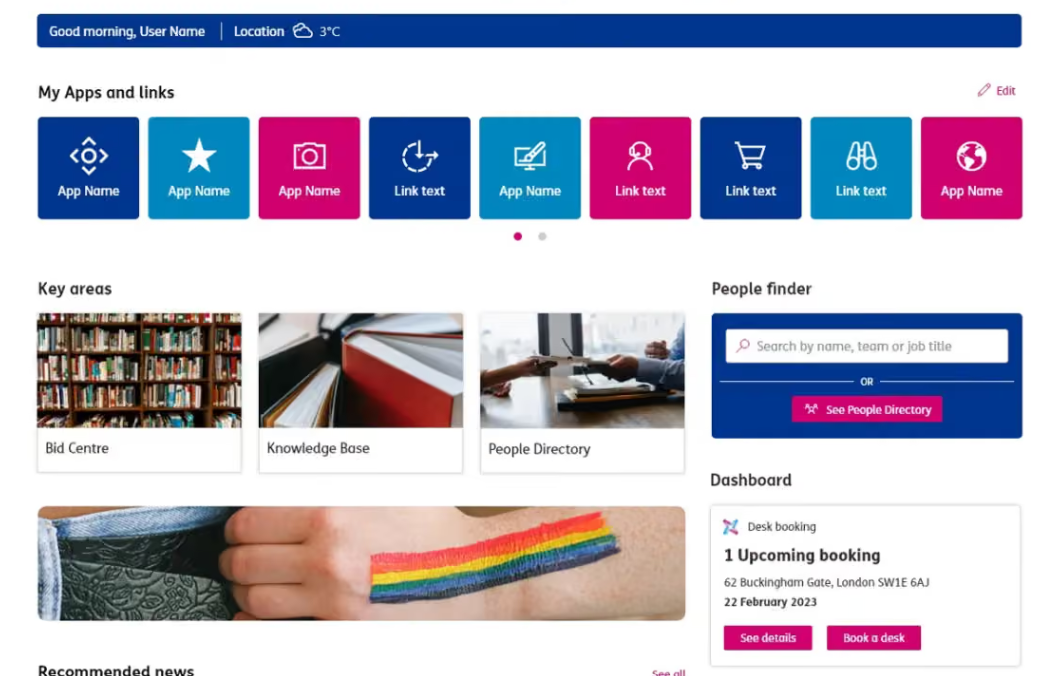
Personalized action tiles via SharePoint
Assurance, another task-based intranet, integrates Microsoft Viva Connections to deliver an adaptive homepage. Unlike Lighthouse’s focus on launching external systems, Assurance centralizes workflows through interactive tiles within the Viva Connections dashboard, without leaving the intranet.
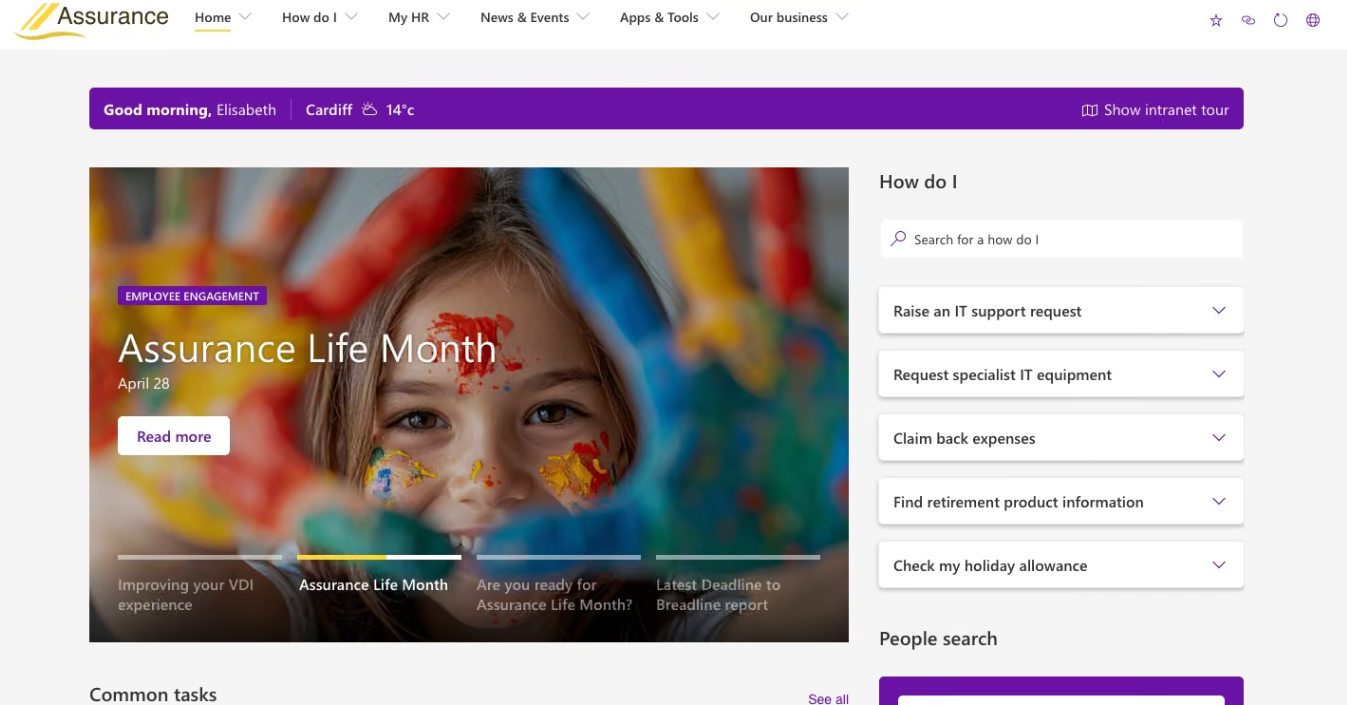
Viva Connections intranet integration via SharePoint
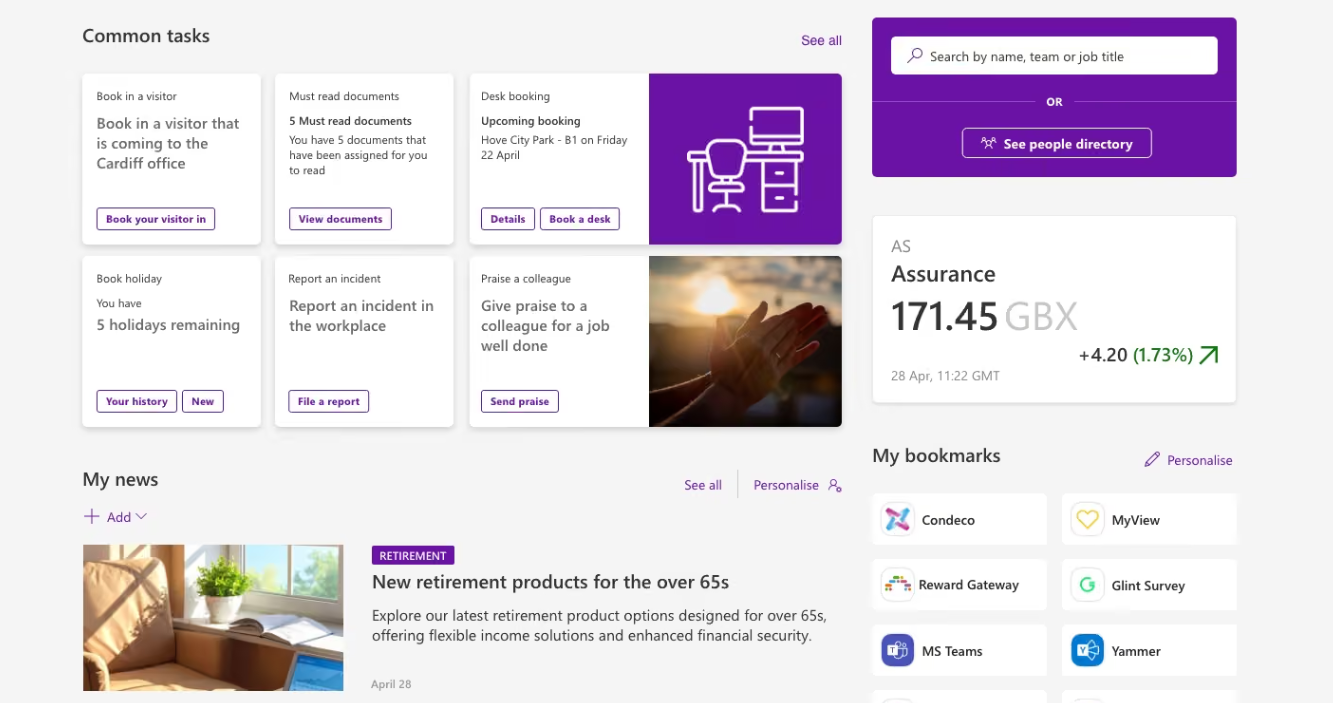
Via Sharepoint
2. Personalized Intranet UX: IBM w3
IBM w3 was revamped to increase functionality and enable personalization for all employees across the globe. For instance, the filter search function has been improved to narrow down results. Users can also customize settings based on their language, location, and interests.
The “News” tab curates content based on the user’s role, ensuring they see IBM events and initiatives relevant to them. IBM w3 integrates generative AI in accomplishing routine tasks, like drafting emails, translating documents, and summarizing content.
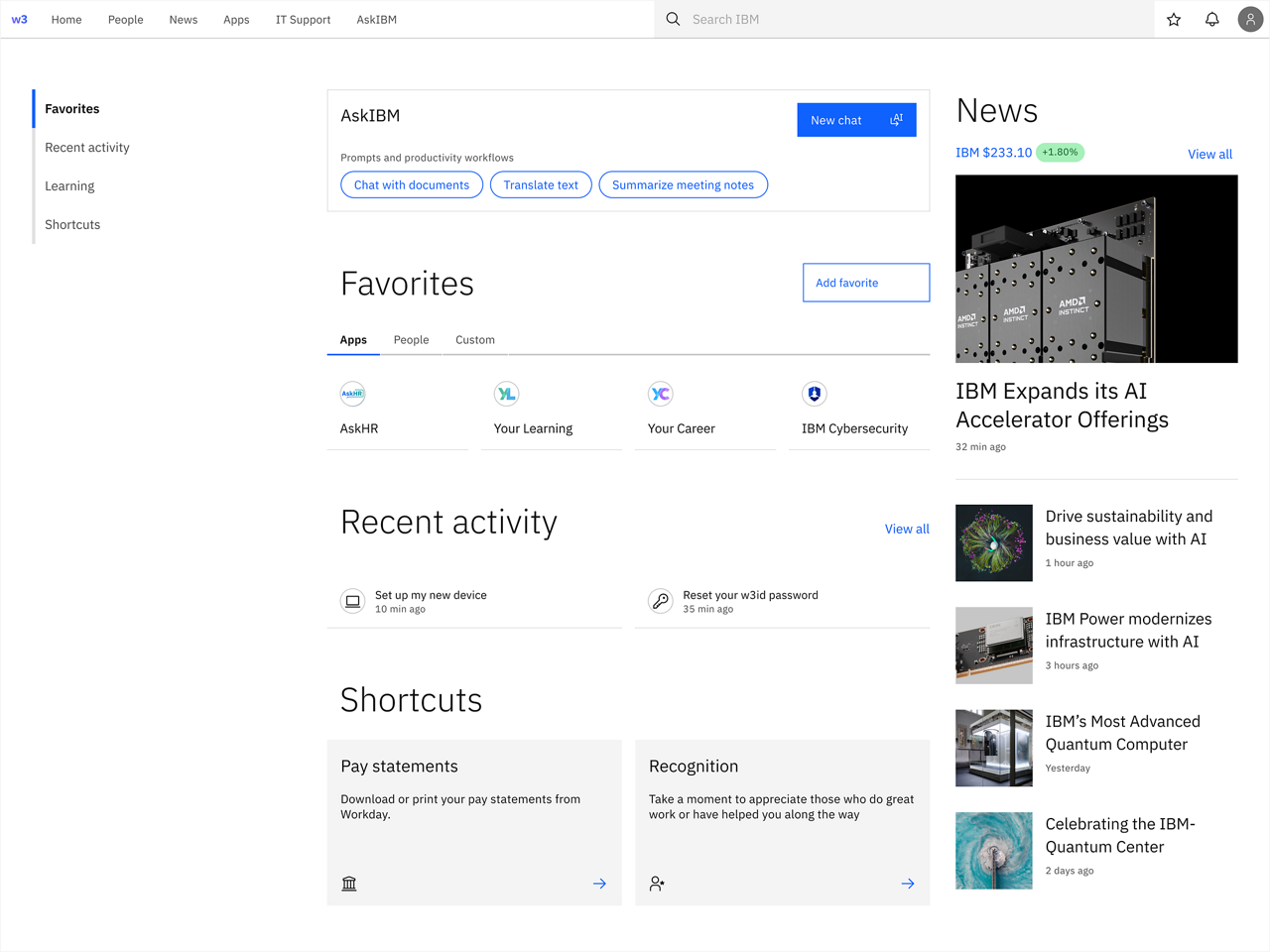
Personalized w3 homepage via IBM
3. Frontline Mobile Intranet: MyWalmart
In 2016, Walmart took its intranet UX to the next level by creating a mobile app that addresses employee engagement. This made collaboration and tracking easier for people on the ground, which became an invaluable asset when the world halted due to the COVID-19 pandemic.
Walmart’s Director of Digital Strategy and Brand Engagement, Steve Wilson, shares in an article, “...We operate at a scale that effectively pushed us to reimagine what an Intranet could be for an organization. It has given OneWalmart incredible resiliency, regardless of what happens in the business or in the broader world around us.”
The internal employee app is fitted with the following features:
- AI-powered Ask Sam Voice Assistant: Receive real-time answers with the help of a voice-activated digital assistant
- Work-life Management and Scheduling: Employees can apply for leave, view upcoming shifts, and swap available shifts all on the app
- Plan and Performance Tracking: Leadership can monitor store goals, track metrics, and keep teams aligned
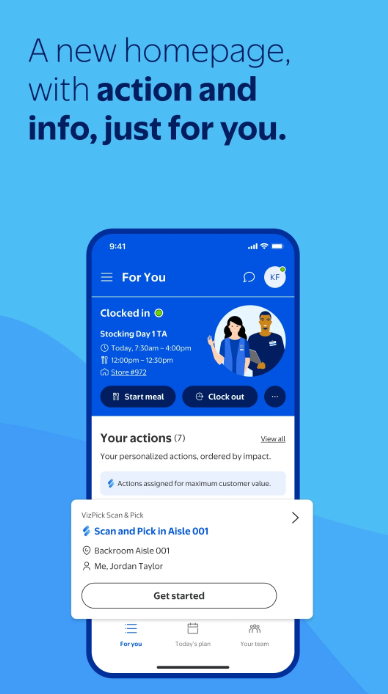
MyWalmart Intranet via Google Play
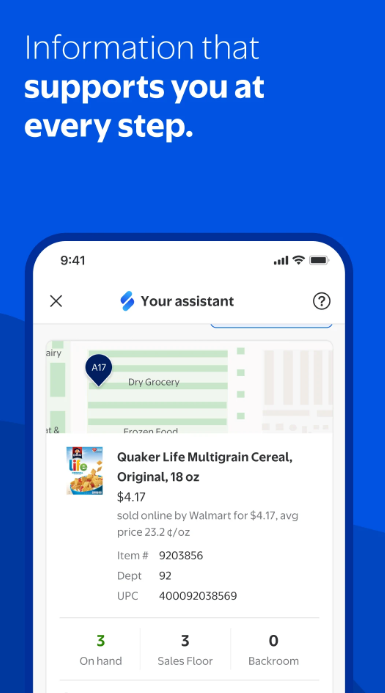
MyWalmart Intranet via Google Play
4. Knowledge-centered Intranet: DHL Smart Connect
DHL Smart Connect acts as a personalized gateway that connects over 600,000 employees across the globe to information, tools, and services they need to do their jobs, regardless of their role or device.
Smart Connect automatically curates content, showing only what’s relevant to the user based on location or region. In effect, there’s high “findability”. Employees can also exchange information like on public social media, and direct person-to-person communication is possible via chat.
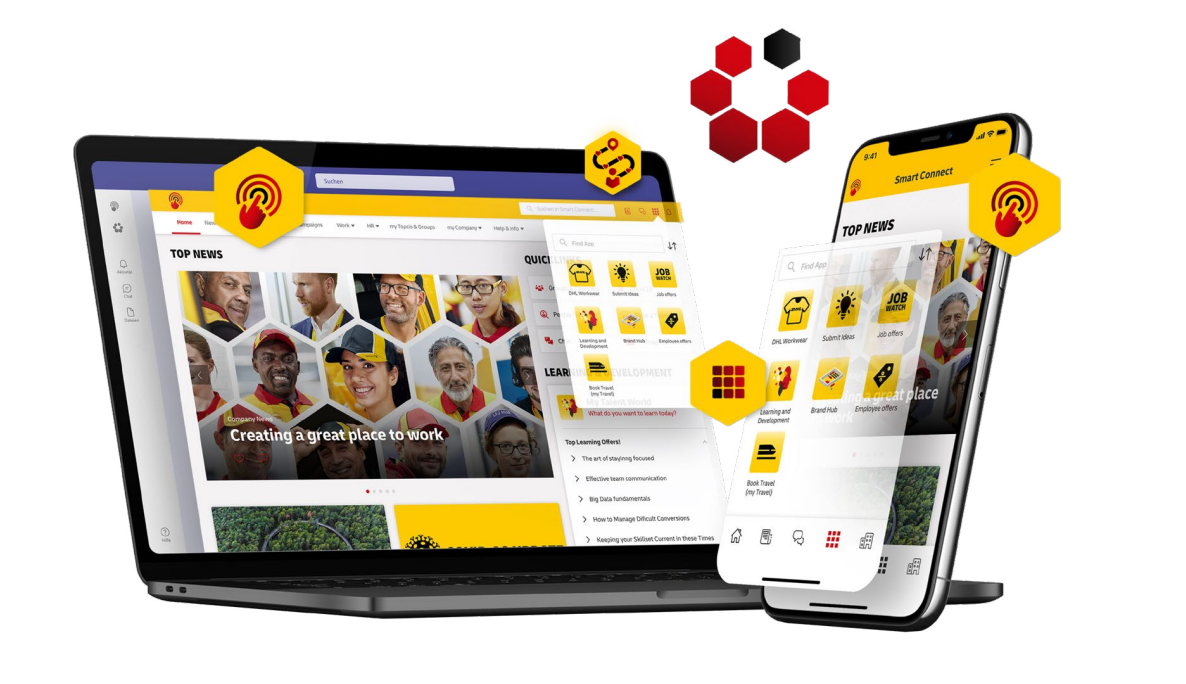
DHL Smart Connect Intranet via Staffbase
Common Intranet Design Mistakes
Static Intranet design
Many companies think that everything’s done once the intranet goes live. But creating and implementing the intranet system is not a single event. It needs to adapt to changes as the business grows and employee behaviors and needs evolve.
The fix: Set up analytics from the start and run quarterly audits to track performance and catch issues before they become serious, costly problems.
Launching without proper onboarding
Employees are often left to figure out how to use the intranet. This leads to multiple intranet adoption barriers that technology alone can’t help.
The fix: Work with your managers and ensure there is a clear understanding of the why and how behind the intranet system. Leadership needs to show up and use it themselves for their subordinates to follow. Let team leaders train their people, stressing how the intranet can improve workflows.
Optimizing Workflows with a Modern Intranet Design
The intranet has evolved from a static information catalogue into a dynamic digital platform that helps teams within companies connect, collaborate, and track results. It needs to balance clear UX, fast search, disciplined content governance, and integrated workflows.
Prioritizing intuitive interfaces and task-based navigation boosts productivity; reliable search ensures people find answers fast; content governance maintains order, accuracy, and trust; and integrated tools reduce complexities.
Crucially, an intranet is not a one-time project but a living platform, continuously measured, updated, and aligned with evolving roles, technologies, and business needs. With ongoing analytics, user feedback, and iterative improvements, the intranet remains relevant and valuable to employees.
Design an intranet that is adaptable, measurable, and human-centered, and it can be a powerful asset to drive business growth.

Creates insightful, strategy-driven content that translates complex design and branding concepts into accessible knowledge, supporting Ramotion’s mission to elevate digital experiences.