
If you’re searching for a specific product on a webpage, you’ll likely scroll past the banner, sale items, and sidebar without registering any of it. They were visible, sure, but they didn’t stick because your attention was already on a target. User attention is allocated by intent, not by visibility alone.
A 2025 Baylor University eye-tracking study found that US consumers shopping online distribute attention unevenly. They focus more on text, price, and ratings rather than images, and this pattern holds on both PC and mobile. While visibility matters, the expectation sets the frame, which is why a prominent banner can be looked at and still not be seen.
Hundreds of brands compete for a user’s attention daily. So how do you make yours matter more? Start by understanding how user attention influences digital interface designs.
User Attention in Digital Interfaces
User attention in UX design plays out in different modes—selective, sustained, and divided—each with varying demands and pitfalls for designers.
Types of user attention
Selective user attention
Selective attention is like a spotlight, focusing on one stream of information, while pushing other elements into the background. It happens when users interact with one goal in mind—to locate a product, complete a sign-up, or pay for purchases. Designing for this attention type steers users towards one clear action.
Integrate high-contrast primary buttons and remove unnecessary elements that may distract users from their target task. Reduce competing signals by simplifying copy, limiting choices, and keeping the page calm and static where possible.
Nike’s product page exemplifies a single funnel, directing users to look at the shoe, decide on the color, pick the size, and add it to the bag. The final action is obvious and easy to find.
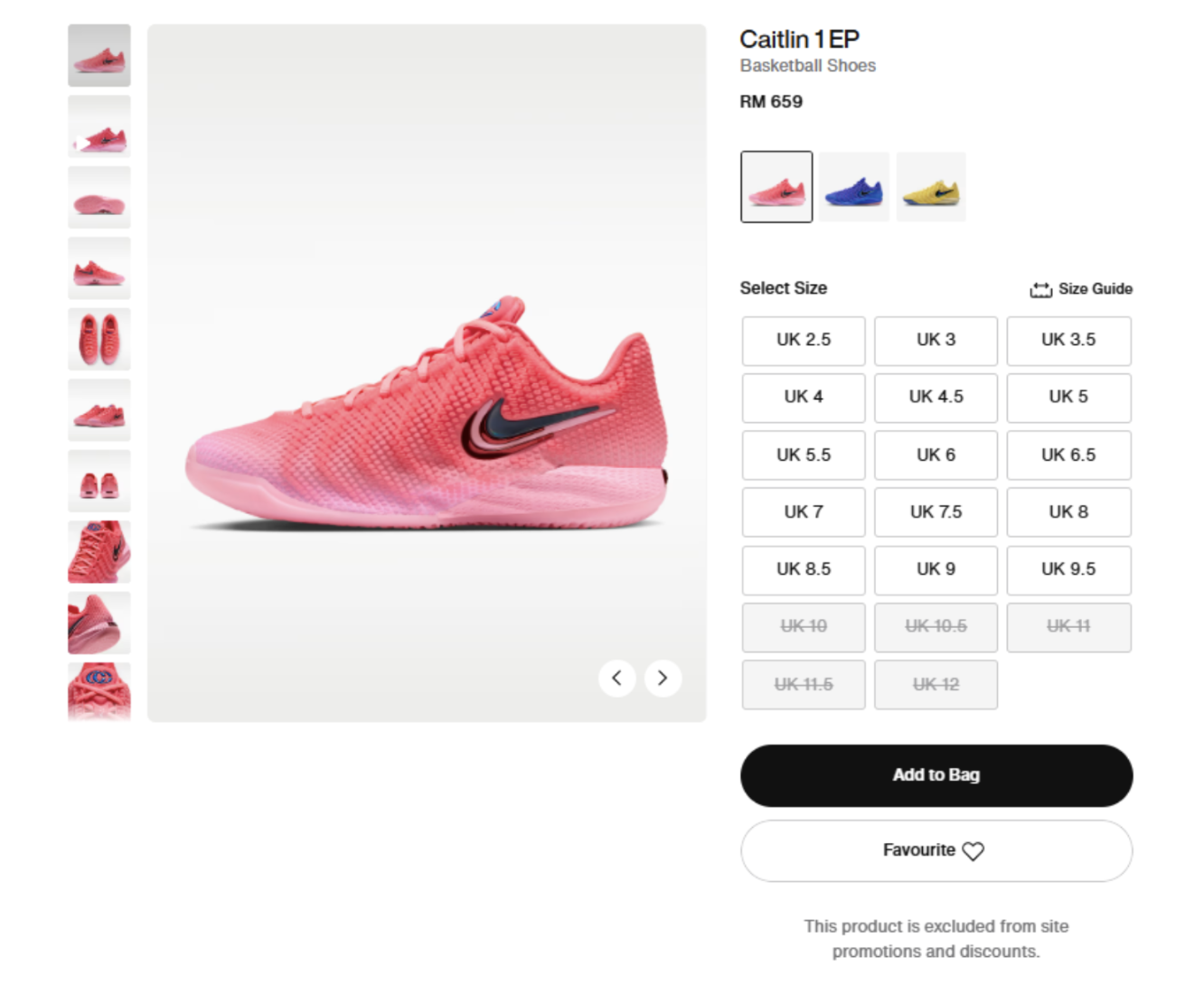
Prominent ‘Add to Bag’ button on product page. Image via Nike
Sustained user attention
If selective attention focuses on a single moment of choice, sustained attention holds one task open across time. It manifests when users read long content or compare options across screens.
Pages built for sustained attention benefit from progress indicators, chunked content, and restoration of context after breaks. The sample subscription form below breaks fields to prevent cognitive overload. The progress bar also orients users and motivates them to continue the process.
Divided user attention
Divided-attention interfaces let people do two things simultaneously. This works when tasks don’t compete for the same mental resources. Examples include a navigation app with a voice assistant instructing the user in the background, or a workout app with a timer and a video.
When designing for divided attention, prioritize lightweight, peripheral content. Expect shallow comprehension, as users with this attention type can only process information at a surface level.
Attention vs. Engagement
Attention in UX design is finite and fleeting, driven by where the user’s mind is; what they’re looking at, what they’re processing, and what they’re ignoring. Engagement lasts much longer. It’s the result of user interest accumulating as they refine what they want, read more information, and keep coming back to the interface.
That said, attention is the precondition for everything else that happens on a digital interface, and it shows up in four levels:
- Notice: the user looks at the elements with no intent.
- Task focus: there’s a specific target, so the user filters out the rest.
- Interaction: user clicks, types, or scrolls.
- Long-term engagement: user comes back between sessions.
Clicks and time on page are unreliable signals because users can do both without processing or engaging.
Why User Attention Fails
Visual attention is often influenced by what the user is trying to do at that moment, and the failures cluster around a few predictable patterns. Before you can design the UX around them, it’s important to know what you’re dealing with first.
Selective attention in UX design and tunnel vision
When a person is immersed in one part of an interface, they often fail to notice surrounding elements. It creates tunnel vision because high perceptual load signals the brain to suppress peripheral information, particularly during demanding central tasks.
For example, a user focused on looking for the promo-code field may miss the free-shipping maximum and an error message in the corner. Someone comparing two plans might fixate on prices and skip important footnote conditions before ordering.
Change blindness and inattentional blindness
A user focused on a task may inadvertently miss interface updates or when something new appears. For example, something on the screen is different from a moment ago, and the user doesn’t see it; that is called change blindness. And if something new enters the screen, and the user doesn’t see it at all, that’s inattentional blindness.
They occur because the brain only processes information relevant to the current task instead of processing everything they see on the screen as a whole. What this tells us is that visual memory is fragile, and attention is what stabilizes it.
Working memory and cognitive load
The human memory processes information in three stages: sensory memory, working memory, and long-term memory.
Sensory memory briefly holds raw input. When attention is activated, it selects which fragments move into working memory. Long-term memory stores information for later retrieval, but only after rehearsal and connection.
Working memory’s capacity is tiny and it shares resources with attention, so high cognitive load looks like inattention. For example, someone entering personal details during signup while trying to remember a discount code from a previous page will likely drop a task because the interface demands too much.
That said, none of the above reasons is a user flaw. But there are ways to guide visual attention around them.
What Directs Visual Attention in UX Design
Visual hierarchy and contrast
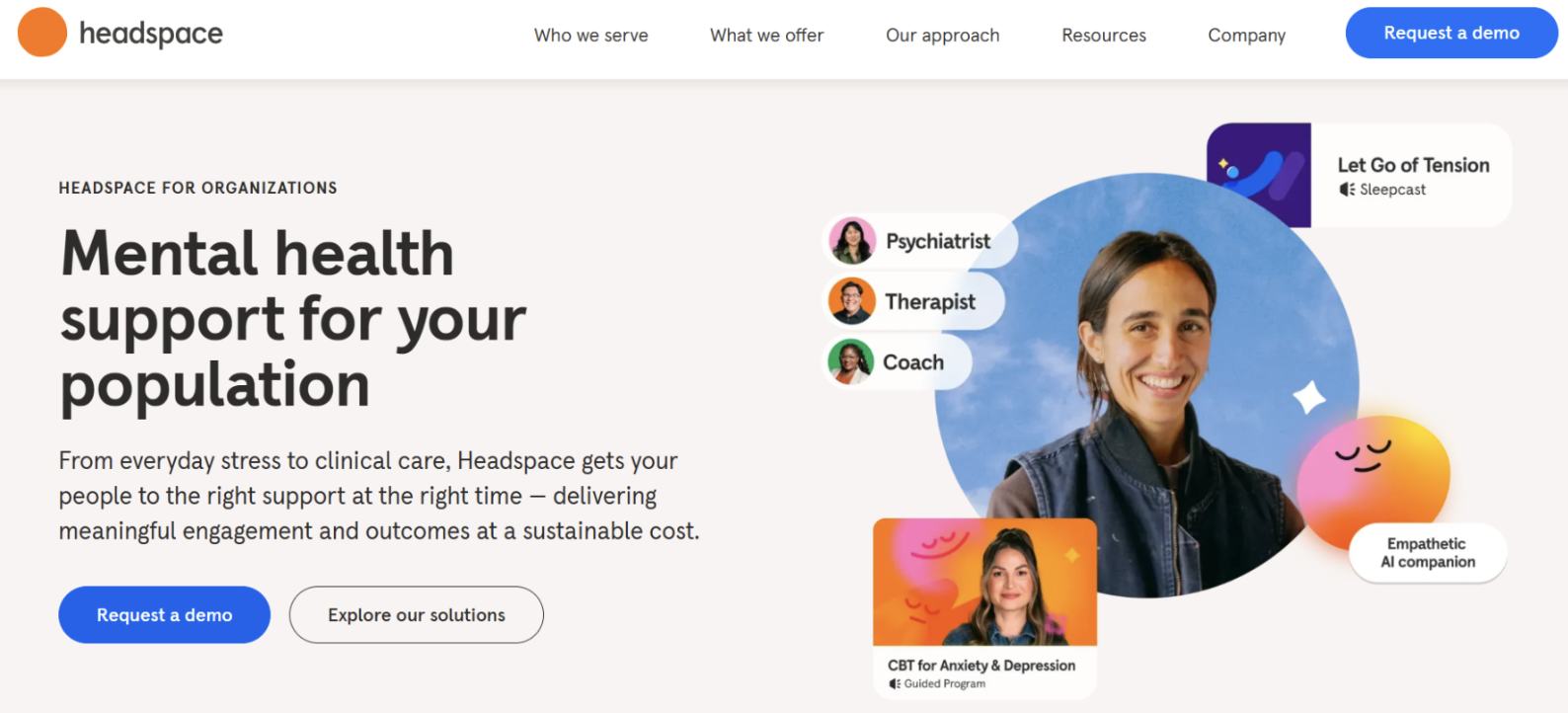
Visual hierarchy in action. Image via Headspace
Notice how your eyes go directly to the headline, then drift to the photos on the side, and finally to the CTA buttons below the headline. No one explicitly told you where to look first. That’s visual hierarchy and contrast in action.
Visual hierarchy ranks page elements by importance, and contrast (size, weight, color) enforces that ranking, creating a reading order the eye follows. You can implement hierarchy by highlighting a dominant element, keeping competing elements lighter, and reserving your strongest contrast for the action you want users to take. On Headspace’s website, the headline dominates, and the CTA outranks the body copy.
Keep in mind that how you rank user interface design elements depends on the context.
Grouping and whitespace
Grouping works through the theory of proximity, where things that are close together are perceived to be related. Alignment reinforces grouping, where elements that share an edge appear to form a column even across gaps.
Whitespace prevents groups from appearing cluttered and helps users distinguish where one section ends and the next begins. It also provides a space for the eyes to rest, reducing attention fatigue during interaction. Together, grouping and whitespace let users parse a page’s structure at a glance—what belongs together and where to start—leaving more attention span for the core task.
Tiffany & Co.’s website demonstrates this. It is intentionally sparse with each heading sitting alone, separated by large gaps, with no lengthy body copy competing beneath it. Across the page, the widest gaps isolate the primary choices, creating a clear structure.
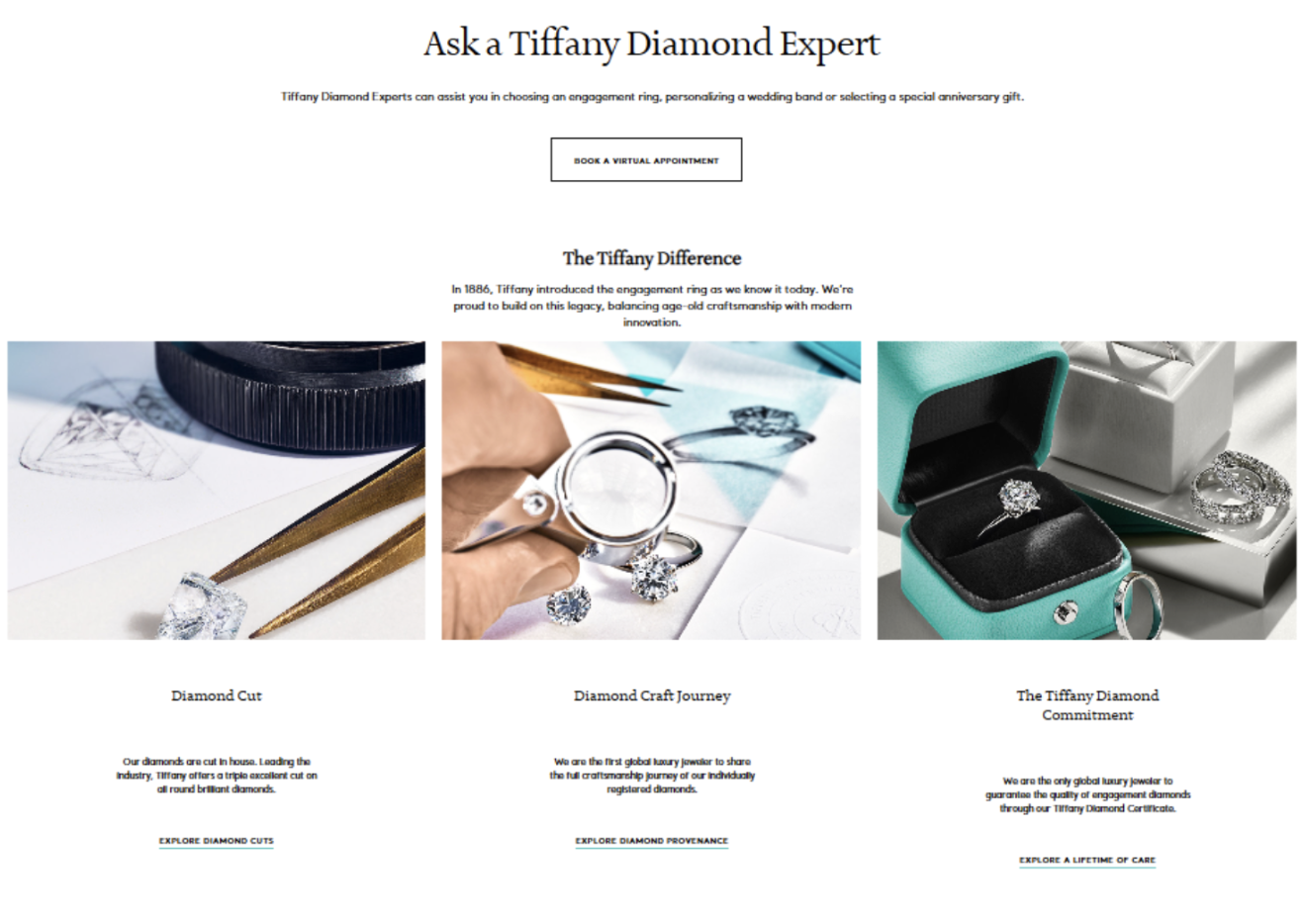
Product page via Tiffany & Co.
Motion and notifications
Motion and notifications are effective ways to nudge users toward something worth noticing.
Motion is continuous and ambient, best used to alert users to changes they may otherwise miss, like a spinning icon for ongoing uploads or progress. Notifications are discrete, interruptive events that demand a response, which means they consume more attention span than motion and can be annoying if overdone.
Use motion to inform without breaking flow and reserve notifications for urgent or actionable updates (a failed payment), positioned next to the relevant field so users can quickly decide what to do next.
Designing for Attention Tasks
UX context changes how user interface design can capture and retain attention. The table below compares four common contexts—transactional flows, monitoring, learning, and search—by task, dominant attention type, main risk, what to emphasize, and what to limit.
| UX Context analysis | Transactional flows | Monitoring | Learning/long-form | Search/filtering |
|---|---|---|---|---|
| Task | Complete a purchase correctly | Detect a problem or exception | Understand and retain material | Find a specific item in a large set |
| Dominant attention type | Selective | Sustained | Sustained | Selective |
| Main risk | Missing a validation error or the next required action | Alert fatigue | Fatigue; context loss after a session break | Result overload |
| Emphasize | Total cost, errors, next step, primary CTA | Severity-ranked alerts, last-updated time | Progress, saved position | Search field, active filters, result count |
| Limit | Promos, secondary links | Continuous motion, low-priority notifications | Attention-recapture interruptions, autoplay | Banners, promotional tiles, carousels |
Transactional flows
Purchase and signup flows put users in selective attention. They have one goal, one path, and errors may cost them missed information. Remove promotional and secondary elements that compete with the task. Emphasize the total cost, validation errors where the user is already looking, and the next required action.
Monitoring interfaces
Users scan for exceptions, so design for attention spikes. Emphasize severity-ranked alerts, exception states, and a last-updated timestamp. Limit continuous motion and low-priority notifications, which may read to some users as noise.
Learning/long-form tasks
When comprehension and retention matter, support sustained attention by showing progress, chunking content, and preserving the reader’s position across sessions. Avoid autoplay and frequent interruptions that force reorientation.
Search/filtering
Users want to find one specific item in a large set, and fast. That puts them in selective attention. The interface’s job is to help them narrow the results without hiding the answer. Emphasize the search field, the active filters, and the result count. Tone down or exclude banners, promotional tiles, and carousels that compete with the results themselves.
Attention Map: Before and After
Now let’s take the principles we discussed and apply them to a specific scenario. Consider a standard checkout for a fashion brand: a returning user, a cart with three items, a saved card, and one field with a validation error. The two tables below show the page as it is and as it could be based on expert analysis.
Before
| Order | Element | Effect on reading order |
|---|---|---|
| 1 | Promo banner | Takes most of the attention, competing with the main task |
| 2 | Logo and nav | Not useful |
| 3 | Order summary | Too faint to register |
| 4 | Pay now/Continue | Equal weight, no clear action |
The promo banner gets the primary attention because it occupies the top of the page at full contrast, and the two bottom buttons tie for last because neither is visually dominant.
After
| Order | Element | Effect on reading order |
|---|---|---|
| 1 | Total and item count | Moved to top, higher contrast |
| 2 | Validation error | Promoted above the form |
| 3 | Payment fields | Promo removed from above |
| 4 | Pay now | Made dominant |
Each element sits next to where the eye already goes. The changes work by moving elements into the right position rather than making them appear bigger.
Measuring Attention in UX
Measuring attention in UX helps designers understand where attention went, what it produced, and what the user said about it. These findings serve as a guide for designers in creating a seamless, satisfying experience.
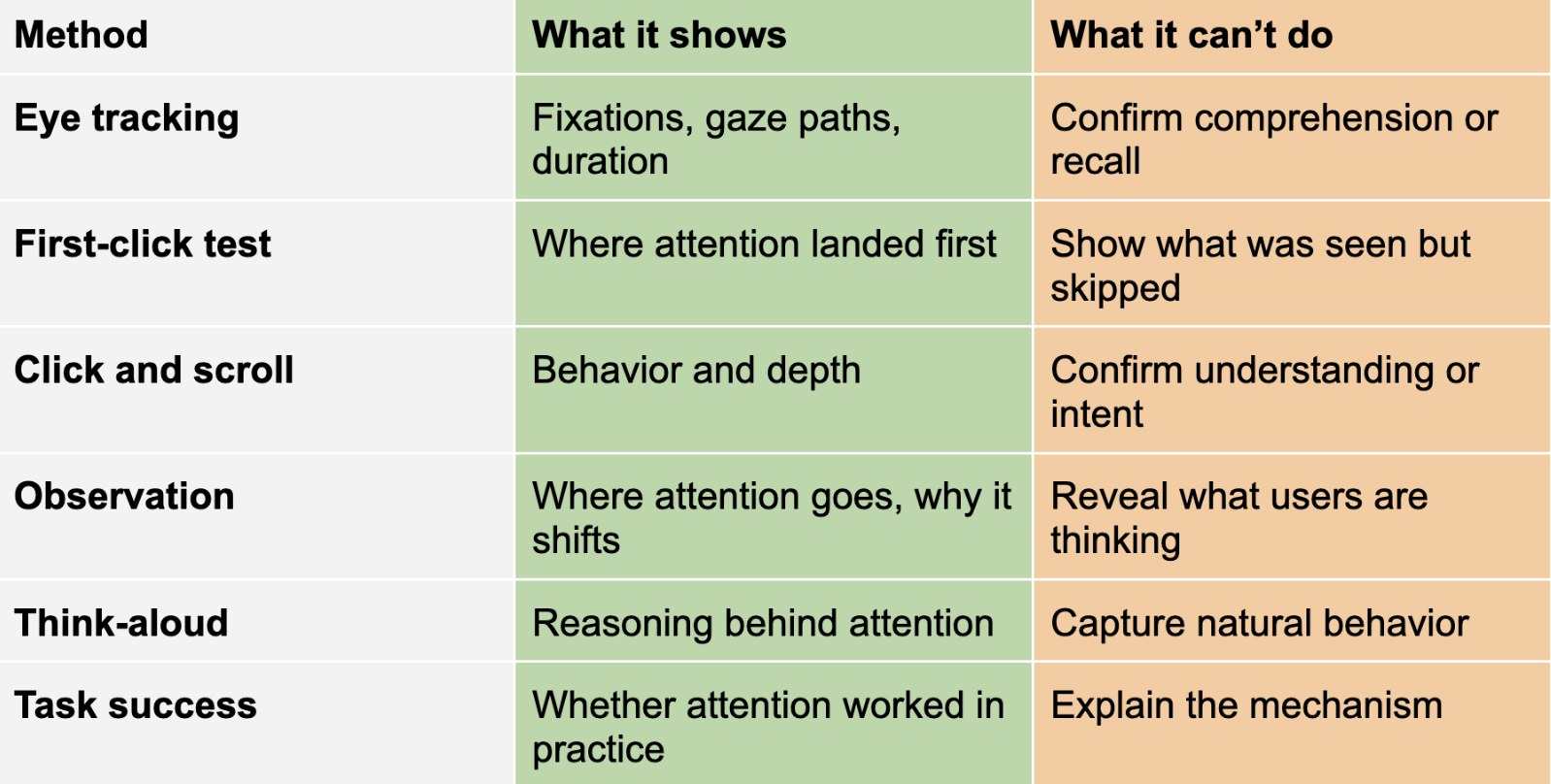
Heatmap limitations
While heatmaps are the most common way to present eye-tracking data, they are primarily a visualization tool. Color density can overlap, obscuring duration, order, or individual differences. A red hotspot may reflect many glances rather than deep processing.
Other limitations of the heatmap to consider include the following:
- No color doesn’t mean no attention. Glances and peripheral vision may not register as fixations.
- Central fixation bias can exaggerate the importance of elements placed in the center of the screen.
- Static maps don’t fit changing interfaces. Zooms or scrolls are not represented on the map.
UX attention test plan
A targeted attention test diagnoses whether users notice critical elements and whether noticing leads to correct actions. Take an alert hierarchy, where alerts are ranked by severity, so the ones that matter interrupt and the rest wait. The test plan below uses a failed payment as its scenario.
- Identify participants. Recruit 5 to 8 people who can do the test task.
- Build the task. Craft a realistic scenario that triggers the alert. Example: “A payment failed. Find out what happened and what to do next.”
- Establish a baseline. Test the current alert hierarchy first with the same task.
- Choose metrics. Measure first fixation on the correct alert, time to first correct action, task success, and recall.
- Define decision criteria. Decide what counts as a pass. For example: the correct alert is fixated within 3 seconds for 93% of participants, and 75% can recall its content.
Ethical Attention Design
Users encounter manipulative interfaces quite often, with a 2024 GPEN sweep finding 75.7% of subscription sites used at least one dark pattern. While these practices earn you temporary gains, they actually create long-term damage that undermines user autonomy, causes financial harm, and erodes trust.
Some of the worst offenders show up as manipulation and deception. Confirmshaming guilt-trips users into opting in. Privacy-invasive defaults are preselected for you. Fake errors or obstruction block access until you do what the site wants.
Attention capture works by being opportunistic. Notification defaults favor the business, keeping every alert on. Engagement-driven notifications fragment your focus to drive app opens instead of helping you.
Psychological exploitation goes deeper, with app usage streaks turning leisure into obligation, creating anxiety about breaking the pattern. Sensory reinforcement uses flashing rewards to sustain compulsive loops.
But these actions do not go unpunished. Companies and designers must adhere to regulations and consumer protection laws to avoid hefty fines. Some examples include the EU’s Digital Fairness Act and the UK’s DMCC Act. These are jurisdiction-specific, so treat them as guidance, not universal law.
User Attention-Driven Design
Focused design adjustments based on user attention reduce cognitive load, prevent costly errors, and improve conversion, retention, and overall user satisfaction across devices consistently. By designing for selective, sustained, and divided attention, you make interfaces intuitive and efficient. Measure attention deliberately, iterate from real evidence, and do not forget to prioritize ethical nudges.
Attention-aware changes in design may go unnoticed, but they compound over time into measurable gains. Take the next step by hiring one of the best design firms to help create a meaningful experience users love and trust.

Creates insightful, strategy-driven content that translates complex design and branding concepts into accessible knowledge, supporting Ramotion’s mission to elevate digital experiences.