
Web application deployment mistakes can trigger application errors, security vulnerabilities, and poor user experience that damage your reputation. Without a doubt, mastering the deployment process is critical for every development team.
Web app deployment is the process that makes your application accessible to users over the Internet, ensuring its functionality in a live environment. Yet many teams rush through preparation, configuration, and launch steps, creating avoidable failures.
In this guide, we'll walk you through deployment best practices that prevent production disasters. We'll cover deployment strategies, repeatable application deployment processes, CI/CD pipelines, database migrations, and production readiness checklists.
By following these web application deployment best practices, recommended by top web application development companies, you'll deploy confidently and maintain system reliability.
What Is Web App Deployment
Deployment is the set of activities that transforms your application from code on a local machine into a live, functional product accessible to users. Specifically, web app deployment involves packaging your application's code, assets, and dependencies, then moving them from a development environment to a production environment where users can interact with the software.
The application deployment process includes several technical tasks. You'll configure web servers and manage databases, set up custom domain names, and optimize performance to handle expected traffic. The goal is straightforward: enable your application to function seamlessly in a live, public environment while providing a smooth experience for users.
Deployment works through three main components. First, you need a deployment source, which is the location of your application code, typically a repository hosted by version control software like GitHub or Azure Repos.
Second, a build pipeline reads your source code and runs steps to get the application in a runnable state, including compiling code, minifying files, running tests, and packaging components. Third, the deployment mechanism puts your built application into the designated directory where instances can access the new files.
Over 70% of software issues arise in post-deployment environments. This statistic underscores why proper deployment practices matter. Until you deploy, your software remains inaccessible to users.
Deployment allows you to monitor how the application performs with actual users under varying conditions, collect feedback, detect bugs, and push updates quickly. In addition, deployment provides stakeholders with a shared space to interact with the latest version for reviews and validation.
Web App Deployment Strategies
Choosing the right deployment strategy determines how safely and efficiently new code reaches users. Each approach balances speed, risk, and resource consumption differently.
Rolling updates
Rolling updates replace application instances incrementally without taking the entire system offline. Kubernetes implements this by gradually replacing current pods with new ones, scheduling them on nodes with available resources. The system waits for new pods to start before removing old ones, routing traffic only to pods serving requests.
We can configure two parameters: the maximum number of pods unavailable during updates and the maximum number of new pods created simultaneously. Both accept absolute numbers or percentages. Updates are versioned, allowing rollback to any previous stable version if issues arise.
Blue-green vs canary deployments
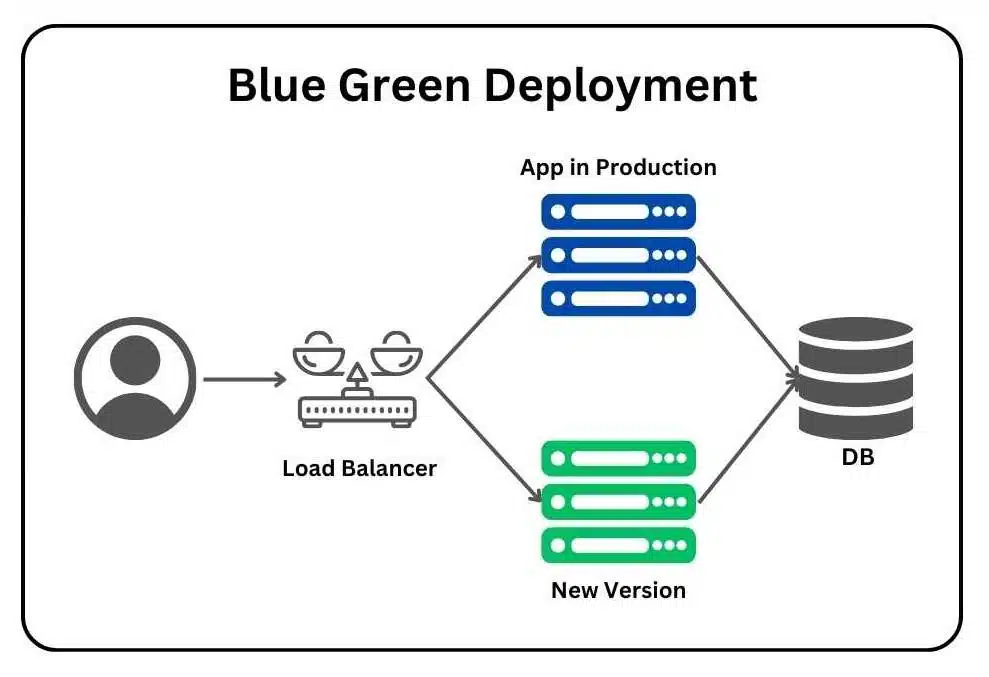
Blue-green deployment maintains two identical production environments. The blue environment runs the current version while green hosts the new version. Once testing completes in green, traffic switches instantly via load balancer, achieving zero downtime. This requires double infrastructure temporarily but enables immediate rollback.
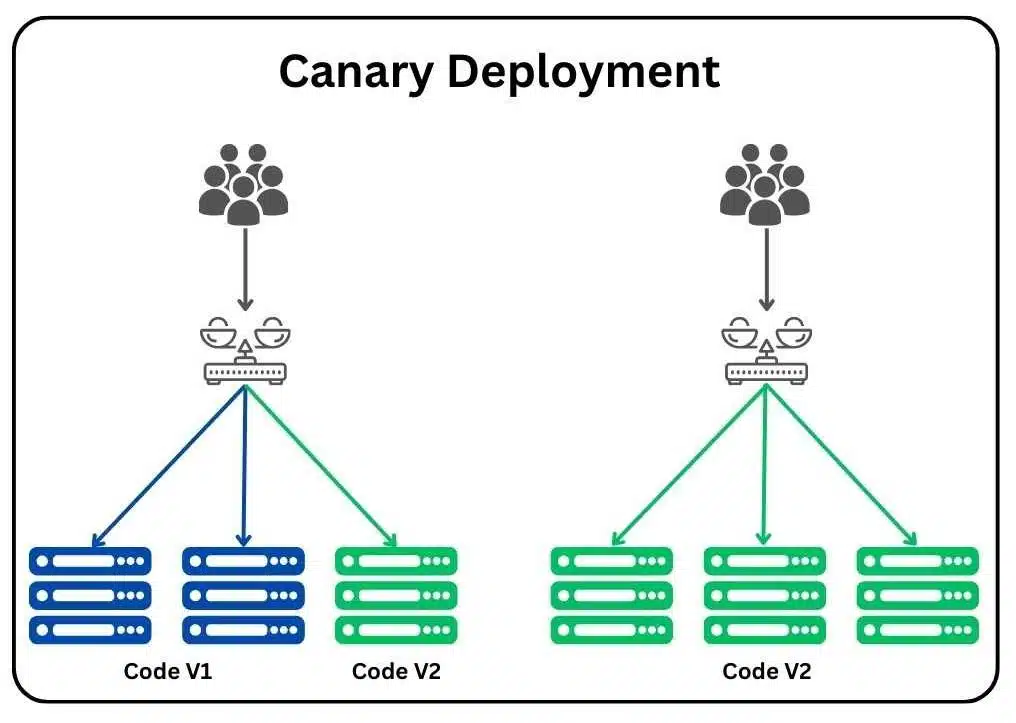
Canary deployment rolls out updates to a small user subset first, then expands gradually based on performance metrics. This limits blast radius if problems occur but requires sophisticated traffic routing.
Feature flags for safer releases
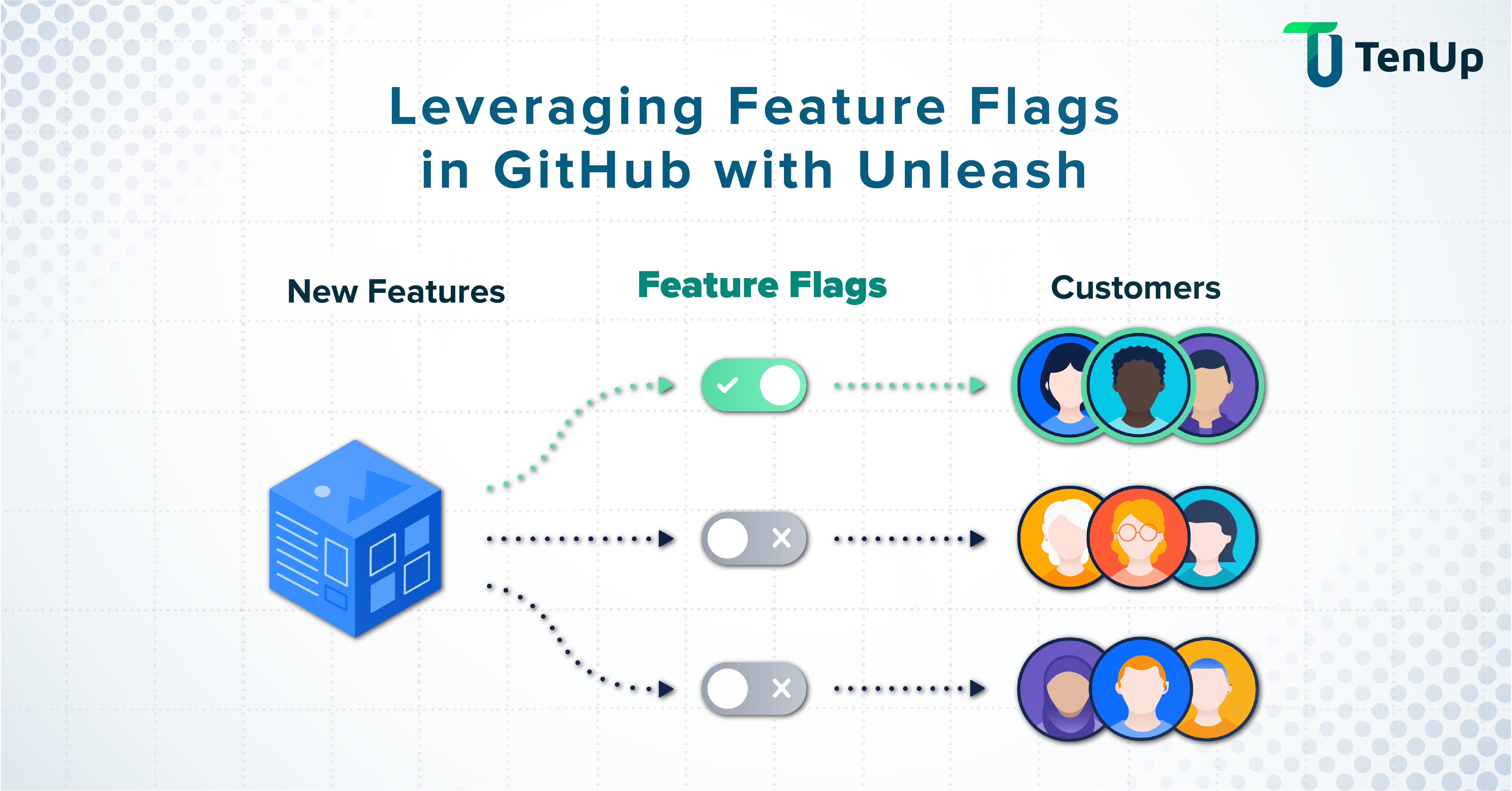
Feature flags decouple deployment from release, allowing new code to exist in production without executing. We can disable problematic features instantly without rollback, reducing mean time to remediate. Progressive delivery becomes possible, releasing features to larger populations incrementally.
Repeatable Deployments: Packaging and Configuration
Consistency across environments eliminates deployment surprises. Building repeatable processes ensures what works in testing reaches production unchanged.
Build once, deploy many
Creating a single artifact and reusing it across all environments prevents discrepancies. Docker images function as binary artifacts that bundle application stacks and requirements. OpenShift creates Docker images during builds, treating them as deployable units.
This approach guarantees the build passing tests in staging matches what runs in production, eliminating risks from environment-specific builds.
Dev-staging-prod parity
Historically, substantial gaps existed between development and production across three dimensions: time (weeks between deploys), personnel (developers write, ops deploy), and tools (different tech stacks).
The twelve-factor methodology addresses this by minimizing these gaps, making time between deploys hours instead of weeks, involving code authors in deployment, and keeping environments similar.
Modern cloud-native systems challenge strict parity. Production operates at scales pre-production cannot replicate. Cost prohibits running true production-scale staging environments. Hence, teams now design environments with intentional, documented differences rather than forcing unrealistic similarity.
Configuration and secrets management
Configuration management maintains system configurations consistently over time. We externalize configurations through environment variables, ConfigMaps, and service discovery systems, keeping code environment-agnostic.
Secrets require encryption at rest and in transit, regular rotation, and restricted access following least-privilege principles. Store credentials in dedicated vaults rather than CI/CD tools directly, limiting blast radius if compromised.
CI/CD Pipeline: Minimal Setup That Scales
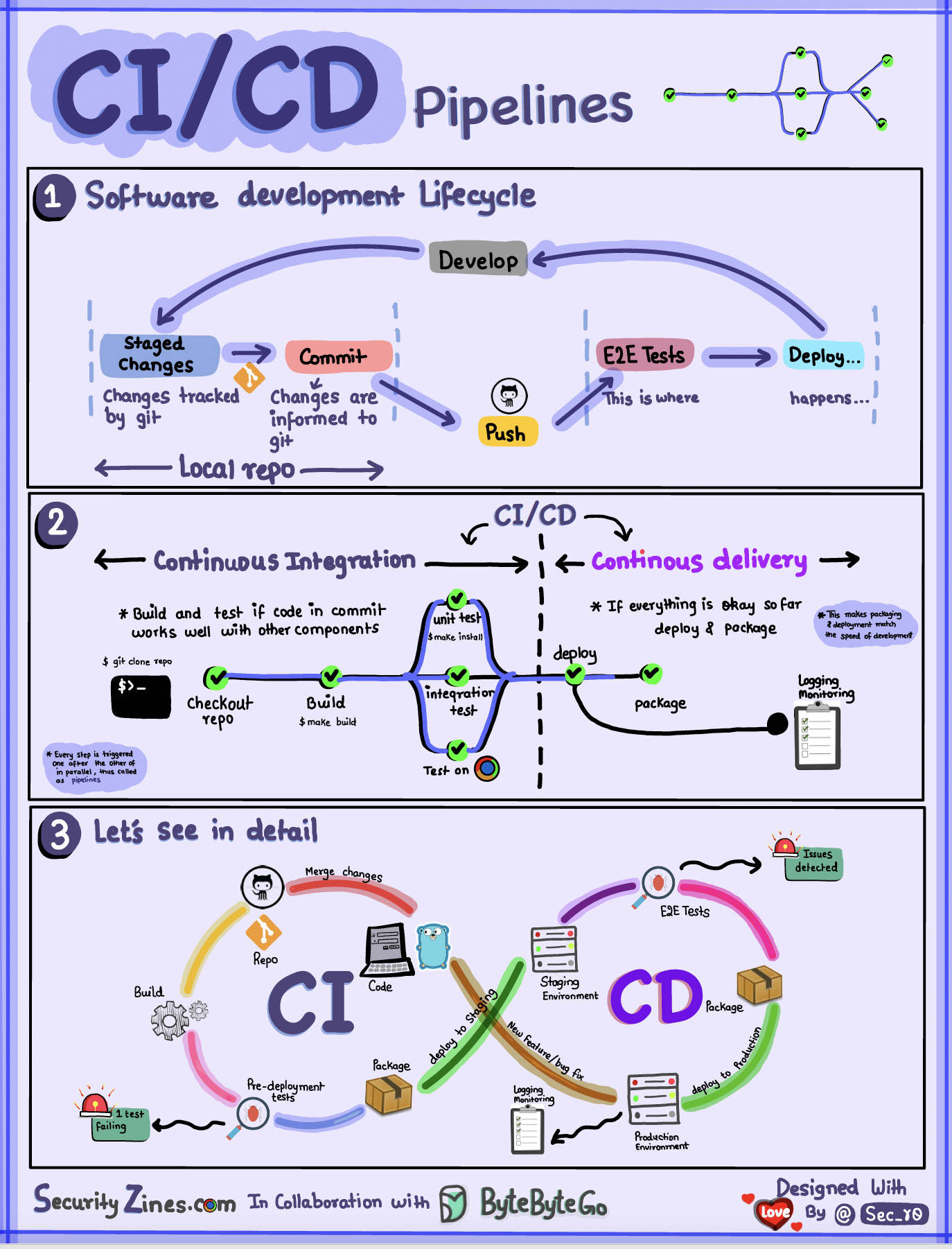
Automation significantly reduces manual errors and accelerates delivery cycles, making the development process more efficient and reliable. A minimal CI/CD setup effectively handles builds, tests, and deployments without overwhelming complexity, ensuring that teams can focus on delivering quality software.
CI essentials
Continuous Integration automates the crucial process of code validation. Developers frequently merge their changes into a shared repository, which triggers automated builds and tests with each commit made. This practice is essential as it catches defects early in the development cycle when fixes are typically less costly and easier to implement.
The CI server orchestrates the entire process: it detects changes in the repository, executes build scripts, runs automated tests, and provides immediate feedback to the developers. Unit tests are prioritized and run first because they execute the fastest, followed by integration tests to ensure that all components work together seamlessly.
Each successful build results in a deployable artifact that can be used in subsequent stages of development. Teams should commit code at least on a daily basis, and it is crucial to prioritize fixing any broken builds immediately to maintain workflow efficiency.
CD essentials
Continuous Deployment automates the process of releasing software to production without the need for manual gates, streamlining the deployment process. Variable management is an important aspect, as it handles environment-specific settings such as database connections and API keys across different deployment stages.
Organizations that utilize test automation within their CI/CD pipelines report impressive results, including 40% faster deployment cycles and 30% fewer post-production defects. Additionally, automated rollback features enable quick recovery when issues surface, ensuring that teams can maintain stability and reliability in their production environments.
Automated verification and health checks
Health checks confirm services function correctly before subsequent pipeline steps execute. Each service should expose a health endpoint providing real-time performance insight.
Verification catches implementation errors through static analysis and unit tests early in pipelines. Validation occurs later through end-to-end tests and canary releases, confirming software meets user needs under realistic conditions.
Database Migrations and Safe Rollback
Database changes introduce a level of complexity that standard application deployment processes simply cannot handle without careful planning and execution. Unlike stateless application code, databases maintain persistent state, which means that schema modifications, data transformations, and structural changes require meticulous orchestration and thorough testing before being applied to production environments.
When teams attempt to use conventional deployment rollback mechanisms for database changes, they often discover that the stateful nature of databases makes straightforward rollbacks impossible in many real-world scenarios.
A rolled-back application binary may expect a previous schema version, but if data has already been written in the new format, reverting becomes a complex data-reconciliation challenge. This is why dedicated migration strategies, tooling, and rollback planning are essential components of any mature data engineering or DevOps practice.
Zero-downtime migrations
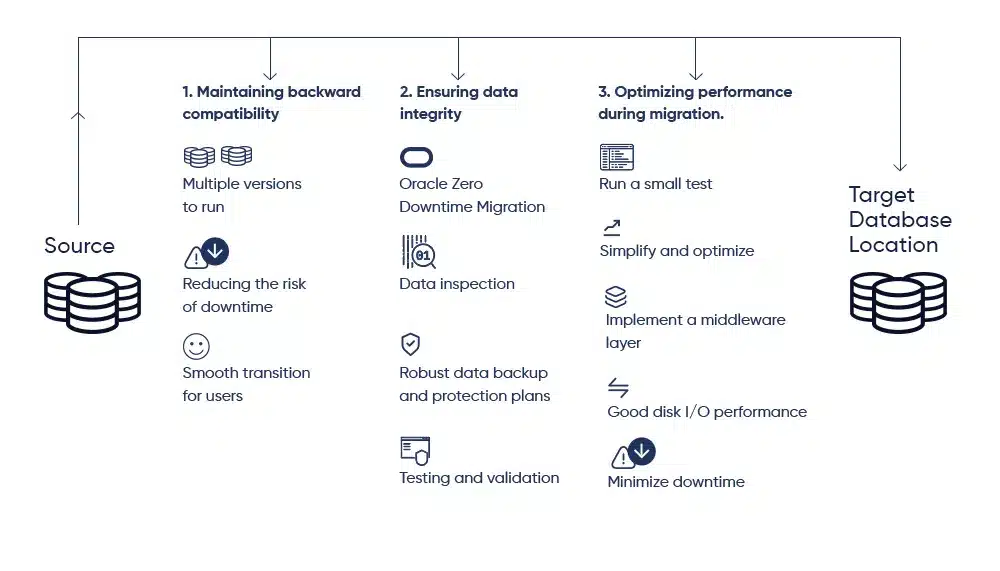
Mission-critical systems demand migrations without service interruption. Replication-based migration syncs old and new systems in real time before cutover. Dual writes enable simultaneous write operations to both existing and new databases, facilitating seamless transition.
Change Data Capture (CDC) is a complementary mechanism that replicates inserts, updates, and deletes in near real time from the source to the target database. CDC tools monitor the database transaction log and propagate changes continuously, ensuring that source and target remain synchronized throughout the migration window. This is especially useful for long-running migrations where the cutover cannot be instantaneous.
Incremental migration strategies further reduce risk by moving data in smaller, manageable batches rather than attempting a single large migration event. Each batch can be independently verified before the next is processed, making it easier to detect and address issues early.
It is equally important to validate your rollback plan in a staging environment that closely mirrors production. Teams that skip this step often discover rollback gaps only when they need to execute under pressure.
Backfills and long-running changes
Backfills are operations that re-process historical data to address late-arriving records, fix bugs in data pipelines, correct schema issues, or apply new business logic retroactively. They are a routine but operationally demanding part of data engineering work, and their complexity is often underestimated until teams encounter them in production.
Industry surveys indicate that data engineers spend approximately 44% of their time manually building and maintaining data pipelines work that includes diagnosing failed backfills and coordinating the reruns that follow.
The financial cost is also significant: organizations collectively spend over half a million dollars annually managing these pipeline failures and the manual intervention they require.
Backfills introduce unique operational challenges that distinguish them from regular pipeline runs. At scale, a backfill job may need to process months or years of historical data, requiring hours or even days to complete.
This creates resource contention with live workloads, particularly on pay-as-you-go cloud platforms where compute costs are directly tied to consumption. Poorly timed or under-resourced backfills can cause budget overruns and degrade system performance for other users.
Rollback vs rollforward
When a deployment goes wrong, engineers must choose between two primary recovery strategies: rollback and rollforward. Understanding the trade-offs between these approaches, particularly in the context of database changes, is essential for building reliable incident response playbooks.
Rollback involves reverting to a previously known-good version of the application code. In many cases, this can be achieved within minutes and immediately neutralizes the user-visible impact of a broken deployment. However, databases are stateful objects, and this statefulness fundamentally complicates the rollback strategy.
If the new code version has already written data in a format incompatible with the previous schema, rolling back the application without also reverting the database can leave the system in an inconsistent state.
Rollforward is an alternative strategy in which engineers fix the defect in a new commit and deploy the corrected version as quickly as possible. Rather than undoing a change, rollforward accepts the current state of the system and moves it to a better one.
This approach avoids the data reconciliation risks associated with schema rollbacks and is often the safer choice when database changes are involved.
Production Readiness: Observability, Security, Checklists
Production readiness reviews are comprehensive assessments that evaluate services across several critical dimensions, including observability, reliability, incident handling, scalability, security, and disaster recovery.
These thorough assessments are designed to identify potential production issues that could arise and significantly reduce operational risks before any releases reach end users. By conducting these reviews, teams can ensure that their services are fully prepared for the demands of a live environment.
Deployment monitoring metrics
- Rollback frequency is a key metric that measures how often changes need to be reversed after deployment. A higher rollback frequency may indicate underlying issues within the deployment process itself or could reflect the successful usage of advanced deployment capabilities. In particular, automation plays a crucial role in facilitating fast rollbacks, which helps to minimize user risk and maintain service stability.
- Deployment lead time is another important metric that tracks the average time required to successfully deploy a feature, starting from the initial trigger to the point when it achieves live status. This metric provides valuable insights into the efficiency of the deployment process.
- Mean time to recover (MTTR) is a critical metric that provides insight into our ability to quickly detect and address production issues as they arise. A lower MTTR indicates safer deployment practices, the effectiveness of automated rollbacks, and robust observability capabilities that allow teams to respond swiftly to incidents.
Deployment security basics
Access to systems and data should be granted only to authorized users to ensure security. It is imperative that we properly secure Personally Identifiable Information (PII) data and ensure that sensitive secrets remain encrypted both at rest and in transit.
Regular rotation of credentials and restricted access following least-privilege principles are essential practices that help protect sensitive information. Additionally, implementing multi-factor authentication is a critical measure that helps safeguard teams, infrastructure, and sensitive data against the risks posed by compromised accounts.
Pre-deploy checklist
Alerts are essential when deployments fail unexpectedly, as they provide immediate feedback. We conduct audits of our logging strategies and configure them correctly to avoid any degradation in server performance.
SSL certificates must be prepared and verified to ensure they are not expired. Furthermore, any third-party code requires thorough security vulnerability audits before deployment to mitigate risks.
Conclusion
Successful deployment requires deliberate preparation rather than rushed execution. We covered essential strategies including rolling updates, blue-green and canary deployments, and feature flags that reduce risk. Automated CI/CD pipelines eliminate manual errors, while proper database migration techniques prevent data loss.
As a matter of fact, production readiness checklists and monitoring metrics protect your application before and after launch. Apply these practices systematically, and you'll transform deployment from a stressful event into a reliable, repeatable process that maintains system stability and user trust.
Mar 23, 2026

Creates insightful, strategy-driven content that translates complex design and branding concepts into accessible knowledge, supporting Ramotion’s mission to elevate digital experiences.