
Modern applications rarely operate alone. They share data with payment processors, CRMs, marketing tools, and internal services, and most of that exchange happens through two mechanisms: API endpoints and webhook endpoints. Both use HTTP, both look like ordinary URLs, and both move data between systems, which is why they get mixed up so often.
The core difference is direction. API endpoints are requested by your application when it wants data. Webhook endpoints are receivers your application exposes so other systems can push data to them the moment something happens.
That one distinction changes how you design the integration, how quickly data arrives, and how much traffic you generate along the way. This article walks through what each one is, how their data flow differs, when to reach for one over the other, and how the two work together in real integrations.
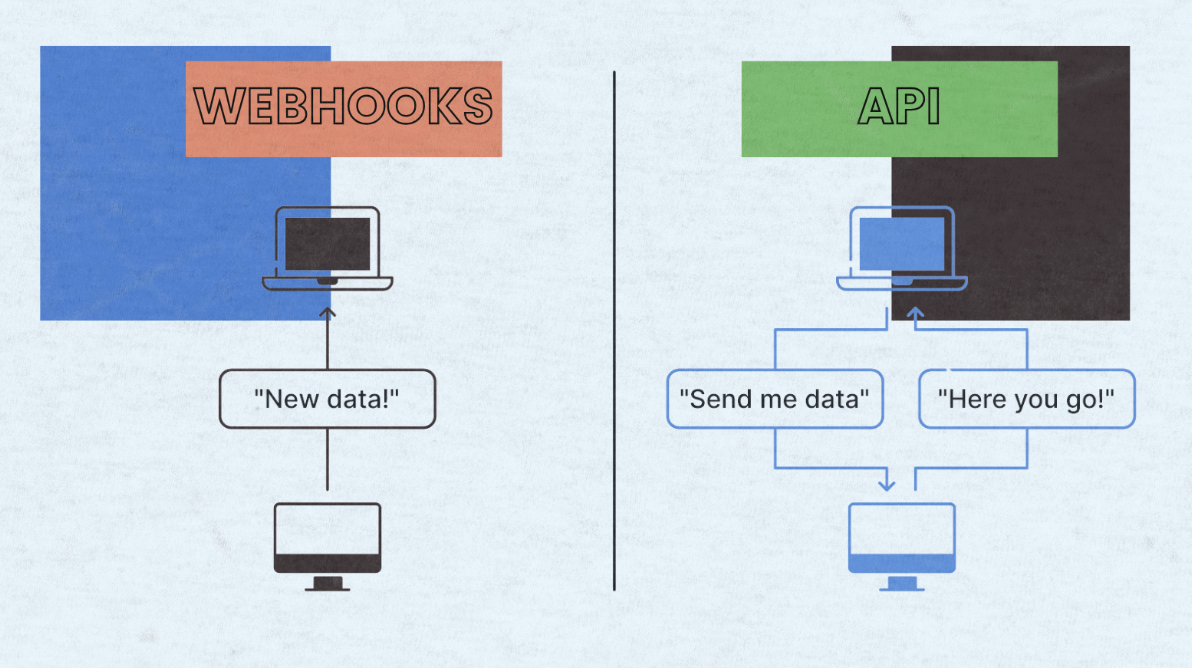
Webhook vs API endpoint overview (Image Source)
What Is an API Endpoint?
An API endpoint is a URL that a client can call to request, send, update, or delete data on a remote system. It is one specific address exposed by a larger API, and each address maps to a particular resource or operation. When your application talks to Stripe, GitHub, or an internal service, it does so by hitting one of these URLs.
Communication follows a request/response pattern. Your application sends an HTTP request to the endpoint, the server processes it, and a response comes back with a status code and a payload, usually in JSON. The client decides when to make the call and what to do with the response, which puts the entire timing of the exchange under your control.
Most REST APIs use four HTTP methods to describe the intent of a request. GET retrieves data, POST creates a new resource, PUT (or PATCH) updates existing data, and DELETE removes it. The same endpoint URL can behave differently depending on which method you use, which is how a single address like /orders can list orders on GET and create a new one on POST.
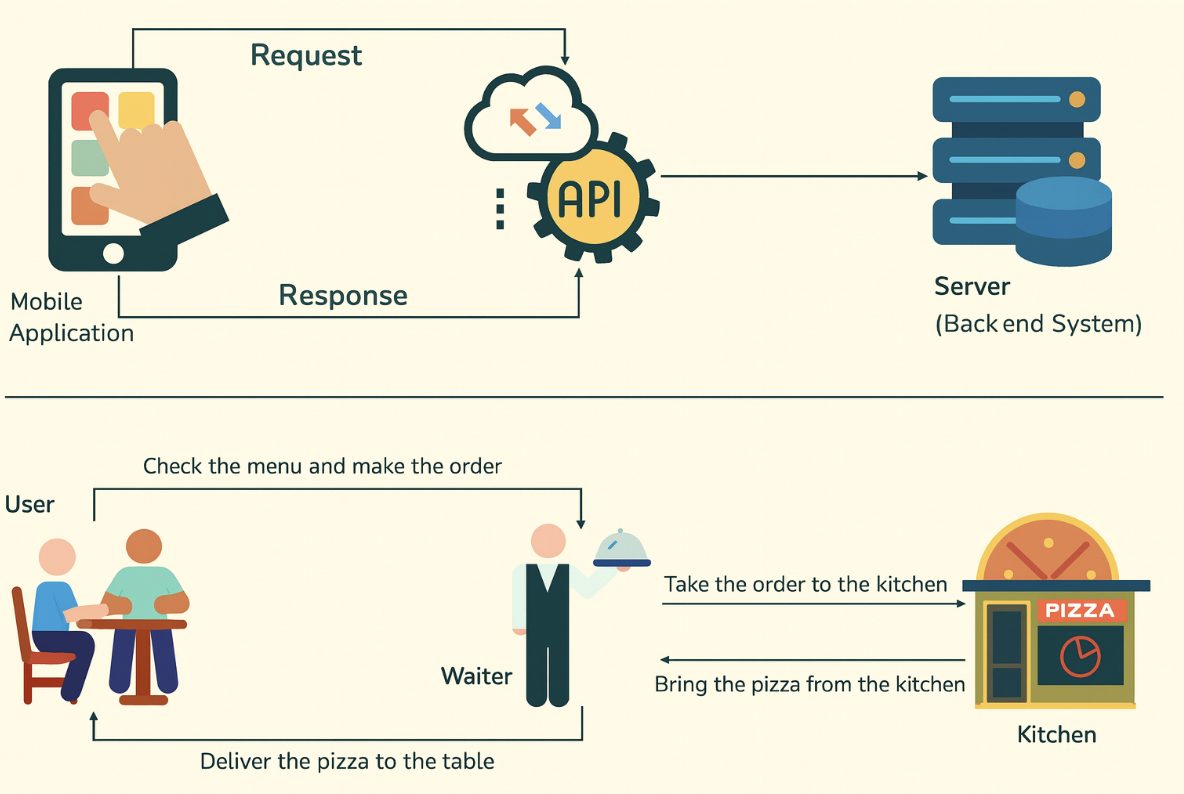
API request and response model (Image Source)
What Is a Webhook Endpoint?
A webhook endpoint is a URL you expose on your own server that receives event-triggered HTTP requests from another system. Instead of your application asking for updates, an external service sends a POST request the moment something relevant happens.
That address is your webhook endpoint, and your job is to listen there and process whatever arrives.
The examples are familiar. A payment provider fires a request when a charge succeeds. An ecommerce platform sends one when an order is created. A form tool notifies you when a submission comes in.
A CRM pings you when a user record is updated. In each case, the source system knows about the event first and delivers the news to your server, along with a JSON payload describing what changed.
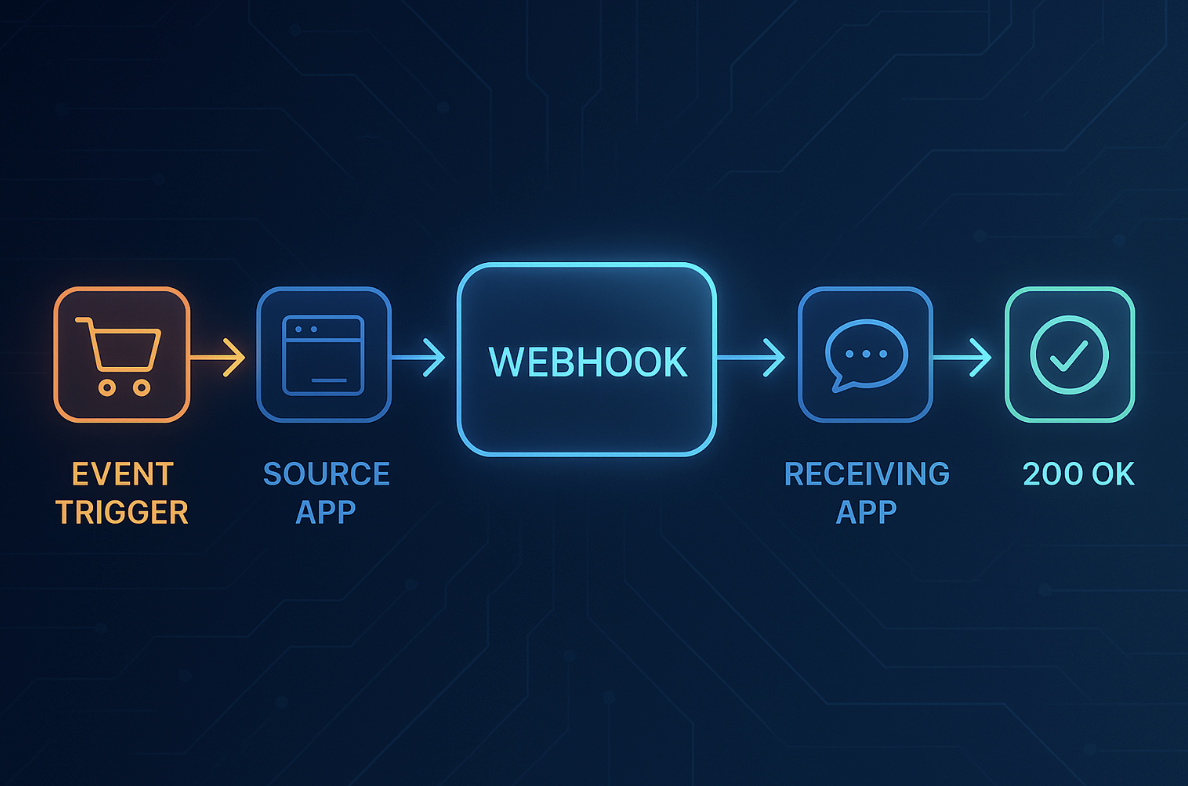
How a webhook delivers an event (Image Source)
The important shift is that the receiving app never asks. It registers a URL once, subscribes to the events it cares about, and then waits. This is why webhooks are sometimes called reverse APIs: the direction of the call is flipped, and the sender initiates the conversation.
Webhook vs API Endpoint: Core Difference
The single most useful way to tell webhooks and API endpoints apart is to ask who initiates the request. If your application makes the call to pull data from somewhere else, you are using an API endpoint. If an external system makes a call into your application to push event data, you are receiving a webhook.
A short formula captures it: API endpoint equals request data, webhook endpoint equals receive event data. Both are URLs and both speak HTTP, but they sit on opposite ends of the exchange. An API endpoint is something you call; a webhook endpoint is something that gets called.
| Aspect | API Endpoint | Webhook endpoint |
|---|---|---|
| Initiator | Your application | The external system |
| Trigger | Your code decides to call | An event in the source system |
| Direction | Client pulls data from server | Server pushes data to client |
| Timing | On-demand or scheduled polling | Real-time, as events happen |
| Best for | Reads, writes, lookups, queries | Notifications, state changes |
That table is a good reference to keep in mind, but the practical difference shows up most clearly once you look at how data actually flows in each case.
API and Webhook Data Flow
An API call follows a clean pull cycle. Your application decides it needs something, builds a request, sends it to the endpoint, and waits. The server receives the request, does whatever work it implies (a lookup, a write, a computation), and sends back a response with a status code and, usually, a JSON body. Your code reads that response and moves on. Every step is initiated and controlled by you.
A webhook flow runs the other direction. Something happens inside a source system (a user pays, a subscription renews, a shipment leaves the warehouse), and that system builds an HTTP POST request describing the event.
The request lands on your webhook endpoint, which validates the signature, acknowledges receipt quickly with a 2xx status code, and hands the payload off for processing. You did not ask for the data; it arrived because a rule you set up matched an event.
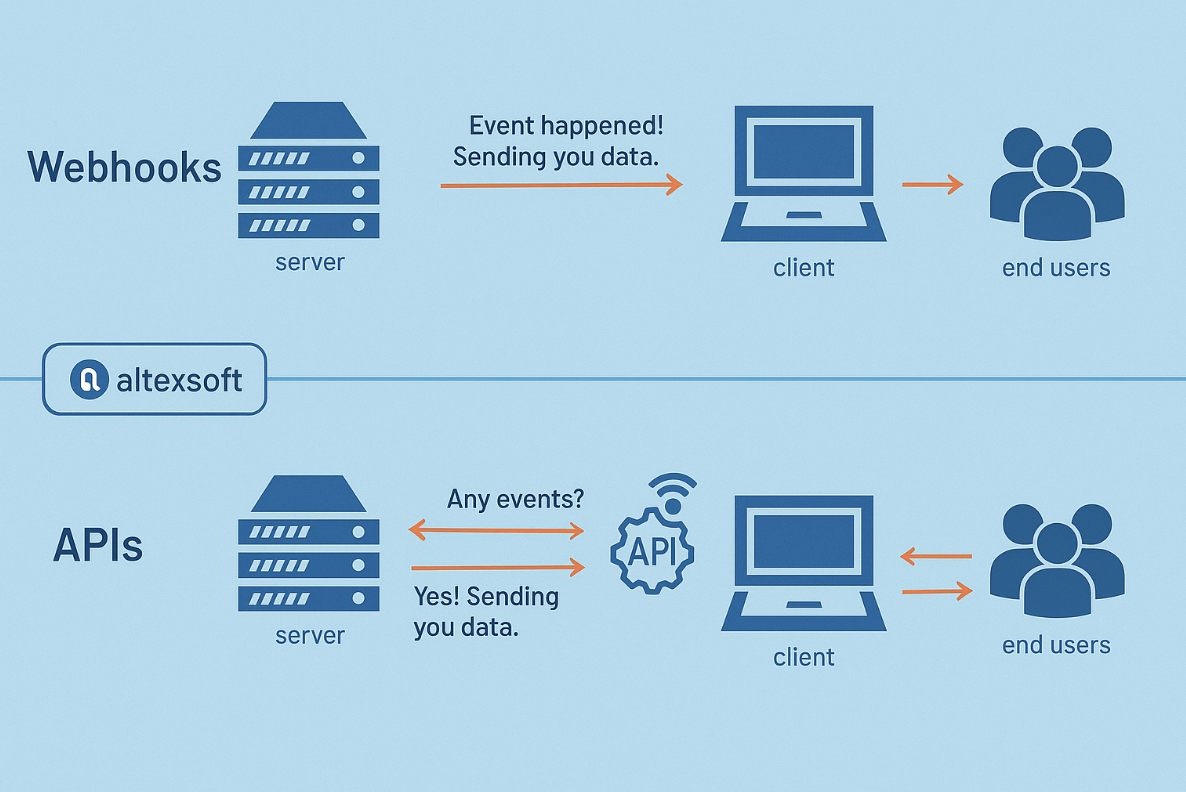
API request/response vs webhook push flow (Image Source)
The trade-off between these two shapes is control versus speed. API endpoints give you full control over what to ask for and when, which is valuable when you need consistency or exact timing. Webhook endpoints give you near real time delivery without any request loop, which matters when a delay of even a minute would break the user experience.
When to Use an API Endpoint
API endpoints are the right choice whenever your application needs to decide when, what, and how often to request something. If the answer to "who should start this exchange?" is your own code, you want an API.
The request/response model gives you deterministic timing, clear failure signals, and the ability to shape queries with parameters, filters, and pagination.
Common examples make the pattern concrete. Fetching a user profile before rendering a settings screen, listing recent orders for a dashboard, updating a CRM record after a support conversation, or checking the current status of a payment before shipping goods all fit the API endpoint shape. The application knows what it needs at that moment and asks for it directly.
APIs are also the right tool for larger operations that do not map cleanly to a single event. Bulk data syncs, backfills, admin scripts, and manual checks all work best as controlled calls.
When something goes wrong, you get an immediate HTTP status code, which makes debugging and retries far simpler than they would be over an asynchronous channel. The same is true when you need to write data on behalf of a user in a controlled sequence, where you want each step to succeed or fail before the next one runs.
When to Use a Webhook Endpoint
Webhook endpoints fit best when events are irregular and you want to react as soon as they happen. Instead of hammering an API every few seconds to check whether anything has changed, you register a URL once and let the source system push updates to you. Latency drops to seconds, and traffic drops to only the requests that actually carry new information.
The examples again help. A new lead lands in your CRM, a payment clears, a subscription is cancelled, an order moves from "processing" to "shipped", a file finishes uploading. Every one of these is a discrete event with a definite moment, and every one of them benefits from being told immediately rather than being discovered on the next poll.
The efficiency gap is significant at scale. Polling a status endpoint every five minutes across 1,000 active resources generates roughly 288,000 requests per day, with almost all of them returning unchanged data. Webhooks collapse that to one request per actual event.
For change-driven workloads, that difference translates directly into lower API quota use, less server load, and fewer wasted rate-limit tokens on empty responses. Webhooks also send push notifications to your app the moment an event fires, which is exactly the kind of behavior polling cannot match.
How Webhooks and APIs Work Together
In real integrations you rarely have to choose one and give up the other. Most production systems use both, and they complement each other neatly. The common pattern is that a webhook signals that something has happened, and an API call then fetches the details or performs the follow-up action.
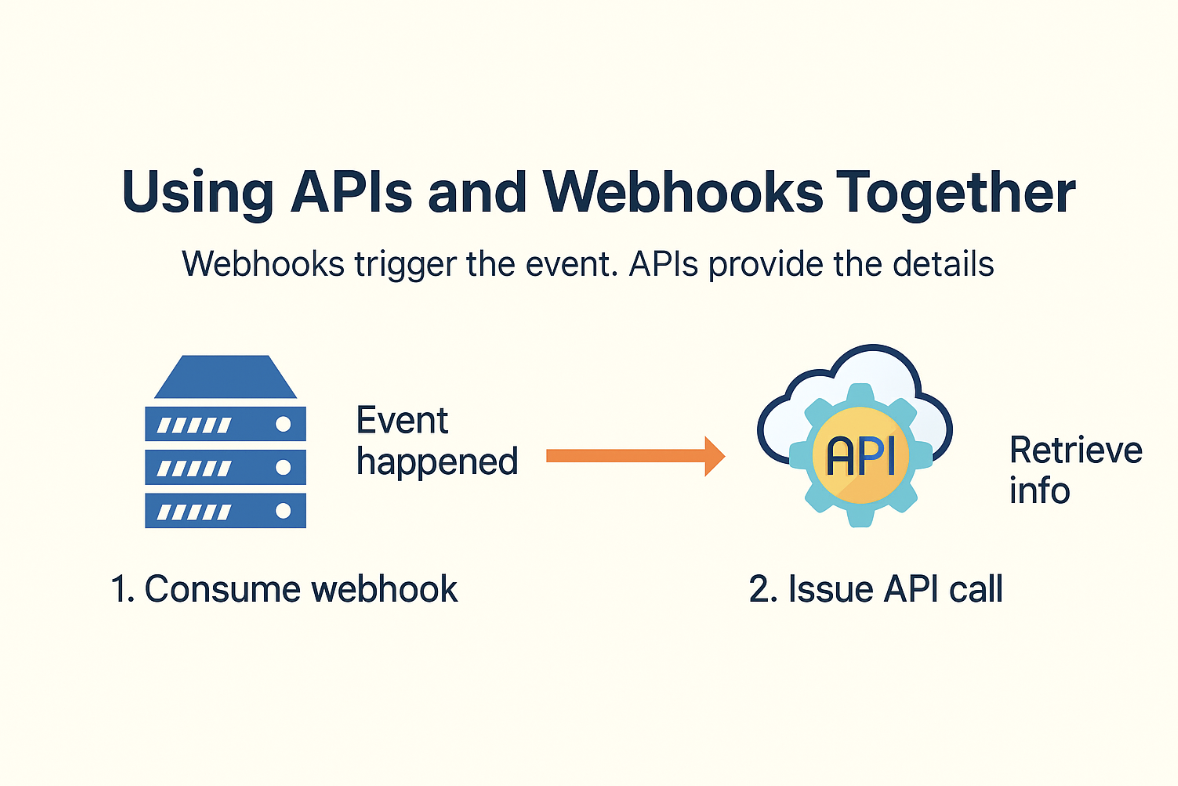
Webhook triggers API call pattern (Image Source)
A payment flow is the clearest example. Stripe fires a payment_intent.succeeded webhook the moment a charge clears. Your endpoint receives that notification, but the webhook payload is a snapshot of a specific moment; by the time you process it, other state may have changed.
So a well-built integration uses the webhook as a trigger and immediately calls the Stripe API to fetch the current authoritative state, then updates its own records or issues a receipt.
This pattern shows up everywhere. In ecommerce, a webhook announces a new order and an API call retrieves the line items. In marketing, a webhook flags a new form submission and an API request pulls the full contact profile.
Splitting the work this way gives you the speed of a push channel and the accuracy of a pull channel in the same pipeline. It also gives you a recovery path: if a webhook is missed while your endpoint is down, you can reconcile by polling the API for anything you might have lost.
Common Webhook and API Mistakes
The biggest misconception is treating webhooks as a strict upgrade to APIs. They are not. Webhooks are a different mechanism for a different job, and calling them "better than APIs" or trying to replace one with the other leads to broken designs. If your application needs to query data on demand, no amount of webhook plumbing will substitute for a proper API call.
A second confusion is mixing up terminology. An endpoint is simply a URL that accepts HTTP requests. A webhook, on the other hand, is an event-driven pattern in which a source system pushes data to a receiver.
A webhook endpoint is the specific URL a receiver exposes for that push. Keeping those definitions straight avoids arguments about whether "webhook" and "API endpoint" are opposites (they are not: one is a pattern, the other is an address).
Finally, there is a set of implementation essentials people forget when they build webhook receivers for the first time. Webhooks arrive at least once, which means the same event can hit your endpoint more than once, so handlers need to be idempotent. Deliveries can fail, so senders retry with backoff, and receivers should tolerate that.
Payloads should be verified with the signature header the provider supplies, and secrets should be stored securely rather than checked into code. For teams without in-house expertise, working with experienced web app development companies can help get retries, security, idempotency, and payload verification right from the start.
Conclusion: Choose by Flow, Timing, and Control
The webhook vs API endpoint question comes down to three factors: who initiates the exchange, when the data is needed, and how much control you want over the request. Get those right and the choice usually makes itself.
API endpoints are the right tool for controlled request/response workflows. When your application knows what it needs and when it needs it, and when consistent responses and clear failure signals matter, calling an API is the cleanest option. Reads, writes, lookups, and admin operations all fit this shape.
Webhook endpoints are the right tool for event-driven, near real-time updates. When something can happen at any moment, when you want to react in seconds instead of minutes, and when polling would burn through requests to no purpose, exposing a webhook URL and letting the source system push to you is the far better pattern.
In production, most integrations use both: webhooks to know that something happened, and APIs to act on it. That combination is what makes modern application integrations fast, reliable, and cheap to run.

Creates insightful, strategy-driven content that translates complex design and branding concepts into accessible knowledge, supporting Ramotion’s mission to elevate digital experiences.