
Navigation determines how easily users find what they need and how they experience your content. Content architecture is the organizational system that anchors navigation. It defines content types and models, their relationships, and the rules for presentation and reuse so users can complete tasks efficiently and teams can scale content reliably.
Learn how to create and leverage content architecture to bring order into an otherwise complex web of information and content, allowing you to improve user experience, grow, and govern efficiently. But first—let’s establish the basics.
Content Architecture: Overview and Definition
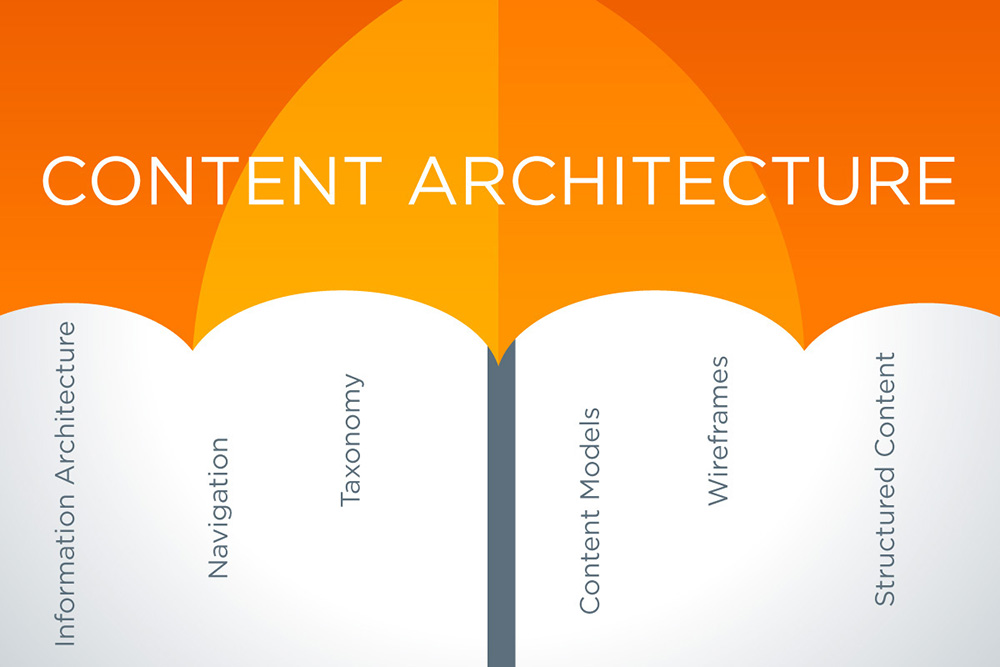
Content architecture diagram via Tendo
Content architecture is the system that defines how content is created, managed, and presented across digital channels. It starts by identifying content types (articles, product pages, etc.), which content models then structure, specifying required fields and presentation rules. Content strategy builds on this foundation to decide what to create, for whom, and how it supports information architecture, user experience, and business goals.
For example, a university website redesign can quickly identify redundant, outdated, or orphaned pages using content architecture rather than manually auditing thousands of URLs.
An efficient content architecture is built on three things: business goals and user needs, content lifecycle and governance, and technology and delivery systems.
Content architecture delivers clear business value:
- It improves omnichannel delivery.
- It ensures consistency in content quality.
- It increases web performance.
- It allows for scalability and easier maintenance.
So, how do you build and improve your organization’s content architecture?
Key Strategies to Build and Improve Content Architecture
How you build content architecture varies depending on user needs, goals, constraints, resources, and competition. Below are four foundational strategies to get you started.
Define your reality
Establish what you know about content, processes, and challenges. Audit all pages and assets: track URLs, purpose, owner, publication date, and performance metrics.
Classify items as keep, update, or delete. Interview content owners to document workflows, platform constraints, and technical limitations. Review analytics and past user testing to spot high-value content and recurring usability problems. Collect relevant regulations, policies, and brand standards so the architecture enforces these constraints from the start.
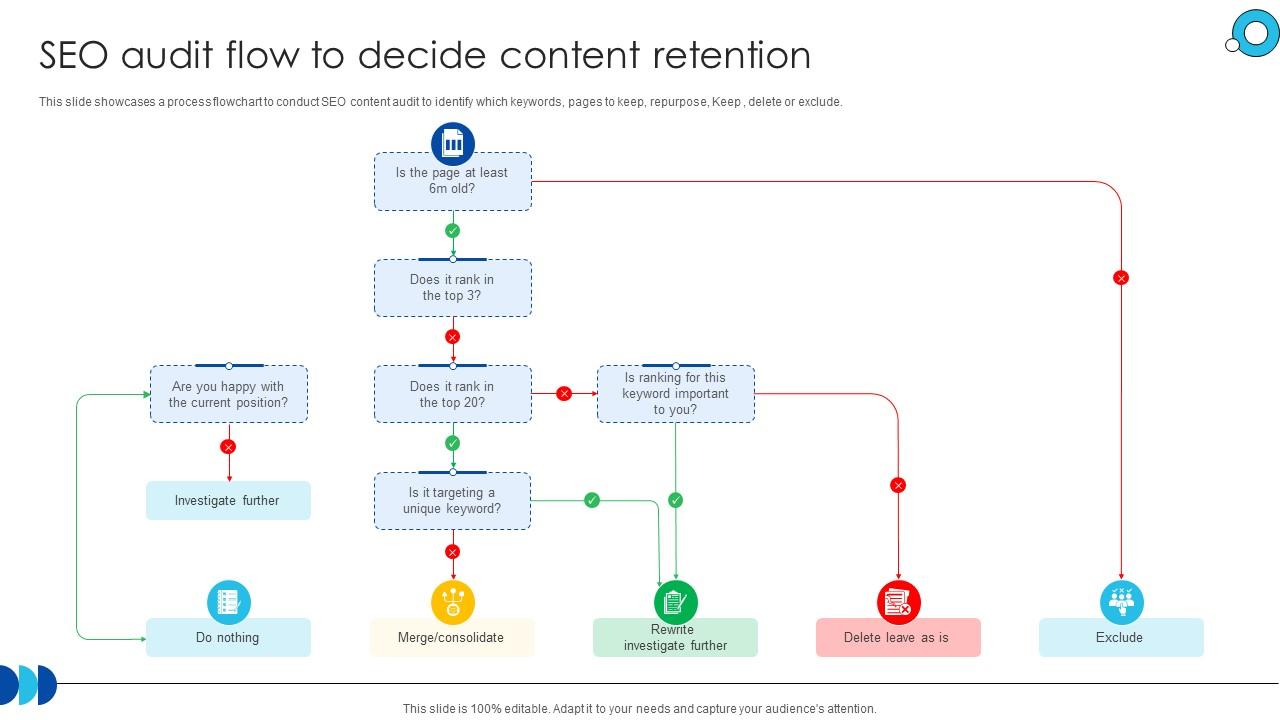
Content audit flowchart sample via Slide Team
Align objectives
Translate business goals into measurable content outcomes. Meet with leadership and stakeholders to confirm priorities and required content capabilities. Map user scenarios and common tasks across the site to identify where structural changes can reduce risks and challenges. And assign success metrics per content type (findability, conversion, time-to-publish) so decisions are accountable and traceable.
Implement progressively
Phase your work. Prioritize high-impact, low-effort fixes to deliver early wins while stabilizing processes. Pilot changes on a subset of content, validate results, then expand incrementally to avoid disruption.
Structure first, always
Define content models and taxonomy before choosing templates or platforms. Let user and business needs dictate structure so your tools support architecture and investment. If an ecommerce business subscribes to a premium content management platform without first defining its content structure, the business risks wasting its advanced features.
Work with one of the best UX design firms to guide you through creating an effective content architecture.
4 Core Elements of Content Architecture
Content Models and Content Types
Content models ensure that every piece of content is presented in a consistent format, so all the stories, videos, or products on a website have a unified visual identity and can be reused across different pages. But before you determine which models to use, you’ll have to categorize your content into different content types.
Below are common content types and corresponding models to consider.
- Articles and blogs. Their core purpose is to tell a story and establish the brand as a thought leader. *Content model inclusions: headline, byline, body copy, and publication date. *
- Case studies. An in-depth analysis of successful projects that prove the expertise of a company or a brand in a specific field. *Content model inclusions: title, executive summary, client profile, challenge, solution, results, and testimonials. *
- Product or service page. It displays current offerings containing fields for price, features, and add-to-cart functionality. *Content model inclusions: product name, pricing and availability, variants, call-to-action button, and social proof. *
- Landing page. A primary tool for marketing campaigns, landing pages intentionally limit navigation options to keep visitors focused on a specific goal. *Content model inclusions: headline, body copy, visual, conversion elements, call-to-action button. *
- Forms. Designed to gather information from users, it contains structured fields—boxes and buttons—that people can fill out, tick, and click. *Content model inclusions: entities, data fields, instructions, submit button, and confirmation page. *
- About Us/Profile. It addresses questions about the organization or brand (what, who, why). Content model inclusions: name, titles, bio, contact information, and other related social links.
If you create a press release, it follows a model that includes a headline, publication date, body copy, media contact information, boilerplate text, and downloadable assets. If you’re selling a course, the content model includes the course title, instructor profile, duration, prerequisites, price, among others.
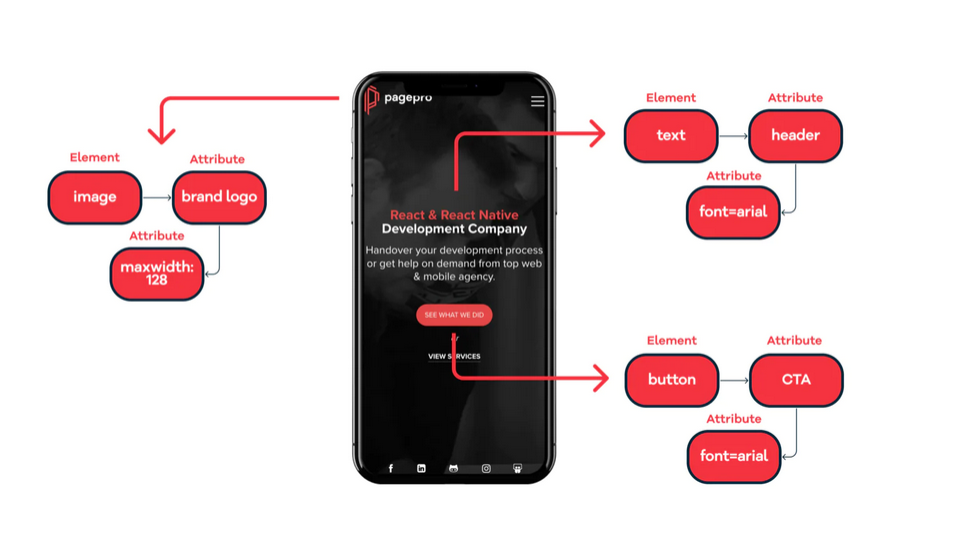
Mobile landing page content type and model example via Pagepro
Taxonomy and metadata
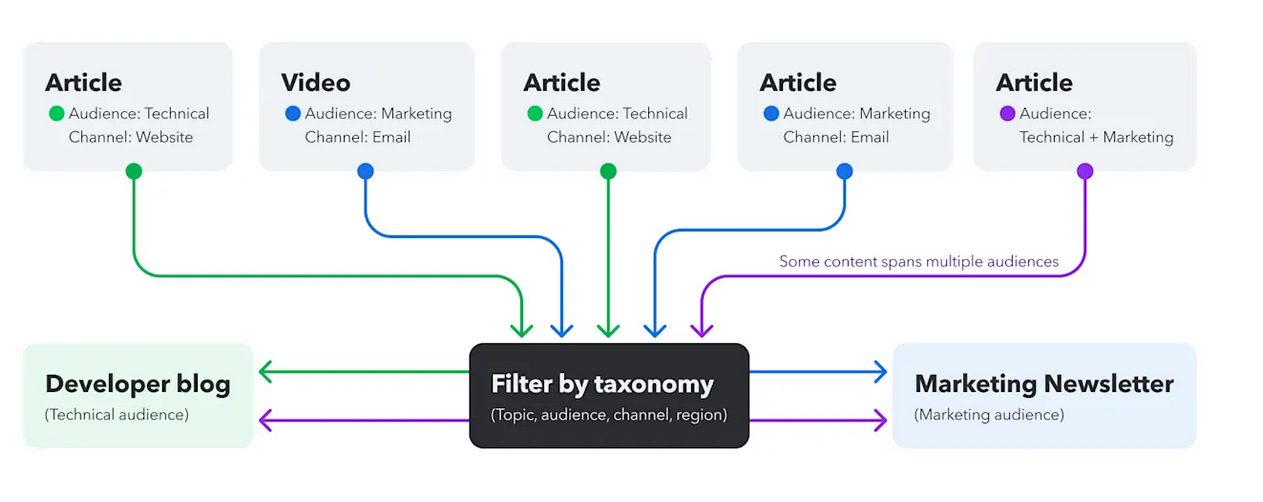
How content taxonomy works via Contentful
Content management taxonomy hierarchically categorizes content, so they are easy to find. Think of it like a librarian, in charge of book catalogs so readers don’t have to search every shelf for what they need. Content taxonomy also aids SEO (search engine optimization) through metadata and helps ensure consistency across pages.
The key components of content taxonomy are:
- Categories: Main groupings that are mutually exclusive, like Home, News, Products, etc. Use for primary organization.
- Tags: Keywords describing specific content details, like “sustainable packaging,” “artificial intelligence,” or “expert interview”. Use tags for specific topics that do not fit the main categories.
- Attributes: These describe content characteristics to help filter information according to price range, store location, size, etc. Use attributes for faceted filtering with a limited set of options. Controlled vocabularies: List of approved terms to ensure consistency.
When adding metadata, it’s important to define the what (topic), why (intent), who (audience), and when (lifecycle duration from drafting to publication and or archiving).
Content relationships and linking logic
Content pages are interlinked to create a seamless, cohesive, and relevant user experience. Articles contain related links to products, case studies invite users to view services, and FAQs pique the interest of users in checking out the product features.
Some core relationships to consider are:
- Parent-child. One content type owns another. Example: A product category contains multiple products.
- Bidirectional. Two content types that reference each other. Example: A university website has two content types: Professor and Course. In the Professor model, there is a field called “courses taught,” which links to the Course model. In the Course model, there is a field called “instructor,” which links back to the Professor model.
- Related. Two or more pages with similar related content. Example: A cooking website has a recipe content type, and each recipe includes a “related recipes” section. Users who view a lasagna recipe will get recommendations for related pasta recipes, keeping them engaged and helping them find more content without searching manually.
But how do they optimize UX modules?
Parent-child relationships generate accurate navigation paths, bidirectional relationships bring forward relevant information when and where users need it, and related relationships feed recommendation engines based on actual content affinity. These relationships create connections that guide users seamlessly without manual effort.
Templates and reusable components
Templates ensure essential information appears on every page in the same order, so users know where to look. Components ensure a signup form looks and functions identically, whether it appears on a landing page or a homepage. Together, they enforce consistency while eliminating redundant work.
That said, it’s important to set rules that ensure consistency. For example, every template field must pull from structured content models. So, the rule can explicitly indicate that it cannot allow manually typed specifications. Another rule is for all components to follow the official design typography, spacing, and color.
Some reusable blocks to keep in mind are:
- Hero section: Includes a headline, an image/video, and a call-to-action button.
- Form container: Standardized contact, signup, or application forms.
- Quote block: Testimonial display with name of satisfied customer, company, and optional headshot.
- Pricing table: Side-by-side comparison of product packages with different prices.
Content Workflows and Governance
You need clear workflows and governance to keep content consistent, easy to find, and up to date as it’s created, reviewed, and published. Following these steps can turn your content architecture into repeatable processes that drive business results.
Step 1: Content audit and structure inventory
Running a content audit establishes a baseline of what you have, revealing the true scale of your content and identifying duplicate or outdated pages. It also captures what’s missing or misused. Without a content audit, your content architecture would be based on what you only assume to have. Ask content owners about workflows, limitations, and challenges to reveal hidden constraints and exceptions.
Use clear quality criteria (freshness, accuracy, relevance, etc.) to score pages and prioritize actions. Typical outputs at this stage include an inventory spreadsheet with URL, content type, owner, analytics, and recommended actions.
Tools: website crawlers (Screaming Frog SEO Spider), performance and analytics tools (Google Analytics), content analysis platform (Ahrefs), and organization tools (spreadsheets).
Step 2: Find gaps in models, metadata, and relationships
Compare the audit results to real user goals and business needs.
Look for missing models, metadata shortfalls (poor tags or inconsistent categories), and broken or nonexistent relationships (orphan pages, deadends). Check whether your content contains keywords relevant to the current user searches. Review whether all pages comply with the correct content models and identify any other taxonomy conflicts.
These gaps, if caught early, prevent larger usability and maintenance issues.
Step 3: Map content to user journeys and business goals
You don’t just bombard users with images, articles, and what-have-yous. You need to present them as if you're telling a story if you want to retain their attention and move them forward in their journey.
Map content to typical user flows—from discovery to conversion and after-sales support—and to measurable business outcomes. Create two to three personas and trace the touchpoints and questions they have at each stage.
For each journey phase, identify the content type and the primary call to action required. Doing so ensures that every piece of content serves a specific purpose and ties back to metrics, like findability, CTR, conversions, or time-to-publish.
Step 4: Define core content model
Based on your audit and gap analysis, select three to five core content types to build your MVP architecture. For each, define required fields and relationships to other models.
Examples:
- Product →fields: name, price, variants; relates to Review and Category models.
- Review → fields: rating, verified icon; links back to Product and User Profile.
Your MVP architecture strictly enforces building on essentials first, before adding other optional fields and content types. Set firm rules, like character limits, required fields, and role-based edit permissions. These prevent content drift and inconsistency as the system scales.
Step 5: Set Taxonomy and Naming Standards
Create practical taxonomy and naming rules informed by data and your team members—marketing team, customer service reps, etc.
Compare the terms used by customers and by marketing, and choose the term that performs best. Define standards for titles, slugs, tags, and labels, and establish controlled vocabularies and tagging rules to avoid duplicates.
Finally, create an easy-to-follow-and-monitor governance process for adding new terms. Designate a team to conduct reviews and approvals.
Step 6: Prioritize high-impact areas
Not all content is equal.
Prioritize pages by traffic, business value, change frequency, and dependency impact. Focus your MVP content model work on high-impact areas first—homepage, key product/service pages, checkout flows, and campaign landing pages. Define success metrics per content type and use them to measure the impact of changes.
Step 7: Establish ownership and governance early
Assign clear roles early to maintain and sustain content architecture:
- Strategic owner: protects the architecture and approves model or content strategy changes.
- Taxonomy owner: manages metadata and naming rules. Responsible for reviewing new term requests.
- Technical owner: implements and maintains content models in the CMS. This is usually a developer or CMS administrator.
Choose owners who can collaborate and enforce rules. Make approvals and change paths explicitly so updates don’t erode structure.
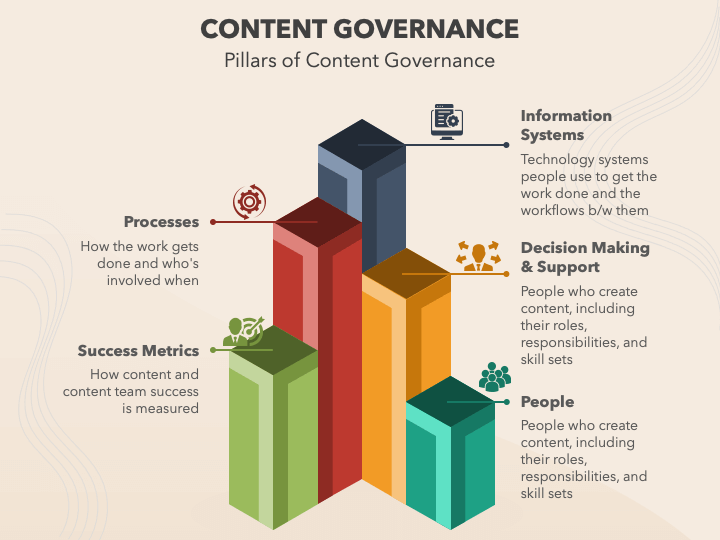
How content governance works. Infographic via Sketch Bubble
Step 8: Test, iterate, and scale
Test the new models and workflows for a few weeks before the official launch, and compare against baseline metrics. Run simple usability checks, track analytics and internal feedback, iterate on fields, labels, or relationships, and conduct regular reviews.
Once you’ve worked out the flaws and perfected content models or types, you can add one or two more at a time to scale up. Train your team periodically, especially if changes are implemented.
Build for Scale
Content architecture can transform disorganized assets into a reliable system that tells a story, delivers a memorable user experience, and achieves business goals. By defining models, taxonomy, and governance, teams churn digital content faster, reduce errors, and scale across digital channels.
If there’s one takeaway from this article you should keep, it’s this: invest in structure first to turn content into strategic assets that strengthen brand recognition, improve performance, and lead to business outcomes you set out to achieve. Don’t forget to measure results regularly, iterate as needed to sustain growth, and consistently train your people.
Mar 13, 2026

Creates insightful, strategy-driven content that translates complex design and branding concepts into accessible knowledge, supporting Ramotion’s mission to elevate digital experiences.