
What is a webhook? A webhook is a lightweight, event-driven communication method that automatically sends data between applications via HTTP in real time. Unlike traditional APIs that require constant polling, webhooks eliminate unnecessary requests and save valuable resources.
Specifically, they power the real-time connections in modern software by triggering actions the moment specific events occur. A webhook endpoint is the URL that receives these event notifications and processes the payload data.
Because building a secure, reliable endpoint involves more than just the URL, many businesses choose to hire custom web application development companies to design and implement this logic correctly from the start.
In this article, we'll explore what webhook endpoints are, how they differ from API endpoints, examine practical webhook examples, and share best practices for implementing secure, reliable webhook endpoints in your applications.
What Is a Webhook Endpoint?
A webhook endpoint is the URL on your server that receives incoming webhook payloads. Essentially, it functions as a listener that waits for HTTP POST requests from external systems whenever subscribed events occur. Your server processes these requests and returns a status code to confirm receipt.
The URL structure follows standard HTTP conventions. A typical webhook endpoint might look like https://yourdomain.com/webhooks/stripe or https://yourdomain.com/api/v1/callbacks/github.
The path structure remains your choice, but the URL must be publicly accessible and capable of handling incoming POST requests. For production environments, registered webhook endpoints must use HTTPS URLs. The format follows this pattern: https://<your-website>/<your-webhook-endpoint>.
Unlike standard API endpoints that wait for your application to send requests and then return data, webhook endpoints work in reverse. Your endpoint sits idle until an external system pushes data to it. It doesn't initiate anything but receives incoming payloads.
This distinction centers on role and direction: you call API endpoints to get or update data in third-party systems, while those systems call your webhook endpoint when something changes.
Setting up a webhook endpoint involves three distinct steps. First, create a route on your server that accepts POST requests at a specific path. Second, register that URL with the source application you're integrating with. Third, implement handler logic that processes incoming payloads, verifies authenticity, and returns a 2xx response.
Most webhook providers enforce specific requirements. The endpoint must respond within a timeout window, typically 5-30 seconds depending on the provider. If your endpoint consistently fails to respond, providers will disable the webhook subscription after several retries.
How Webhook Endpoints Work?
Once you register a webhook endpoint with a service provider, that system can push real-time event data to your application whenever specific events occur. The provider uses HTTPS to send webhook events as JSON payloads that include an Event object. Your endpoint function must accept these POST requests and process the structured data they contain.
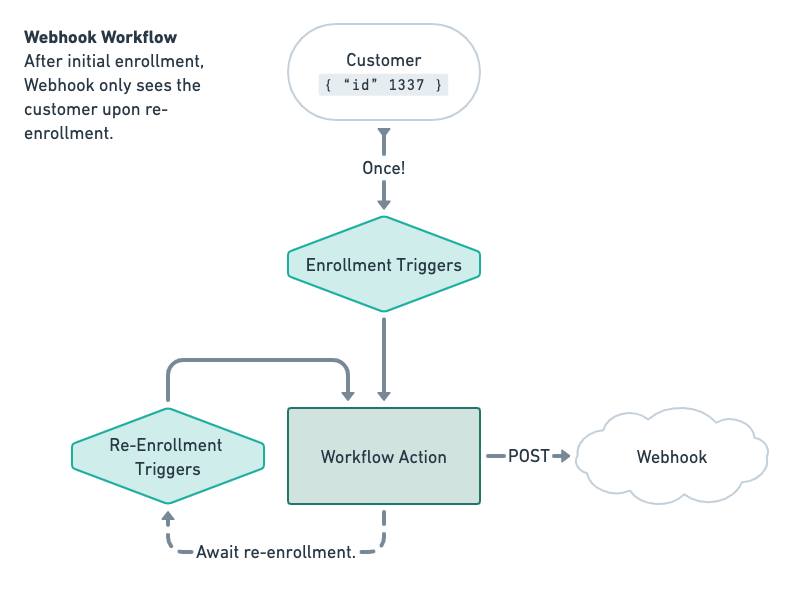
Webhook workflow (Source)
The endpoint needs to handle POST requests carrying a JSON payload with event information. Upon receiving the webhook, your server should immediately return a 200 status code to confirm receipt.
This acknowledgment tells the provider the webhook arrived successfully. Webhooks operate over standard HTTP request-response flows, where the event source sends an HTTP request to your endpoint, and your listener replies with a status code.
Timeout windows are brief. Webhook requests wait for a response from your server for at most 5 seconds and sometimes as low as 1 second. Returning a 200 response quickly confirms you received the data.
Since these timeout constraints exist, you should persist the data immediately and process events asynchronously. This approach ensures your system responds fast to the request while deferring long-running operations to background jobs.
Webhook Payload
The webhook payload contains the actual data sent when an event triggers. This data package provides information about the event, such as user actions, system updates, or transactions.
Payloads most commonly use JSON format because of its lightweight structure and compatibility across platforms. However, the body can also be XML, CSV, or even binary files like PDFs.
Webhooks typically have at-least-once delivery guarantees, which means receiving the same request multiple times is possible. They're not guaranteed to arrive in order. Payloads typically include a timestamp in the content or headers that helps determine if an event is out of sequence or stale.
Webhook Endpoint vs Webhook URL
The terms often get used interchangeably because they refer to the same thing. Webhook endpoint and webhook URL both describe the specific URL address where your server receives event notifications from external systems.
The confusion stems from technical architecture. Your webhook listener is essentially an API endpoint that accepts HTTP requests. When a source system sends you a webhook, it hits your endpoint with a POST request. So "webhook endpoint" carries real meaning: it's the URL you registered to receive webhook payloads.
However, the distinction matters when discussing role and direction. An API endpoint is what you call to get or update data in a third-party system. Conversely, a webhook endpoint is what that third-party system calls on your server when something changes. Both are URLs that handle HTTP requests, but the initiator differs.
Webhooks are sometimes called "reverse APIs" because the application sending the data initiates communication rather than the one receiving it. This reversal explains why people mix up the terminology. Your webhook endpoint only receives notifications, whereas traditional API endpoints receive requests and send responses.
In other words, webhooks represent a specific method for connecting applications, while an endpoint is part of what the client application uses when making an API request. If you want real-time updates from an API provider, you specify a webhook URL where you'd like to receive event notifications. That webhook URL is your webhook endpoint.
The terminology distinction exists purely for clarity in conversation. When someone mentions a webhook endpoint, they're talking about your receiving URL. When discussing webhook URLs, they mean the same address.
Webhook Endpoint vs API Endpoint
Both webhook endpoints and API endpoints operate as HTTP URLs, but they flow in opposite directions. API endpoints follow a pull-based model where your application actively requests data from another system.
You send a request, the server processes it, and returns a response. Webhook endpoints use a push-based model where external systems automatically send data to your server when events occur. No request from your end is needed.
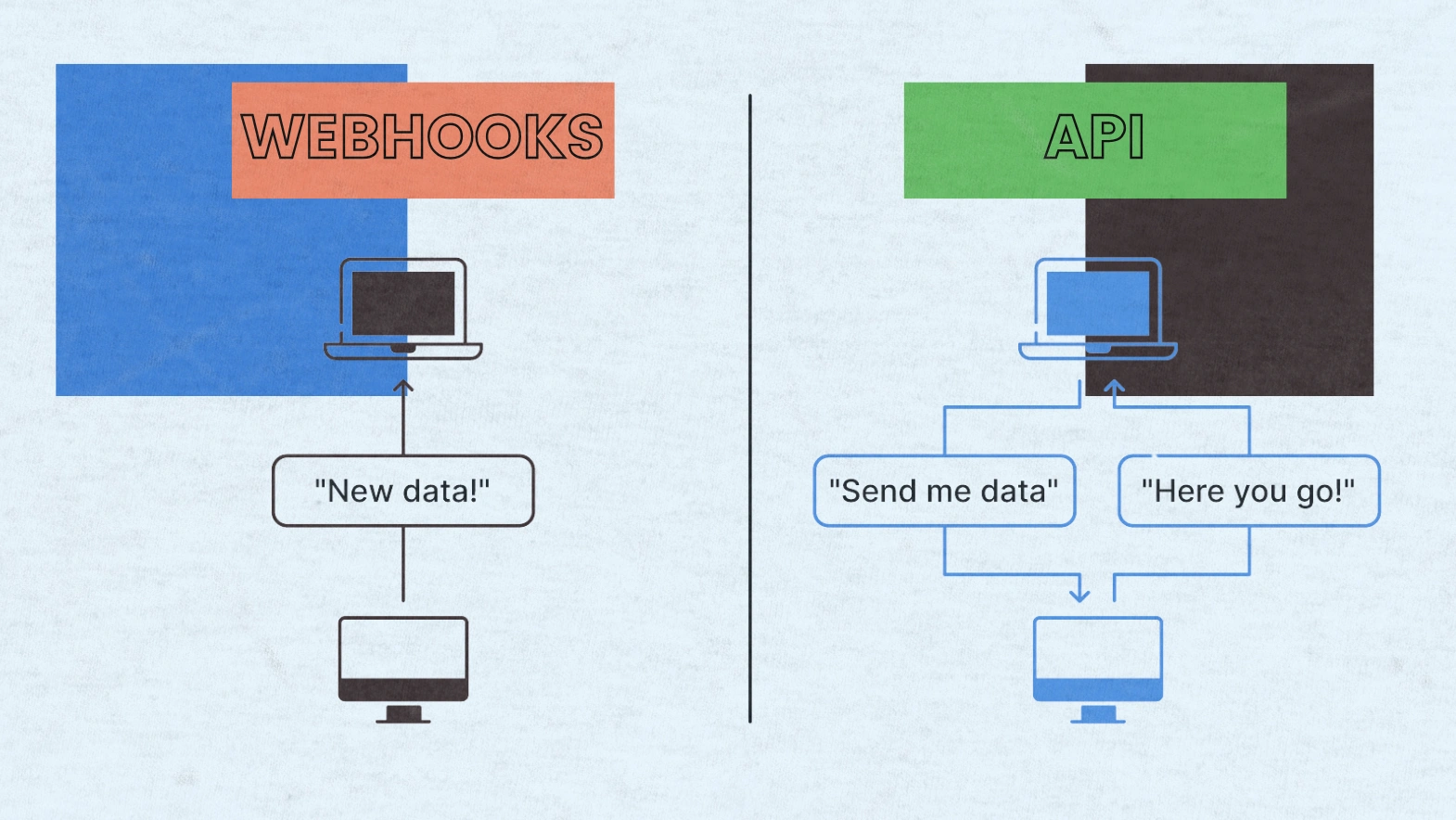
Webhooks vs API (Source)
The distinction centers on who initiates communication. With API endpoints, you (the consumer) start the conversation by making a request. With webhook endpoints, the third-party system initiates contact when something changes. APIs wait for you to ask for information, whereas webhooks notify you immediately when updates happen.
| Aspect | API Endpoint | Webhook Endpoint |
|---|---|---|
| Direction | Client pulls from server | Server pushes to client |
| Trigger | Your code makes a request | An event in the source system |
| Timing | On-demand or scheduled polling | Real-time, as events happen |
| Resource cost | Higher when polling frequently | Low under normal conditions |
| Error Handling | Immediate HTTP status codes | Retry/queue-based, async |
In production systems, most applications use both. API endpoints handle reads, writes, and complex queries, while webhook endpoints manage real-time sync and notifications. APIs give you control over when to fetch data, but webhooks eliminate polling overhead and deliver updates instantly.
Webhook Endpoint Examples
Real-world webhook implementations span across payment processors, e-commerce platforms, and customer relationship management systems. These integrations automate critical business workflows without manual intervention.
Payment, ecommerce, and CRM examples
Payment processors rely heavily on webhook endpoints to handle transaction events. When a payment succeeds or fails, your system updates order status and sends receipts automatically. Stripe uses webhooks extensively for events like payment_intent.succeeded, invoice.paid, and customer.subscription.deleted.
Each payload is signed with a Stripe-Signature header using HMAC-SHA256 for verification. QuickBooks sends webhook notifications when invoices, payments, or customers are created, updated, or deleted. The payloads contain only entity references rather than full data, requiring follow-up API calls to retrieve complete records.
E-commerce integrations trigger multiple downstream actions simultaneously. When an order is created, inventory gets updated, confirmation emails are sent, and analytics events fire.
Shopify notifies applications about events like orders/create, products/update, and customers/create. Each webhook payload includes an HMAC-SHA256 hash in the X-Shopify-Hmac-SHA256 header for authenticity verification.
CRM systems push data to maintain synchronization across platforms. When a contact is created, the data syncs to internal systems and email workflows begin. After closing a deal in a CRM, you can register a webhook to automatically create invoices in accounting software by listening for opportunities marked as "closed-won".
Benefits of Webhook Endpoints
Webhook endpoints deliver measurable performance improvements across your infrastructure. Webhooks cut API calls by 80% for event-heavy applications. This reduction stems from eliminating constant polling, where your application repeatedly asks servers if anything changed. Instead, the server pushes data only when events actually occur, resulting in zero traffic when nothing changes.
Real-time data delivery stands out as the primary advantage. The moment an event happens on a platform, relevant data gets sent instantly to subscribed systems. This speed proves crucial for time-sensitive applications like automated processes or live alerts.
By comparison, polling creates delays because your application receives updates minutes later on the next scheduled cycle.
Automation becomes seamless with webhook endpoints. You can trigger invoice generation after payments clear, update order status when shipments leave warehouses, or sync customer data across multiple platforms without manual intervention.
These automated workflows improve productivity by reducing manual data entry requirements and minimizing errors.
Setup requires minimal effort because webhooks use standard HTTP protocols. You receive the webhook URL from the destination system and configure it in your application.
This simplicity contrasts sharply with building full APIs, which can be as complex as designing applications themselves. Webhooks are platform-agnostic and programming language-neutral, connecting to virtually any application.
Webhook Endpoint Security
Protecting webhook endpoints requires multiple security layers working together. Attackers can intercept unencrypted traffic, send fraudulent requests, or replay legitimate messages to exploit your system. Thus, implementing proper security controls becomes non-negotiable for production environments.
HTTPS encryption forms the foundation. All webhook communication must occur over HTTPS rather than plain HTTP. This encrypts data in transit and prevents man-in-the-middle attacks. Your server needs a valid SSL/TLS certificate from a globally trusted certificate authority. Most webhook providers will only connect to secure HTTPS URLs with valid certificates.
HMAC signature verification authenticates each request. Providers sign payloads using a shared secret key and hashing algorithm like SHA-256, then include the signature in request headers. Your endpoint calculates the same HMAC using the payload and stored secret, then compares signatures using constant-time comparison methods to prevent timing attacks. Never use plain equality operators.
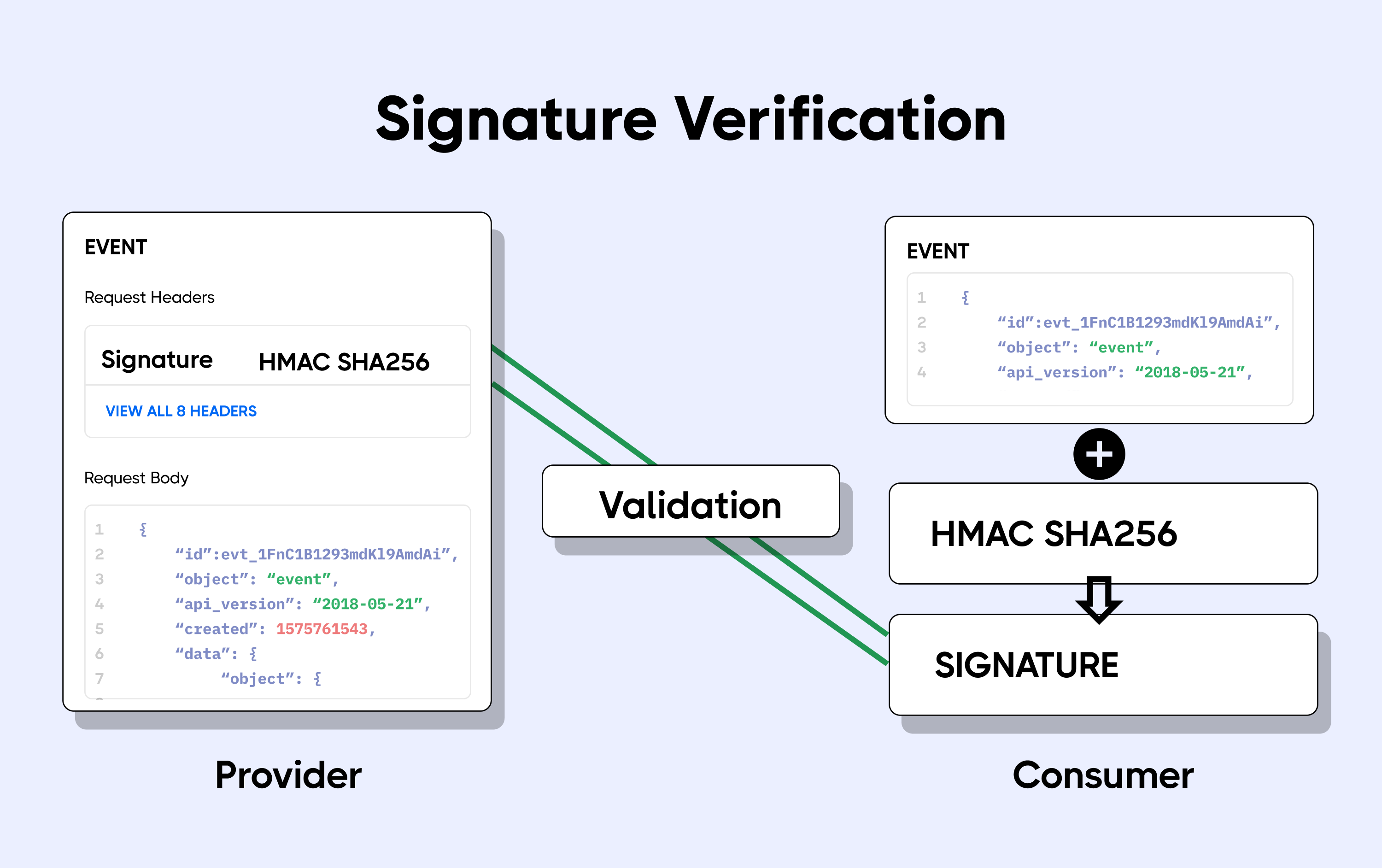
Webhook signature verification (Source)
Timestamps prevent replay attacks. Include timestamps in signed payloads and reject requests older than five minutes. Attackers cannot modify timestamps without invalidating signatures. Synchronize your server clock with NTP to ensure accuracy.
Store webhook secrets securely in encrypted configuration systems rather than hardcoding them. Rotate secrets quarterly minimum. Subscribe only to events you need, reducing attack surface. Respond with 2XX status codes within 10 seconds.
Webhook Endpoint Failures
Webhook deliveries fail for numerous reasons. Your server might be down during deployments, take longer than the allowed timeout to respond, experience network glitches, or encounter application crashes.
When a provider sends a webhook request, they queue it for 10 seconds to get a response. If your endpoint doesn't respond within this window, the delivery gets marked as failed.
Providers employ retry mechanisms to handle transient failures. Most systems attempt delivery up to 5 times before marking it as permanently failed. Retry schedules use exponential backoff, waiting progressively longer between attempts.
For instance, retries might occur at 30 seconds minimum to 10 minutes maximum intervals. This approach prevents overwhelming your recovering server while giving adequate recovery time.
Automatic deactivation protects both systems. If a webhook fails 20 consecutive times, providers typically deactivate it and send a failure notification email. Similarly, after 4 consecutive failures, some services temporarily disable the webhook for 1 minute, escalating the disabled period up to 24 hours with subsequent failures. Permanent disabling occurs after 40 consecutive failures.
Failed events move to Dead Letter Queues rather than disappearing completely. These queues retain items for 14 days, allowing manual inspection and retry once you resolve underlying issues.
How to Set Up a Webhook Endpoint
Creating a functional webhook endpoint follows a straightforward process. First, build an endpoint that accepts HTTP POST requests with JSON payloads. Your URL must be publicly accessible and respond with a 2xx status code within 15 seconds.
The endpoint can be built using various methods. You might create an HTTP server with frameworks like ExpressJS, deploy a cloud function through AWS Lambda or Google Cloud Function, or use webhook testing services like webhook.site for initial testing. Self-signed certificates are not supported. Your server must have a valid TLS or SSL certificate correctly configured.
Your endpoint handles two request types. Verification requests arrive as GET requests when you register the URL in a provider's dashboard. These include query parameters like hub.mode, hub.challenge, and hub.verify_token.
Compare the hub.verify_token value against your stored verification string. If they match, respond with HTTP status 200 and return the hub.challenge value. Event notifications arrive as POST requests containing JSON payloads describing changes.
Once your endpoint responds correctly to verification, navigate to the provider's webhook configuration panel. Add your endpoint URL to the designated field, paste your verification token, and select which event types you want to receive. The provider validates your endpoint before activating the subscription.
Webhook Endpoint Best Practices
Implementing webhook endpoints requires operational discipline beyond basic security measures. Subscribe only to events you actually need rather than registering for all available types.
Unnecessary subscriptions increase server load and complicate debugging. By the same token, use separate endpoints for test and live environments to prevent test events from corrupting production data.
Design idempotent handlers that produce identical results when processing duplicate deliveries. Store unique event identifiers from webhook payloads in Redis or your database with appropriate expiration times.
This prevents duplicate transactions when retries occur. Process webhooks asynchronously in order to respond with 2xx status codes immediately. Push payloads to message queues like RabbitMQ or AWS SQS, then handle business logic in background workers without blocking the response.
Cap maximum backoff intervals at reasonable ceilings like 1 hour. Without limits, exponential growth could delay final retry attempts by days. Support signature algorithm rotation by including version identifiers in signature headers. When upgrading from SHA-256 to SHA-512, run both algorithms during transition periods without breaking integrations.
Implement comprehensive logging with timestamps, source IP addresses, authentication outcomes, and payload hashes. Expose metrics through APIs so webhook consumers can build monitoring dashboards.
Consider partition keys based on entity identifiers to maintain per-entity ordering. Implement reconciliation jobs that periodically check provider APIs for missed events.
Conclusion
Webhook endpoints have become essential building blocks for modern software integrations. Throughout this article, we explored how these URLs receive real-time event data, the differences between webhook and API endpoints, and practical implementation examples across payment systems and e-commerce platforms.
By comparison to traditional polling methods, webhooks reduce infrastructure costs significantly while delivering instant updates. Security measures like HMAC verification and HTTPS encryption protect your endpoints from malicious actors.
Consequently, following best practices around idempotent handling, asynchronous processing, and comprehensive logging ensures reliable webhook systems. We encourage you to implement these patterns in your applications and experience the efficiency gains firsthand.

Creates insightful, strategy-driven content that translates complex design and branding concepts into accessible knowledge, supporting Ramotion’s mission to elevate digital experiences.